
Flutter and Google Play's 16 KB page size rule: find the library that fails
Updated
What the Play Console message means
Google's page size guide says that all apps targeting Android 15 (API level 35) and higher must support 16 KB memory page sizes on 64-bit devices on Google Play, and that from February 1, 2027 updates without 16 KB support can't be released. Play Console shows a compatibility warning for a bundle that doesn't support them.
Google Play already requires new apps and updates to target API level 36 (Google's target API rule; Wear OS, Android Automotive OS, Android TV and Android XR have lower levels). So for a phone or tablet app, the 16 KB rule applies to every update that contains native code.
The warning is about native libraries, the .so files for the 64-bit ABIs arm64-v8a and x86_64. A library fails when its LOAD segments are aligned to 4 KB instead of 16 KB, or when it is stored uncompressed and does not start on a 16 KB boundary in the zip. Every Flutter app for Android has native code: the engine ships as libflutter.so, your Dart code is compiled ahead of time into libapp.so, and plugins can add libraries of their own.
What we found in two real Flutter apps
We ran Ship Check on two open-source Flutter apps from F-Droid, LocalSend 1.18.2 and Saber 1.37.1 (APKs downloaded on 10 November 2026):
- In both, every 64-bit library is 16 KB aligned,
libflutter.soandlibapp.soincluded, and the uncompressed libraries start on 16 KB boundaries in the APK. - In both, a copy of
libdatastore_shared_counter.sofrom AndroidX DataStore fails Google's RELRO rule: GNU_RELRO ends at 0x6000, which is not a multiple of 0x4000, and writable data follows it in the same LOAD segment. - Libraries from other native plugins, such as
librust_lib_localsend_app.soandlibpdfium.so, are not in Ship Check's library map and are listed by file name.
So a Flutter app can pass an alignment check and still break on a 16 KB device. Check RELRO as well.
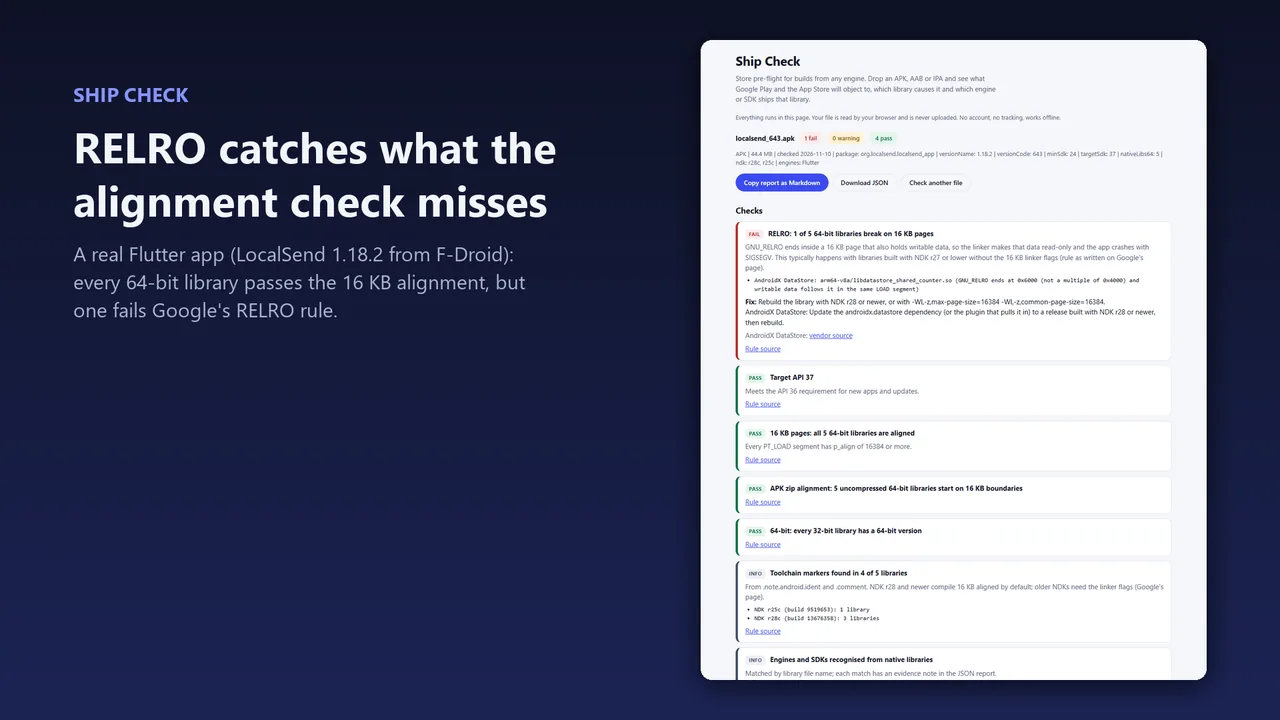
Find the library that fails
- List the native libraries in the build. In a macOS, Linux or Git Bash terminal:
unzip -l app-release.aab | grep '\.so$'. In Windows PowerShell:tar -tf .\app-release.aab | Select-String '\.so$'. In an AAB they are underbase/lib/<abi>/, in an APK underlib/<abi>/. - Look at the
arm64-v8aandx86_64folders; the rule is about 64-bit devices. Match each file name against the table below to see whether it comes from the engine, a plugin or an SDK. - Check how each library is aligned. Ship Check (below) checks all of them at once. In Android Studio, Build > Analyze APK... shows an Alignment column that warns about every library that is not 16 KB aligned.
| Library | Comes from | What to do |
|---|---|---|
libflutter.so | The Flutter engine | Update Flutter and rebuild. |
libapp.so | Your Dart code, compiled ahead of time | Rebuild with the updated Flutter. |
libdartjni.so | The jni Dart package | Update the plugin that uses it to a release built with NDK r28 or newer. |
libdatastore_shared_counter.so | AndroidX DataStore, pulled in by a plugin | Update the androidx.datastore dependency, or the plugin that pulls it in, to a release built with NDK r28 or newer. |
libc++_shared.so | The NDK's C++ runtime | Google says copies from NDK r26 and lower are not always 16 KB aligned. Update the plugin that ships it. |
Any other .so file | A plugin with native code | Update the plugin. If no 16 KB build exists, ask its maintainer. |
Fix it
We did not find a Flutter release note that names the first Flutter version with 16 KB support, so this guide gives no version number. What Google's page and Ship Check's library map say:
- Update Flutter and rebuild.
- Update every plugin that ships its own native library. A library has to be built with NDK r28 or newer, or with
-Wl,-z,max-page-size=16384 -Wl,-z,common-page-size=16384on an older NDK, to pass. - If your project pins its own Android Gradle Plugin version, use 8.5.1 or higher, so uncompressed libraries are 16 KB aligned in the zip.
- Build the AAB again and check it.
Check the build before you upload it
- Open Ship Check and drop the
.aabor.apkon the page. It is free, runs in your browser and nothing is uploaded. - Read the 16 KB results. Every 64-bit library is checked for LOAD segment alignment and for Google's RELRO rule, and each failing library is named with the engine, plugin or SDK that ships it where Ship Check knows it. A library it does not know is listed by file name.
- On a build server, run Ship Check CLI:
node shipcheck.mjs app-release.aab --fail-on=error. It exits with code 1 when a check fails, so the pipeline stops before the upload. Add--date 2027-02-01to see the build as it will be judged on that day.
Alignment is not the only test. Google's page also has a rule for the GNU_RELRO segment: if it ends inside a 16 KB page that also holds writable data, the app crashes with a segmentation fault (SIGSEGV) on a 16 KB device when that data is written. Google says this typically happens with libraries built with NDK r27 or lower without the 16 KB flags.
Ship Check reads what is in the file. It cannot see your Play Console, and a passing report does not guarantee that Google Play accepts the app.
The same rule in other engines
FAQ
My build passes zipalign. Why does Ship Check fail it?
zipalign and LOAD segment checks do not look at RELRO. Google's page has a separate rule for the GNU_RELRO segment, and the two Flutter apps we checked fail only that one.
Which Flutter version do I need?
We did not find a Flutter release note that names one. Update Flutter and your plugins, rebuild, and check the result.
Which plugin brings in AndroidX DataStore?
The library itself does not say. Look for the plugins in your project that depend on androidx.datastore and update them.
Is my build uploaded anywhere?
No. Ship Check reads the file in your browser, and Ship Check CLI reads it on your own machine.
More guides
Unity and Google Play's 16 KB page size rule: versions, plugins and how to check
Unity 2021.3.48f1, 2022.3.56f1, 6000.0.38f1 and 6000.1 or later support 16 KB pages, per Unity staff. Update the editor, the Burst package and every plugin that ships a .so file, rebuild, and check each 64-bit library before you upload.
Read the guide →Unreal Engine and Google Play's 16 KB page size rule: which version, and how to check
Unreal Engine 5.6 and higher support 16 KB page sizes. On 5.6.0 it needs legacy packaging, which 5.6.1 no longer requires. Rebuild or update every plugin's .so files, then check each 64-bit library in the AAB before you upload.
Read the guide →React Native and Google Play's 16 KB page size rule: 0.77 and how to check the build
React Native 0.77 added support for 16 KB page sizes on Android. Upgrade React Native, update every library with native code, rebuild, and check each 64-bit library for alignment and Google's RELRO rule before you upload.
Read the guide →