
Karelia Revision: review FBX and OBJ model updates in Blender and keep your finish
A new model revision should start with a clear view of what changed. Karelia Revision is a preview-first FBX and OBJ reconciliation add-on for Blender visualization work: it shows what was added, changed, unchanged, removed and blocked before anything touches your scene.
Beta 0.3.0, tested on Windows with Blender 4.5.14 LTS. Try it on a copy of your own files first.
- Version
- 0.3.0 (beta)
- Blender
- 4.5 LTS minimum
- Tested on
- Windows, Blender 4.5.14 LTS, synthetic FBX and OBJ revisions
- Source files
- FBX or OBJ with meshes and/or empties
- License
- GPL-3.0-or-later
- Price
- $12
- Get it on
- Blendkit (formerly BlenderKit)
Import your original model into an owned baseline collection and finish it in Blender. When a revised source file arrives, stage it, review the differences and apply only the changes you want. The latest apply can be reversed from the Recovery section.
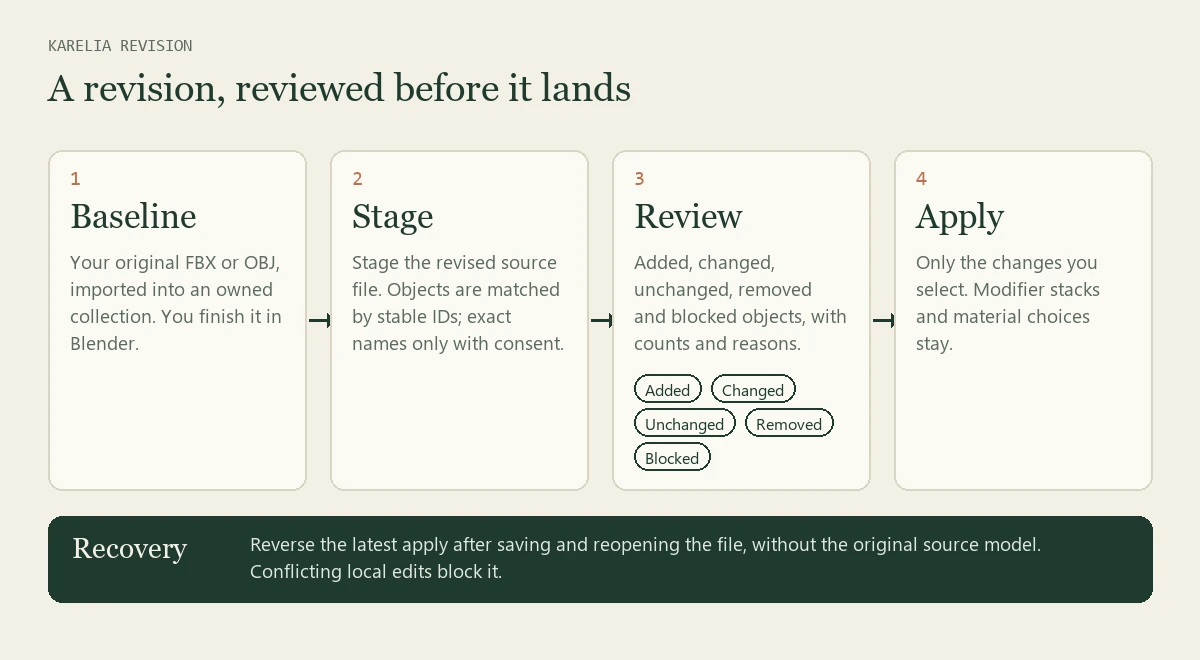
What Karelia Revision does
Preview before you apply
Added, changed, unchanged, removed and blocked objects are listed with counts and reasons. Nothing changes until you apply.
Three-step sidebar
Source selection, comparison and review sit together. Select the permitted additions and updates in one action; removals stay an individual choice.
Keeps your finish
Updated objects keep their local modifier stacks and material choices when the documented mapping requirements are met. Original source material names guide slot mapping, including reordered source slots.
Honest matching
Objects are matched by stable IDs. The sidebar and the report count the exact-name fallbacks separately, and the add-on never silently picks another field or matches unrelated scene objects.
Your placement, your call
Source placement is adopted by default; you can keep local placement instead. Parent relationships you added stay, and unchanged source meshes keep their current Blender data.
JSON change report
Export a readable report of the preview to discuss the changes before applying them.
Recovery
Reverse the latest apply after saving and reopening the Blender file, without the original source model. Edited or incomplete backups and conflicting local edits block it instead of being overwritten.
Local, no account
No account, AI model, paid API or network connection is needed at runtime. The extension source is GPL-3.0-or-later.
How it works
- Import the baseline. Bring the original FBX or OBJ into an owned baseline collection and finish your scene in Blender.
- Stage the revision. Select the revised source file. It is imported in a clean local background Blender process and compared with the baseline.
- Review and apply. Check the counts and reasons, export the JSON report if you want to discuss it, then apply the changes you intend.
How objects are matched
Karelia Revision matches objects by a stable ID exported with each object. The sidebar and the JSON report count the matches made with a real stable ID and the lower-confidence matches made by exact name, in both the baseline and the revised file.
If the configured ID field is missing, the add-on shows the text and integer property fields that were actually exported. It never silently chooses another field.
Duplicate IDs and detected changes to the identity contract block apply. If both the name and the ID of an object change, no reliable match can be made.
What it keeps, and what it asks you about
- Local modifier stacks and material choices on updated objects, when the mapping requirements below are met.
- Parent relationships you added yourself.
- The current Blender data of source meshes that did not change.
- Placement: the source position is adopted by default, with an option to keep your local position.
- Removals: each one is an individual choice, never part of the select-all action.
Requirements
- Blender 4.5 LTS or newer. The tested combination is Windows with Blender 4.5.14 LTS.
- FBX or OBJ source files with meshes and/or empties.
- Stable, unique exported string or integer IDs for reliable matching. Without them, exact unique names are used only with your consent.
- Unique original source material names and an unchanged local material slot count.
- The installed Blender executable and its bundled FBX importer, because imports run in a clean local background Blender process.
From the Blendkit listing for version 0.3.0. Cross-platform and other Blender-version compatibility have not been validated yet.
Pricing
Sold on Blendkit. Blendkit may show a reduced price next to the $12 list price.
Good to know
- This is conservative reconciliation, not a universal CAD merger. It is a beta, so test a copy of your own production files before you use it for client work.
- The incoming source hierarchy is flattened to world-space placement. Cameras, lights, curves, armatures and animated hierarchies are not supported.
- Exporter compatibility is not assumed: Revit and Archicad exports do not all carry usable stable IDs.
- There is no automatic UV or weight transfer across incompatible topology. Shape keys and conflicting local base-mesh edits need manual reconciliation.
- Modifiers remain, but index-dependent modifier results may need adjustment after the source geometry changes.
- No arbitrary custom-attribute transfer, no texture-file change audit and no universal geometry merge.
- Backup materials share shader datablocks, so later shader edits affect both the current object and its backup, and Recovery does not roll them back.
- Recovery works on revisions applied with 0.3. Older 0.2 backups need manual recovery.
Guides
FAQ
How do I update a Blender scene when the FBX or OBJ model is revised?
Import the original into a baseline collection and finish it. When the revision arrives, stage the new source file in Karelia Revision, review what was added, changed, removed or blocked, and apply only the changes you want. The guide walks through the same steps.
Will I lose my materials and modifiers?
Updated objects keep their local modifier stacks and material choices when the mapping requirements are met: unique original source material names and an unchanged local material slot count.
How does it know which object is which?
By a stable ID exported with each object. Exact unique names are a fallback that needs your consent, and the report counts them separately. If the ID field you configured is missing, the add-on lists the fields that were actually exported.
Can I undo an applied revision?
The latest apply of a new-format revision can be reversed from the Recovery section after saving and reopening the Blender file, without the original source model. Conflicting local edits and edited or incomplete backups block it, and shared shader edits are not rolled back.
Does it work with Revit or Archicad exports?
Only if the export carries usable stable IDs, and not all of them do. The add-on does not assume it, and it will not match objects by another field behind your back.
Which Blender versions and systems does it support?
Blender 4.5 LTS is the minimum. It is tested on Windows with Blender 4.5.14 LTS; other systems and Blender versions have not been validated yet.
Does it need an account or an internet connection?
No. There is no account, AI model, paid API or network connection at runtime.
Is it ready for production work?
It is a beta, tested with synthetic FBX and OBJ revisions. Try it on a copy of your own files before you rely on it for client work.
Is it affiliated with Blender or Blendkit?
No. It is an independent add-on by Karelia Labs, sold on Blendkit. The names describe compatibility and where to get it.
Updated 2026-10-19