
How to manage ship-and-debit claims in Odoo
Updated
What standard Odoo offers
- Vendor pricelists record what you pay the supplier, not what the supplier pays back on a particular sale.
- Sales records the delivered and invoiced quantity on each order line.
- Vendor credit notes can be entered by hand and reconciled against the supplier's bills.
- There is no supplier program or claim: nothing ties a credit to the sales that earned it, or stops the same sale from being claimed twice.
The usual workaround
Export the invoice lines for the approved customers and products to a spreadsheet, multiply the units by the agreed amount, and send the file to the supplier. When the supplier agrees, enter a vendor credit note. The link between the credit and the sales lives in the spreadsheet, nothing stops a line from turning up again in next month's claim, and a return after the claim is easy to miss.
Claims built from delivered sales
- Install Karelia MarginClaim on Odoo.sh or your own server (Odoo 18, 19 or 20).
- Create a program under MarginClaim / Programs: the supplier and its authorization, start and end dates, eligible customers and products, the fixed amount per product base unit and the rebate account. Attach the agreement. A manager activates the program, and its terms are then frozen.
- Create a claim and add posted customer invoice lines. The claimed units come from what was delivered and invoiced; lines outside the program's customers, products or invoice dates are refused, and each invoice line can be in one claim only. Claims can also be imported from a CSV file.
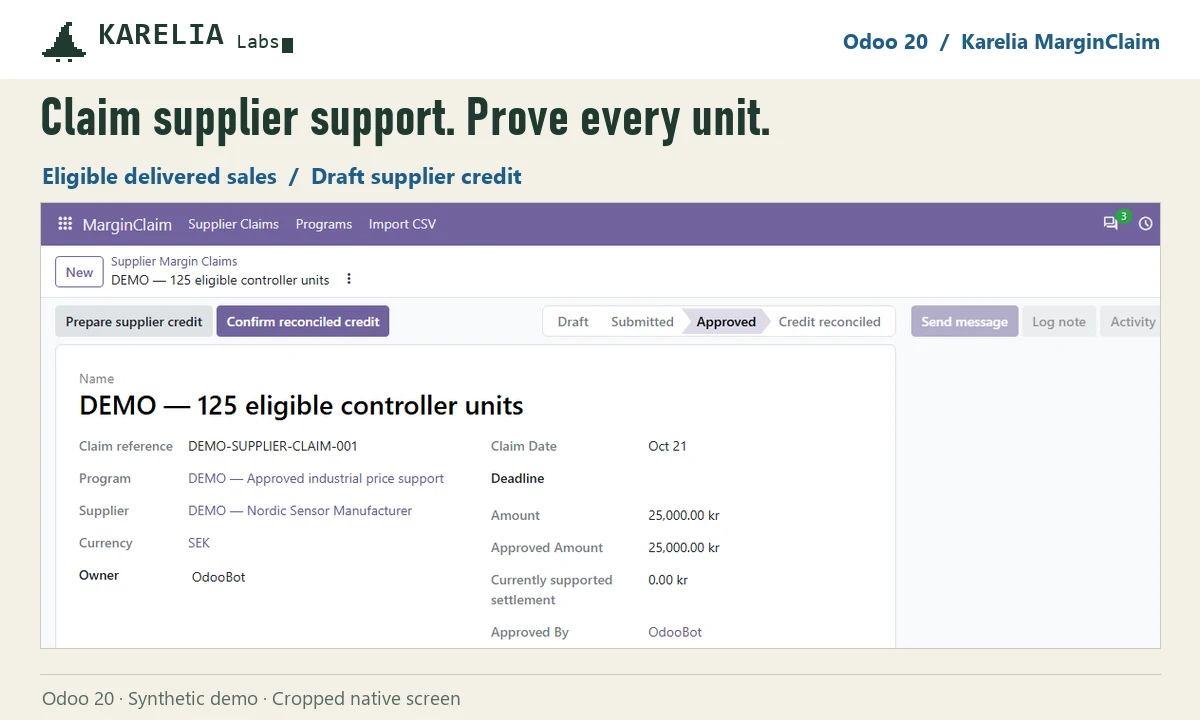
- Submit the claim. A manager approves it and prepares a draft supplier credit note with one line per sale, to review and post in Accounting. Print the supplier claim statement with the source quantities and the authorization.
- When the posted credit is fully reconciled against the supplier's bills, confirm the settlement.
Returns and customer credit notes after a claim lower what you have earned. The claim then shows a warning, and a manager can prepare a draft vendor bill that reverses the rebate on the returned units.
FAQ
Does Odoo have ship-and-debit or supplier rebate claims?
No. Standard Odoo records vendor prices, sales and vendor credit notes, but has no supplier program or claim that ties them together.
Can the same sale be claimed twice?
Not in Karelia MarginClaim. Each customer invoice line can belong to one claim only.
Which programs does it handle?
Supplier-approved programs in one currency that pay a fixed amount per product base unit, on fully delivered sales with one invoice line per sales order line. Percentage rebates, volume tiers and supplier portals are not covered.
More guides
Så exporterar du närvaro från Odoo till PAXml för lönesystemet
Swedish PAXml Export bygger en PAXml 2.0-fil av Odoos närvaro, godkända frånvaro och utlägg. Någon granskar raderna och låser underlaget innan .pax-filen laddas ned och importeras i lönesystemet.
Read the guide →How to charge late payment interest in Odoo
Odoo sends payment reminders but does not calculate interest on overdue invoices, in any version up to 20. Statutory interest follows a half-year reference rate, changes with every partial payment and allows one fixed compensation per late business invoice. You can calculate it by hand on a separate invoice, or let LateRate do it from your posted invoices.
Read the guide →Expense reports are gone in Odoo 19 and 20: how to group expenses again
Since Odoo 19 every expense is submitted, approved, posted and paid on its own; the Create Report button and the Expense Reports menu are gone in 20 too. To bill a client for several receipts, use re-invoicing through a sales order. To approve, print and pay a month of expenses as one report again, add Expense Report Sheets.
Read the guide →