Karelia Plan Switch & Upgrade: let members switch Wix Pricing Plans with credit
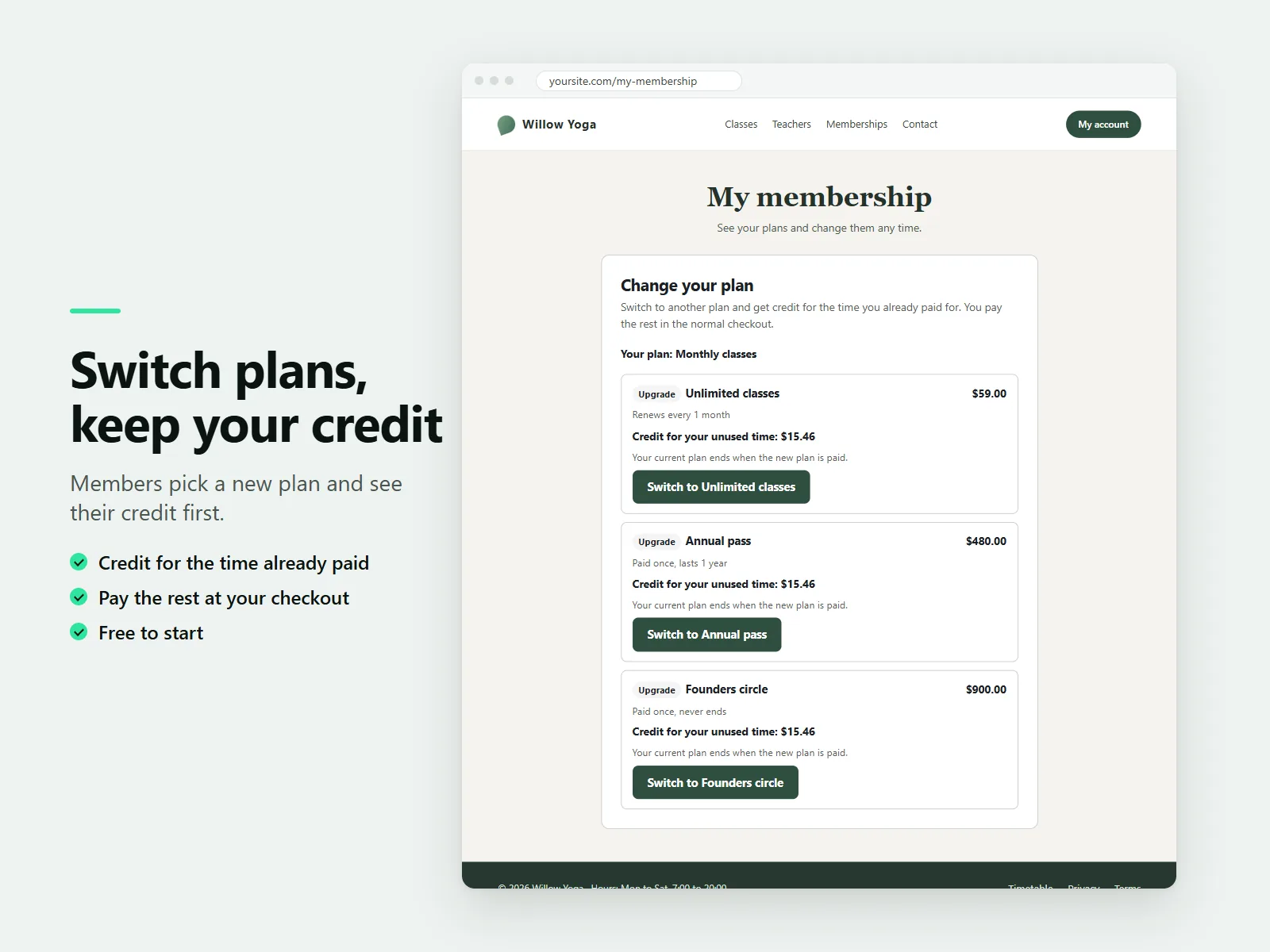
Members who want a different plan should not have to cancel, buy again and lose the time they already paid for. With Karelia Plan Switch & Upgrade they open a page on your site, pick the new plan and see their credit before they start.
- Requires
- Wix Pricing Plans (the plans members switch between)
- Languages
- The Switch plan widget in 15 languages
- Price
- Free plan; Pro $5.99/month or $4.92/month billed yearly, billed by Wix
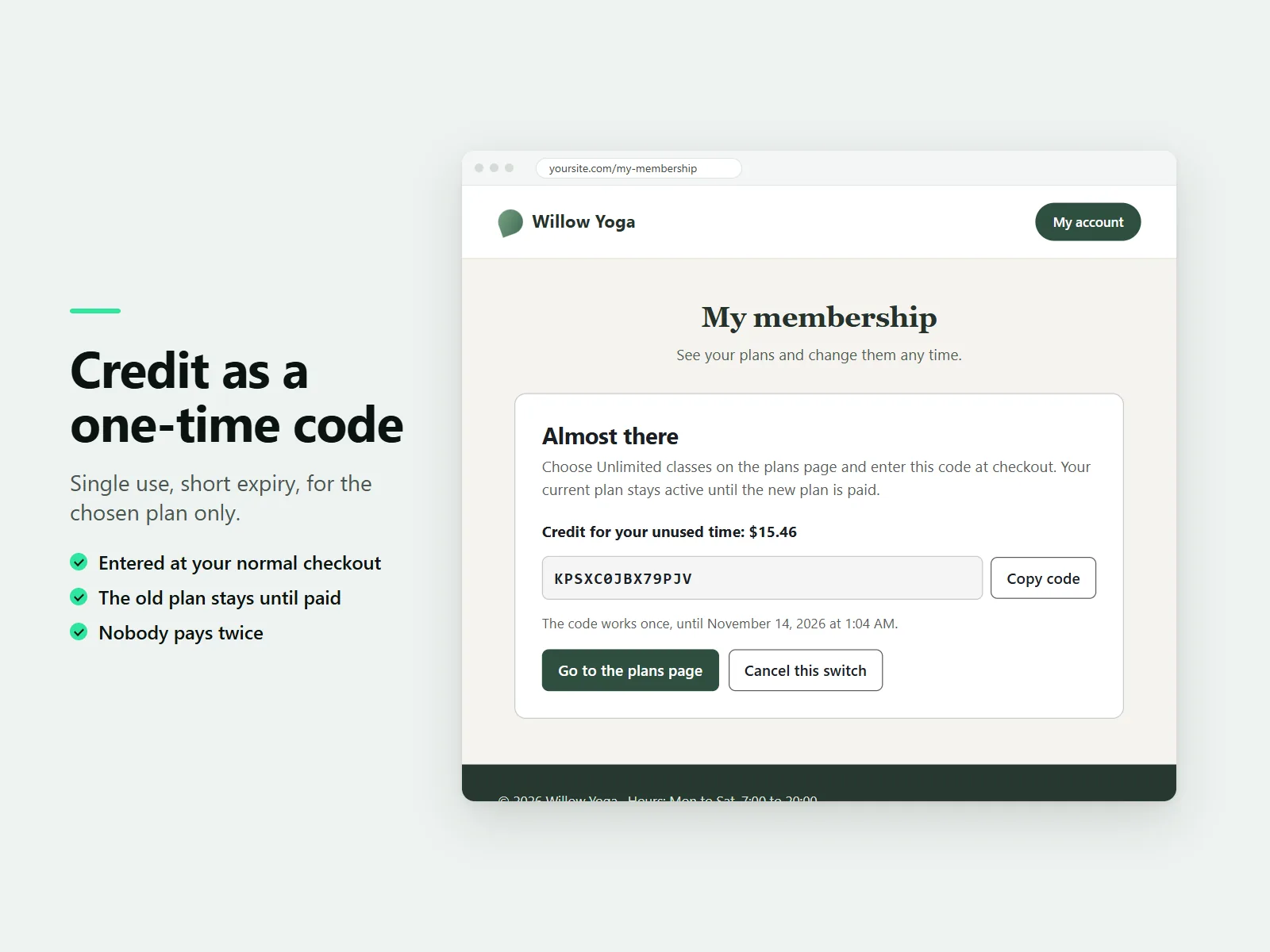
The member gets a one-time code worth the credit for the plan they chose, short-lived and valid for that plan only. They enter it at your normal checkout and pay the rest. Only when the new plan is paid does the app end the old one, so nobody pays twice and nobody is left without access in between. If the member never pays, the code simply expires and nothing changes.
What Karelia Plan Switch & Upgrade does
Credit for unused time
Members see their credit for the time they already paid for before they switch, for upgrades and downgrades, exact to the cent.
One-time credit code
A single-use code for the chosen plan only, with a short expiry. The member enters it at your normal checkout and pays the rest.
Old plan ends after payment
The old plan ends only when the new one is paid. If the member never pays, the code expires and nothing changes.
Every kind of plan
Plans that renew, plans paid once for a period, plans that never end, members with several plans and plans with no credit are all handled.
Every switch in one place
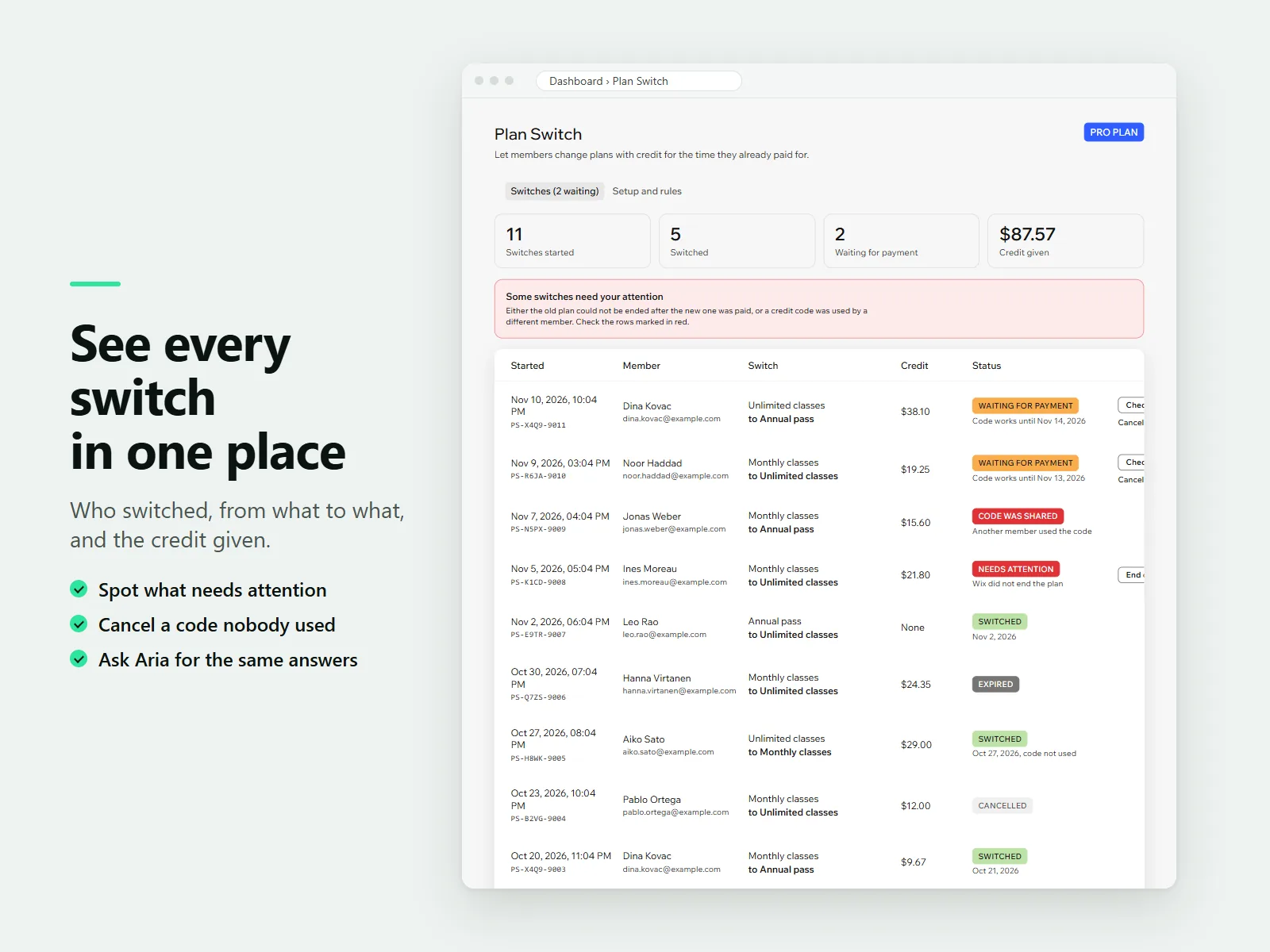
The dashboard lists who switched, from which plan to which, the credit given and the status. Cancel a code nobody used; if the old plan could not be ended, the app shows it and retries.
Your own rules (Pro)
Choose which switches are allowed, whether downgrades earn credit, how the credit is rounded and how many days a code works.
How it works
- Check your plans. Open the app dashboard and check the plans your members can switch between.
- Enter your plans page. Enter the page where members choose a plan. That is where they use their credit code at checkout.
- Place the widget. Add the Switch plan widget to the page members use to manage their membership.
Screenshots
Pricing
The complete guided switch (member widget, credit code, automatic ending of the old plan, switch list, Aria tools) for up to 5 switches started per calendar month, with credit for upgrades and downgrades, exact to the cent.
Or $4.92/month billed yearly, billed by Wix. Unlimited switches, and your own rules: which switches are allowed, credit for downgrades on or off, rounding of the credit, and how many days a code works.
Good to know
- A switch that is already paid for is never blocked by the plan.
- The credit is the part of the price the member paid for the time they have left, without tax. It is never larger than the price of the new plan.
- A credit code works like any other coupon: anyone who has it can enter it, so members should keep it private. If another member uses it, the app does not end the original member's plan and marks the switch for you.
- The widget works with the keyboard and screen readers and follows your site's colors and fonts. Ask Aria which members finished switching, who has not paid yet, or to finish a stuck switch.
- The app is a technical tool. It is not legal, tax or accounting advice: check that the credit shown to members matches your own terms and tax rules.
Privacy
Last updated: 11 November 2026
Karelia Plan Switch & Upgrade ("the app") is provided by Karelia Labs ("we"). This policy explains what the app stores and where. Website: https://karelialabs.com. Contact: support@karelialabs.com.
Who is responsible for what. The site owner who installs the app decides why membership data is processed on their site and is the controller of that data. We process it on the owner's behalf only to run the app. Members who use the Switch plan widget should read the privacy policy of the site they are on.
What the app handles.
• Member details: the name and email address of the logged-in member who starts a plan switch, taken from the member's own account on the site.
• Plans and orders: the member's current plan orders (plan, price, billing period, payment status, start and end dates), read to work out the credit and to end the old plan after the new one is paid.
• Switch records: the old and new plan, the credit amount and currency, the credit code, its expiry date, the order of the new plan, and the status and dates of the switch.
• Owner settings: the address of the plans page, which switches are allowed, and on the Pro plan the credit rules.
Where it is stored. All of this is stored inside the site owner's own account: as notes on the member's contact in the site's Contacts list, as single-use coupons in the site's coupon list, and in the app's settings kept with the site. We do not keep a copy in a database of our own and do not sell or share the data. The app's code runs on the platform's infrastructure and processes this data only while a request is being served. Error logs contain no names, email addresses or credit codes.
Payments. The app never sees or stores card or bank details. The member pays for the new plan in the site's own checkout.
Retention and deletion. Switch records stay in the site's Contacts until the site owner deletes the notes or the contacts. Coupons stay in the site's coupon list until the site owner deletes them. Removing the app does not delete data in the owner's Contacts or coupon list. A site owner can ask us for help at support@karelialabs.com.
Your rights. To see, correct or delete personal data from a plan switch, contact the site where you switched plans. We help site owners meet such requests.
Changes. We will update this page when the app changes how it handles data.
Terms of service
Last updated: 11 November 2026
These terms apply to the use of Karelia Plan Switch & Upgrade ("the app"), provided by Karelia Labs ("we"). Website: https://karelialabs.com. Contact: support@karelialabs.com.
The service. The app lets members of a site move from one membership plan to another with credit for the time they have already paid for. The member chooses the new plan and receives a single-use credit code, pays the rest in the site's normal checkout, and once the new plan is paid the app ends the old plan. The app is a technical tool. It is not legal, tax or accounting advice.
Who may use it. The app is for site owners who accept these terms. You are responsible for your site, your plans, your prices, the taxes on your sales and your own terms with your customers.
Plans and fees. The app has a Free plan and a Pro plan. The Free plan limits the number of switches started per calendar month and uses the standard rules. The Pro plan removes that limit and lets you set your own rules. Fees for the Pro plan are shown and charged by the marketplace where you installed the app, under that marketplace's own billing terms. A switch that is already paid for is never blocked because of the plan.
How a switch works.
• The credit is the part of the price the member paid for the time they have left, without tax, worked out for the moment the code stops working. It is never larger than the price of the new plan.
• Plans that never end, free plans, free trials, and plans that are unpaid or refunded give no credit.
• A credit code is a coupon for one plan, can be used once and expires after a few days. It is a code like any other coupon: anyone who has it can enter it, so members should keep it private. If another member uses it, the app does not end the original member's plan and marks the switch for the site owner.
• The old plan is ended only after the new plan is paid. Until then nothing changes for the member.
• Refunds are handled by the site owner in the site's orders. The app does not refund payments. Cancelling a switch in the app stops its code from working.
Your responsibilities. Check that the credit shown to members matches your own terms and tax rules. Keep your site's privacy policy up to date. Do not use the app for unlawful purposes.
Availability. We work to keep the app running but do not promise uninterrupted service. The app depends on services provided by others, such as the site's checkout, Pricing Plans, Contacts and coupons. We are not responsible for failures of those services. If the old plan cannot be ended automatically, the app shows the switch as needing attention and retries; you can also end the plan yourself in the site's orders.
Liability. To the extent the law allows, the app is provided as it is and we are not liable for indirect losses or lost profits. Our total liability is limited to the fees you paid us for the app in the three months before the claim.
Changes and ending. We may update these terms and will publish the new version here. You can stop using the app at any time by removing it from your site.
Support. Write to support@karelialabs.com.
FAQ
Can members switch Wix Pricing Plans without losing what they already paid?
Yes. A member picks the new plan in the Switch plan widget and sees the credit for the time they already paid for. They get a one-time code worth that credit, enter it at your normal checkout and pay the rest.
When does the old plan end?
Only when the new plan is paid. Until then nothing changes for the member. If the member never pays, the code expires and the old plan stays as it is.
How is the credit worked out?
It is the part of the price the member paid for the time they have left, without tax, worked out for the moment the code stops working. It is never larger than the price of the new plan.
What happens if the old plan cannot be ended?
The dashboard shows the switch as needing attention and the app retries. You can also end the plan yourself in your site's orders.
What does Pro add?
Unlimited switches (the Free plan covers up to 5 switches started per calendar month) and your own rules: which switches are allowed, whether downgrades earn credit, how the credit is rounded and how many days a code works.
Related tools
Karelia Cancel Subscription
Add a cancel form and a cancel link to your Wix site. Members and visitors cancel Pricing Plans online with a reference number. Free plan, Pro $9.99/month.
Karelia Gift a Membership
Let visitors give your Wix membership plans as gifts. They pay at your checkout; the recipient claims the plan with a one-time link. Free plan, Pro $4.99/month.
More from Karelia Labs
Updated