
Karelia Cancel Subscription: let customers cancel Wix Pricing Plans online
With Wix Pricing Plans, a customer normally has to log in before they can cancel, and a customer who cannot log in ends up writing to the site owner. A customer who cannot find a cancel button is more likely to write an angry message than to wait. Karelia Cancel Subscription adds a clear cancel form and an always-visible "Cancel subscription" link to your site.
- Requires
- Wix Pricing Plans (the plans and memberships customers cancel)
- Works in
- Wix Harmony, Wix Studio and the classic Wix Editor
- Price
- Free plan; Pro $9.99/month or $99/year, billed by Wix
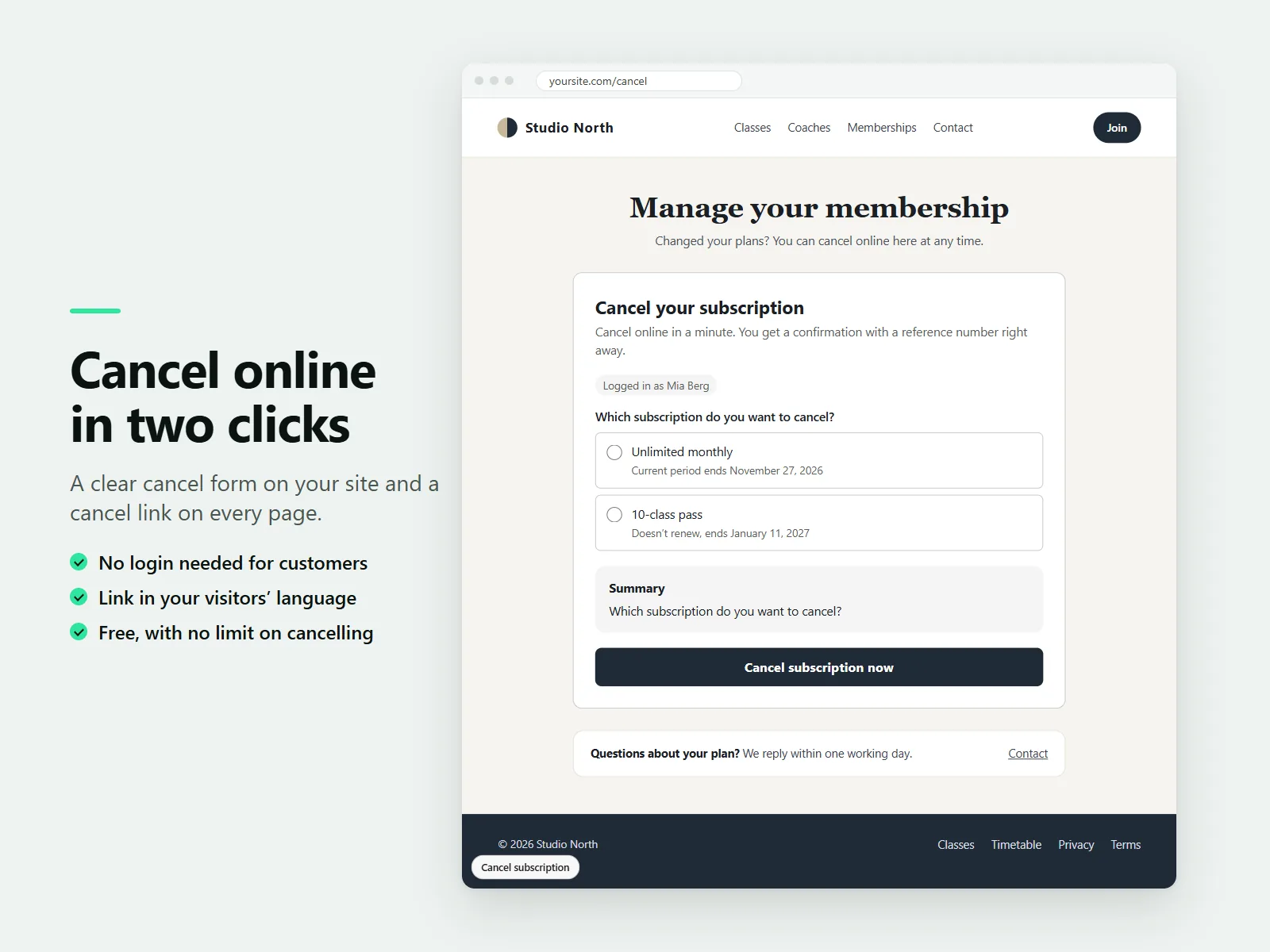
Logged-in members pick the plan they want to end. Everyone else enters a name and an email address, with no login needed. A confirmation with date, time and reference number appears right away, and every request is saved on the customer's contact and listed in your dashboard.
What Karelia Cancel Subscription does
Cancel form and cancel link
Put the form on a page of your choice and turn on a small cancel link that shows on every page.
No login needed
Logged-in members pick a plan; everyone else enters name and email. The confirmation looks the same whether or not an email address has a subscription.
You choose what happens
For visitors who are not logged in: cancel at the end of the paid period, cancel right away, or wait for your confirmation in the dashboard.
Confirmation to keep
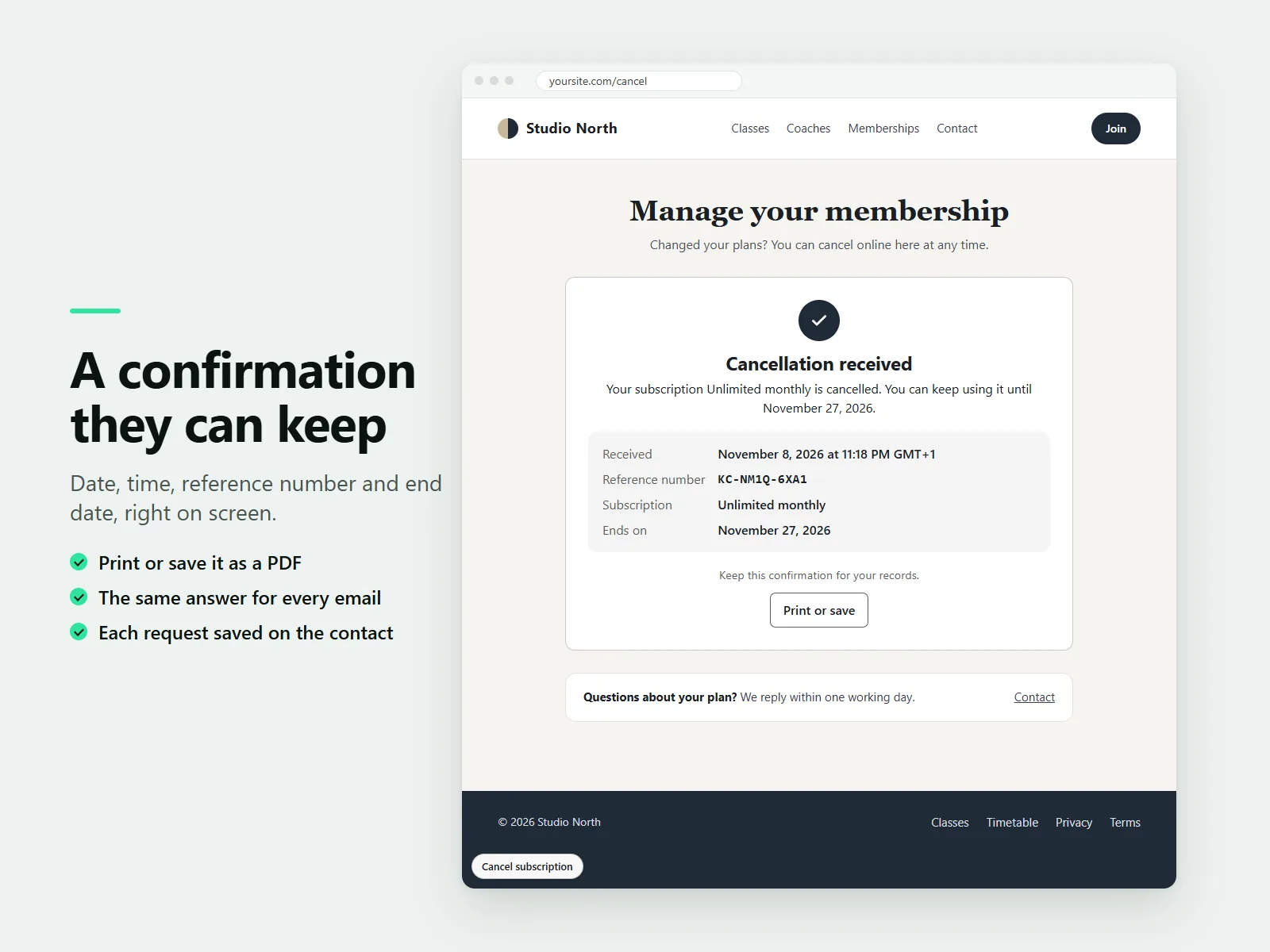
Date, time and reference number on screen, with Print or save as PDF. Your site's automations can email it.
Wording presets
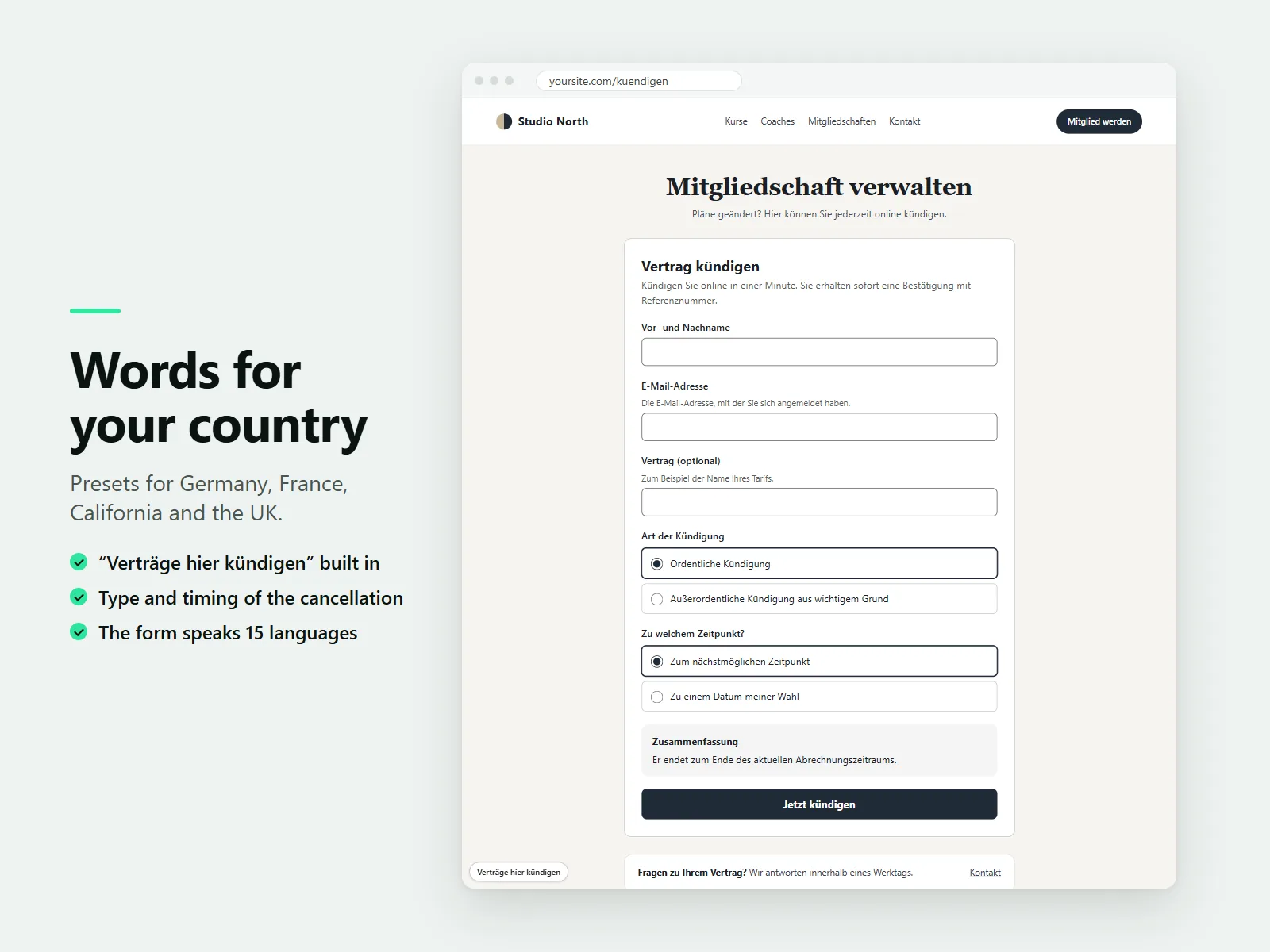
Presets for Germany, France, California and the United Kingdom, and a form in 15 languages, including right-to-left ones.
Every request on record
Saved as a note on the customer's contact and listed in the dashboard, where you can confirm the ones that wait for you.
How it works
- Add a cancel page. In the Wix editor, create a page such as Cancel subscription, add the Cancel Subscription component from Add, then Apps, and publish the page.
- Turn on the link. Open the app dashboard. The checklist shows Pricing Plans and the cancel page as done. Click Turn on link to show the cancel link on every page.
- Choose how requests are handled. Set whether visitors who are not logged in cancel at the end of the period, right away, or wait for your confirmation.
Screenshots
Pricing
The full cancel form, cancel link, confirmation with reference number, country presets and request list.
Or $99/year, billed by Wix. Reason survey with your own reasons, a fair offer above the cancel button, statistics, CSV export, your own texts and an email copy for you.
Good to know
- Plans that do not renew and requests for a chosen end date always wait for you to confirm in the dashboard.
- The presets and wording describe features only. They are not legal advice and do not guarantee that your site or contracts meet the laws that apply to you.
- Cancelling itself is never limited on any plan.
Privacy
Last updated: 8 November 2026
This policy explains what personal data the Karelia Cancel Subscription app ("the app") handles, where it is kept and why. The app is made by Karelia Labs ("we", "us"). Contact: karelialabs@outlook.com. Website: https://karelialabs.com.
1. Who is responsible. The app is installed by the owner of a website ("site owner") to let the site's customers cancel plans and memberships online. For the personal data of the site's customers and visitors, the site owner decides what is collected and why, and is the controller. We provide the app and process that data only to run it on the site owner's behalf. For the site owner's own account details, Wix handles them under its own policies.
2. What the app handles and where it is kept. The app has no servers or databases of its own. Its code runs on Wix's platform, and everything it keeps stays inside the site owner's Wix account.
When a customer sends a cancellation request, the app handles:
• the name and email address the customer types in, or, for a logged-in member, the member's name, email address and member ID from the site's member area;
• which plan or membership the request is about, and the plan orders it concerns;
• the reason for cancelling, any comment and, where the site asks for them, the type of cancellation and a preferred end date (all optional, except a short description when someone cancels for good cause);
• the date and time of the request, a reference number, what happened to the request and when it ends.
This record is saved as a note on the customer's contact in the site's contact list (Contacts), and the contact gets the label "Cancellation request". If the email address does not belong to a contact yet, the app adds a contact with the name and email address. The site owner can see, edit and delete these notes, labels and contacts in their dashboard at any time.
When a customer chooses an offer instead of cancelling (only on sites using the Pro plan), the app adds a short note to that customer's existing contact. It never creates a contact for this.
To process a cancellation, the app reads the customer's plan orders in the site's Pricing Plans and cancels the chosen ones, as the site owner has set it up.
To send confirmation emails, the app passes the reference number, the customer's name, the plan name, the dates and the contact to the site's own Automations, which send the emails the site owner has switched on. On the Pro plan, an email copy for the site owner can also include the customer's email address, the status and the reason.
The app's settings (texts, reasons, offer, processing choices and the address of the cancel page) are kept with the site in Wix's settings for the app.
3. What the app does not do. The app does not use cookies, local storage or tracking on the public website, does not collect IP addresses or device identifiers, does not show ads, and does not sell or share personal data. We do not receive copies of the records; they stay in the site owner's Wix account. In the site's dashboard, the app keeps a few small values in the browser’s local storage to decide when to show a review request; they contain no personal data.
4. Why the data is used. The data is used only to receive and process cancellation requests, to give the customer a confirmation, to keep a record of each request for the site owner, and, on the Pro plan, to show the site owner statistics about cancellations and the reasons given. The site owner is responsible for having a legal basis for this, for example to perform the contract with their customer or to meet legal obligations about cancelling contracts.
5. How long it is kept. Records stay in the site's contact list until the site owner deletes the note or the contact. Removing the app does not delete them, because they are the site owner's records of their customers' requests. Settings are removed when the app is removed from the site.
6. Security. The data stays within Wix's infrastructure and is transferred over encrypted connections. The app's backend checks every request: only the site's owners and collaborators can open the dashboard functions, and logged-in members can only see and cancel their own plans. Visitors who are not logged in always receive the same confirmation, so the form never reveals whether an email address has a subscription.
7. Your rights. Customers of a website that uses the app can ask the site owner to access, correct or delete their data, or exercise any other right they have under data protection law. Site owners can do all of this directly in their dashboard. If you have questions about how the app works, write to karelialabs@outlook.com.
8. Changes. We may update this policy when the app changes. The date at the top shows the latest version.
Terms of service
Last updated: 8 November 2026
These terms apply when you install or use Karelia Cancel Subscription ("the app") on a website. The app is provided by Karelia Labs, a sole proprietorship registered in Sweden ("we", "us"). Contact: karelialabs@outlook.com. Website: https://karelialabs.com.
By installing the app you agree to these terms. If you install it for a business, you confirm that you may accept them on its behalf.
1. What you get. The app adds a cancel form and a cancel link to your website so that your customers can cancel the plans and memberships they bought through your site's Pricing Plans. It shows customers a confirmation with a reference number, processes or records each request as you choose in its settings, saves a record of each request on the customer's contact, and shows the requests in your dashboard. The features of each plan are described in the app's listing and dashboard.
2. Not legal advice. The app's presets, wording and settings describe features. They are not legal advice and do not guarantee that your website, your contracts or your cancellation process meet the laws that apply to you. You are responsible for your terms with your customers, for the settings you choose, for checking the texts the app shows, and for handling the requests that wait for you in the dashboard.
3. Plans and payment. The Free plan costs nothing and includes the full cancel form, the cancel link, the confirmation and the request list. Cancelling is never limited on any plan. The Pro plan is sold and billed through Wix; prices, renewals, cancellations and refunds follow Wix's terms for app purchases. If the Pro plan ends, the app continues on the Free plan and the Pro features stop; your settings for them are kept in case you upgrade again.
4. Your customers and your data. You keep all rights to your website, your content and your customer records. You allow the app to read your Pricing Plans orders and members, to cancel orders as your settings say, to add contacts, notes and labels in your contact list, and to start your site's automations, so that the app works. You are responsible for telling your customers about this processing where the law requires it, for example in your website's privacy policy. How the app handles personal data is described in the Karelia Cancel Subscription Privacy Policy.
5. Acceptable use. Do not use the app to break the law, to infringe anyone's rights, to mislead customers about cancelling, to overload or attack any system, or to try to reach data of other websites. Do not copy, resell or reverse engineer the app except where the law allows it.
6. Availability and changes. We work to keep the app running and correct, but we do not promise that it is free of errors or always available. The app depends on Wix's platform, on Pricing Plans and on your published website; changes there can affect it. If the app cannot complete a cancellation automatically, the request is kept for you in the dashboard. We may improve or change features. If we remove a feature of a paid plan you are paying for, we will tell you in advance where we reasonably can.
7. Liability. The app is provided "as is". To the extent the law allows, we are not liable for indirect or consequential loss, such as lost profit, lost data or claims from your customers, and our total liability for anything related to the app is limited to the amount you paid for it in the 12 months before the claim. Nothing in these terms limits liability that cannot be limited by law, or rights you have as a consumer.
8. Ending. You can stop using the app at any time by removing it from your website. The records of requests stay in your contact list until you delete them. We may suspend or end access if these terms are seriously broken.
9. Changes to these terms. We may update these terms. The date at the top shows the latest version. If a change matters to you, we will tell you in the app's dashboard before it applies; if you keep using the app after that, the new terms apply.
10. Law. Swedish law applies, and disputes go to the courts of Sweden, unless the law where you live as a consumer gives you other rights.
Guides
FAQ
Can customers cancel a Wix Pricing Plans subscription without logging in?
Yes. A visitor who is not logged in enters a name and an email address. You choose whether the plan then ends at the end of the paid period, ends right away, or waits for your confirmation in the dashboard. The confirmation screen is the same whether or not the email has a subscription, so nobody can find out who your customers are.
How do I add a cancel button to my Wix site?
Add the Cancel Subscription component to a page, such as /cancel, and turn on the cancel link in the app dashboard. The link then shows on every page of the site.
What happens when a logged-in member cancels?
The member picks the plan to end and the request is processed straight away in Pricing Plans. A confirmation with date, time, reference number and end date appears on screen.
Does it support the German cancellation button?
The Germany preset uses the familiar "Verträge hier kündigen" link and "Jetzt kündigen" button and asks for the type and timing of the cancellation. The app describes features and does not promise legal compliance, so check your own obligations.
What does Pro add?
An optional reason survey with your own reasons, a fair offer above the cancel button, statistics, CSV export, your own texts and an email copy of every request.
Related tools
Karelia Accordion & FAQ
Add collapsible questions and answers to Wix Harmony, in your fonts and colors. Four layouts, links to any question. Free plan, Pro $3.99/month.
Karelia Text Mask
Fill Wix Harmony headline letters with a photo, a gradient or a looping video. Real text for search engines. Free plan, Pro $3.99/month.
Karelia Audio Player
Add an audio or music player to Wix Harmony with a playlist, artwork and your colors. It never autoplays. Free for 10 tracks, Pro $4.99/month.
Karelia Podcast Player
Add a podcast player to Wix from your RSS feed or a directory link. New episodes appear by themselves. Free for 10 episodes, Pro $4.99/month.
More from Karelia Labs
Updated