
Auto Stock for Paymenter: product stock from the free room on your Pterodactyl nodes
Paymenter sells a product until you change its stock by hand. When every node is full, the customer pays, the server cannot be created, and you refund or move servers around.
On sale on Gumroad. The SourceXchange listing is coming soon.
- Works with
- Paymenter 1.5, Pterodactyl 1.x and 2.0
- Tested with
- Paymenter 1.5.9, Pterodactyl 1.15.1 and 2.0.0-beta.2
- Server extensions
- Paymenter's built-in Pterodactyl extension (1.x) and Pterodactyl 2.0 for Paymenter (1.x and 2.0)
- Price
- $4.99, one Paymenter installation
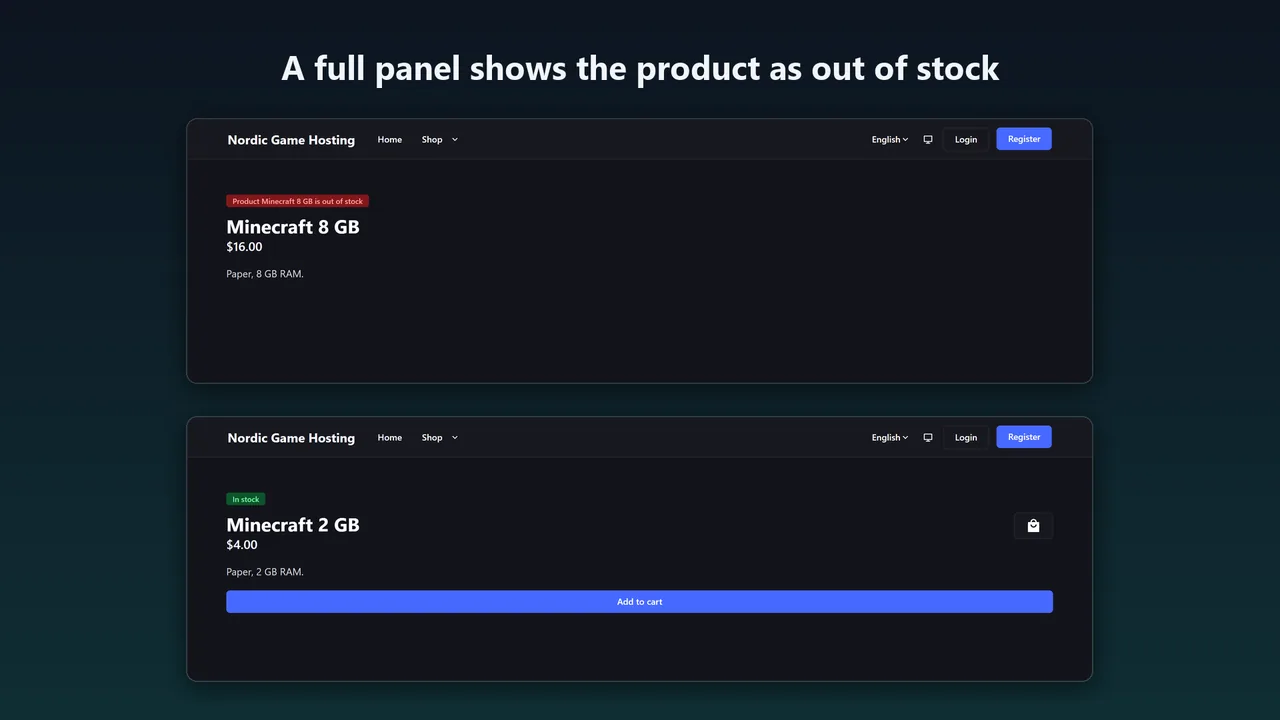
Auto Stock keeps the stock of each Pterodactyl product equal to the number of servers that still fit on your panel. When no node has room, the product shows as out of stock. When you add a node or free up space, the stock comes back on the next sync.
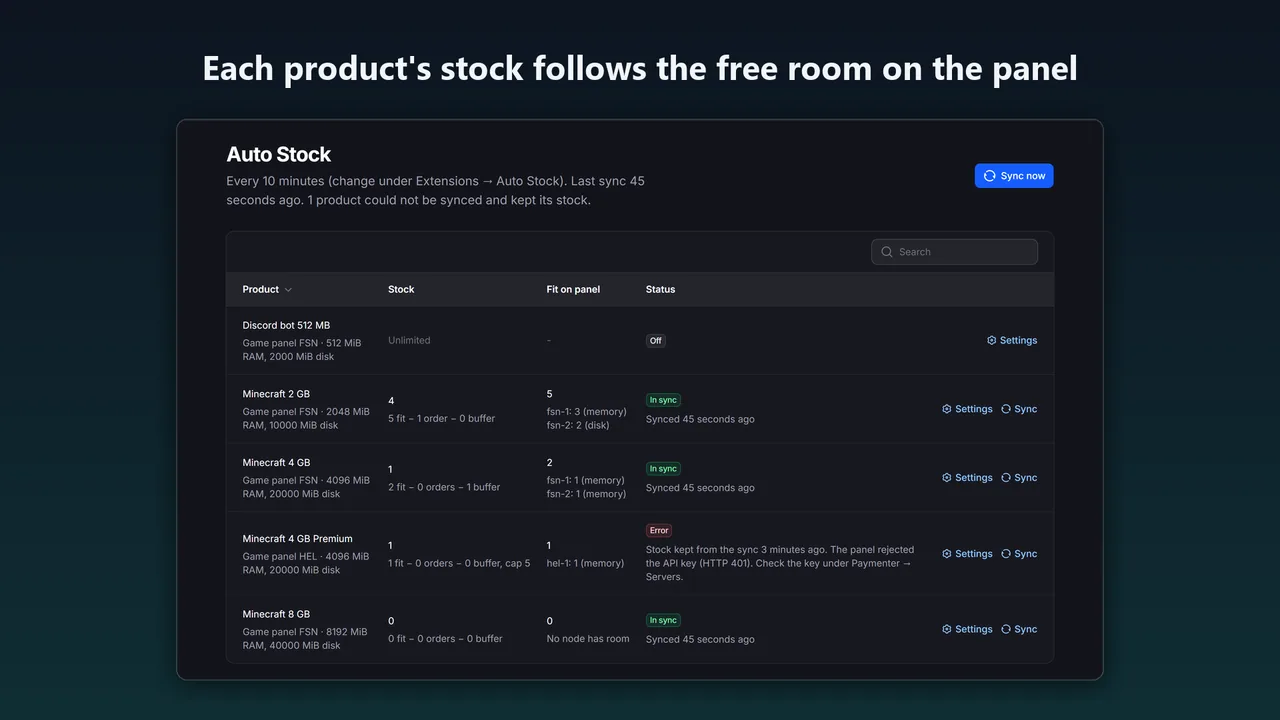
What Auto Stock for Paymenter does
Counts the nodes it would deploy to
The product's own location(s), fixed node or port array, and on Pterodactyl 2.0 the egg tags and node reservation tags. Private nodes do not count.
Counts like the panel does
Memory and disk with overallocation, minus what the node's servers already use, and the free allocations a server needs: port ranges, port arrays and dedicated IPs.
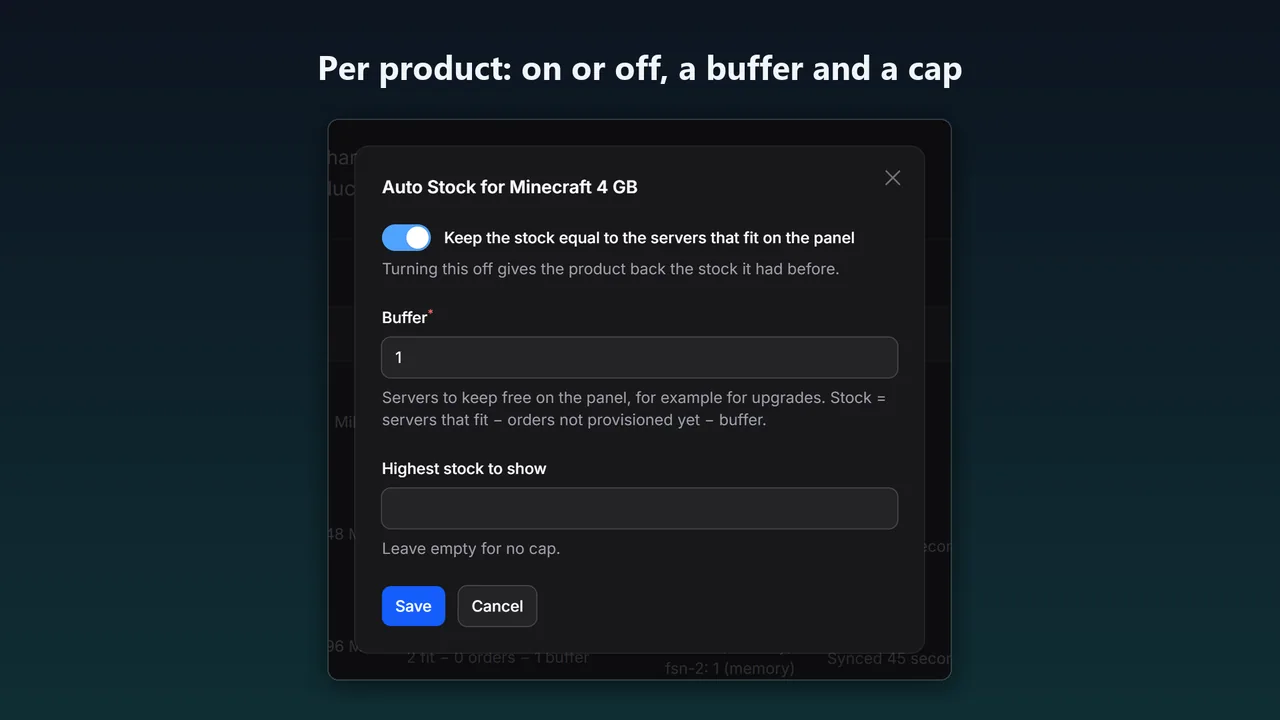
Stock = fit − orders − buffer
Servers that fit, minus orders not provisioned yet, minus your buffer. Never below 0 and never above your cap.
On Paymenter's own scheduler
Every 5, 10, 15, 30 or 60 minutes, with Sync now, a Sync button per product and php artisan autostock:sync.
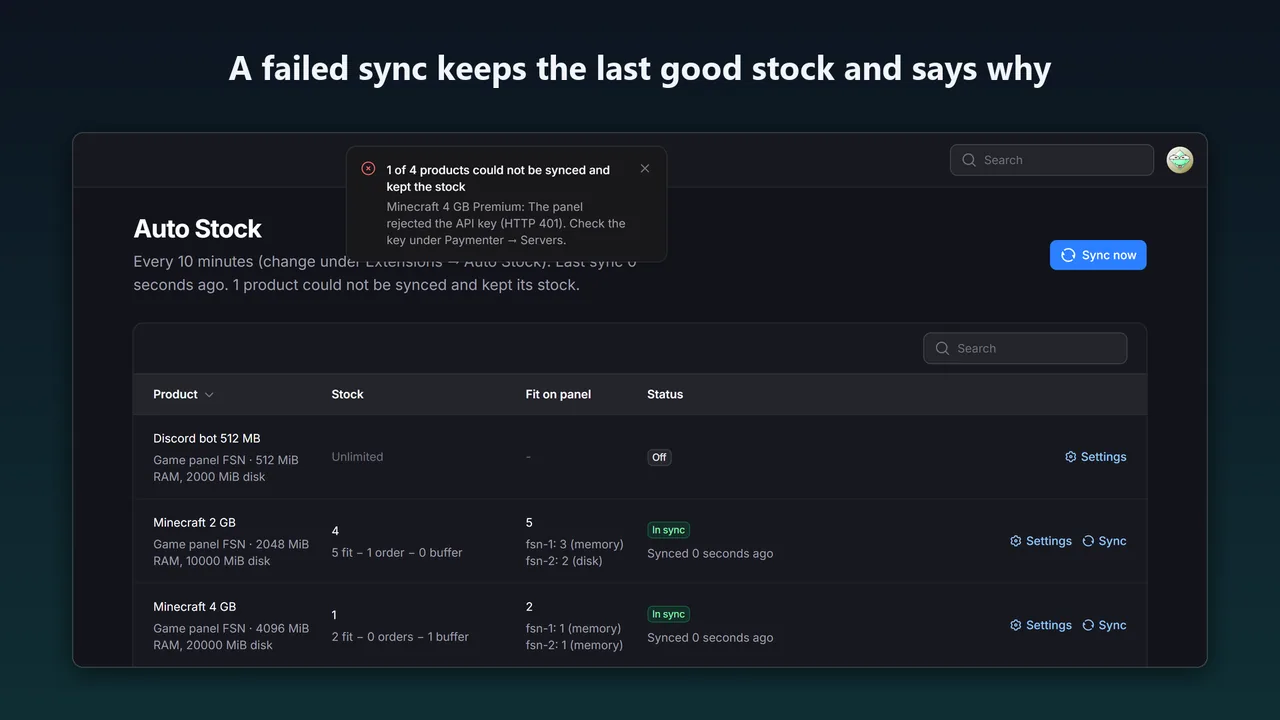
A failed sync keeps the stock
If the panel is down, the API key was revoked or a product's settings are broken, the product keeps its last good stock and the Auto Stock page shows the error.
Per product, and reversible
Turn it on per product with a buffer and a cap. Turning it off, or uninstalling, gives the product back the stock it had before.
How it works
- Upload. Admin → Extensions → Available Extensions → Upload Extension, upload the zip and click Install next to Auto Stock (Karelia Labs).
- Enable. Turn on Enabled and pick an interval (10 minutes if you leave it empty).
- Turn it on per product. Admin → Auto Stock → Settings on a product. Saving syncs it at once.
Screenshots
How the count works
- Memory and disk: a server fits on a node while used + size ≤ total × (1 + overallocation / 100), the same rule as the panel.
- Ports: each server needs its free allocations: a port in the range, every port of a port array, or a free IP for a dedicated IP. All pages of a node's allocations are read.
- Orders: unpaid orders keep their server, the same way Paymenter keeps their stock. Paymenter itself lowers the stock by one at checkout; between syncs that is what customers see.
- Shared nodes: products on the same nodes each see the same free room. An order for one lowers the others on the next sync.
Checked against the panel's own /nodes/deployable on Pterodactyl 1.15.1 and 2.0.0-beta.2: it accepted exactly the number of servers Auto Stock counted, and not one more.
Pricing
One Paymenter installation and the Pterodactyl panels it manages. Updates within 1.x, full source.
Good to know
- The count uses the product's own memory and disk. If customers can pick a larger size with configurable options, set a buffer.
- Paymenter's scheduler must run (
* * * * * php artisan schedule:run), as in Paymenter's install guide. - Paymenter's built-in Pterodactyl extension cannot create servers on Pterodactyl 2.0, which removed the nest endpoints it uses. Auto Stock shows that as an error for such products instead of counting them.
- Editing a product's stock by hand while Auto Stock is on for it is overwritten by the next sync.
- Tested on Paymenter 1.5.9 with Pterodactyl 1.15.1 and 2.0.0-beta.2. Node capacity comes from the panel, so real Wings nodes were not part of the test.
Guides
FAQ
Do I have to change my products?
No. Auto Stock reads the settings the products already have: location, fixed node, port array, egg and resources.
What if several products share the same nodes?
Each one sees the same free room. An order for one lowers the others on the next sync. Use a short interval or a buffer when your nodes are nearly full.
What happens if the panel is down?
The product keeps the stock of its last good sync, and the Auto Stock page shows the error. A failed sync never sets the stock to 0.
Does it change anything in Pterodactyl?
No. It only reads nodes, allocations and eggs through the Application API. The key needs read access to nodes and allocations, and on Pterodactyl 2.0 to eggs; the key your server extension already uses has this.
What happens when I uninstall it?
Every product gets back the stock it had before you turned Auto Stock on, and its table is removed.
Where can I buy it?
On Gumroad for $4.99, and on SourceXchange, where the listing is coming soon.
Related tools
Free Trials for Paymenter
Free trial game servers in Paymenter: 24 hours or 3 days, one per person, a reminder, then suspend and terminate. Upgrading keeps the same server.
Pay All Invoices for Paymenter
Free Paymenter extension: clients pay all unpaid invoices with one payment and one gateway fee. Each invoice is then paid on its own, so services renew. MIT.
Pterodactyl 2.0 for Paymenter
Free drop-in Paymenter extension for Pterodactyl 2.0 and 1.x. Fixes "api/application/nests could not be found" after the panel upgrade.
Karelia Bridge
Customers open Pterodactyl 2.0 from Paymenter already signed in, and see due dates and unpaid invoices in the panel. Official 2.0 extension, no core edits.
Updated 2026-10-25