
How to keep Paymenter stock in line with free Pterodactyl node capacity
Updated 2026-10-25
The problem: paid orders that cannot be deployed
Paymenter sells a product until its stock runs out, and without an extension the stock only changes when you change it by hand (Paymenter itself lowers it by one at checkout). Pterodactyl, meanwhile, refuses to create a server when no node the product can use has enough memory, disk or free ports. The customer has paid, the server is not created, and you refund or move servers around.
The fix is to make the stock follow the panel: a product should show as out of stock as soon as no node has room for one more server of its size, and come back when there is room again.
How Pterodactyl decides whether a server fits
- Memory and disk: a server fits on a node while used + size ≤ total × (1 + overallocation / 100), for memory and for disk. *Used* is what the node's servers already have.
- Ports: the server needs free allocations on that node: a port, every port of a port array, or a free IP address when it gets a dedicated IP.
- Which nodes count: the nodes in the product's location(s), or its fixed node. Private nodes do not take automatic deployments. On Pterodactyl 2.0, egg tags and node reservation tags narrow the list further.
Count it by hand
- For each node the product can deploy to, take its total memory and disk, its overallocation percentages, and the memory and disk its servers already have.
- Work out how many more servers of the product's size fit by memory and by disk. The smaller number wins.
- Check the free allocations. A product that needs two ports per server fits only as many times as there are free pairs.
- Add up the nodes, subtract orders that are paid but not provisioned yet, and keep one or two free for upgrades.
- Set the result as the product's stock in Paymenter, and repeat whenever servers are created or deleted.
Example: a node with 16,384 MiB of memory, no overallocation and 10,240 MiB in use has room for (16,384 − 10,240) / 2,048 = 3 more 2 GB servers by memory. With 50 % overallocation the limit is 24,576 MiB, which leaves room for 7.
This works, but the number goes stale with every order and every server someone deletes, and products that share nodes all change when one of them sells.
Keep the stock in sync automatically
Auto Stock for Paymenter does this count for every Pterodactyl product on Paymenter's own scheduler, every 5 to 60 minutes. It reads the settings the products already have, so nothing has to be set up again.
- Upload the zip under Admin → Extensions → Available Extensions → Upload Extension and click Install next to Auto Stock (Karelia Labs).
- Turn on Enabled and pick an interval. Paymenter's scheduler must run (
* * * * * php artisan schedule:run), as in Paymenter's install guide. - Open Admin → Auto Stock, click Settings on a product and turn it on. Set a buffer (servers to keep free) and a cap if you want one. Saving syncs it at once.
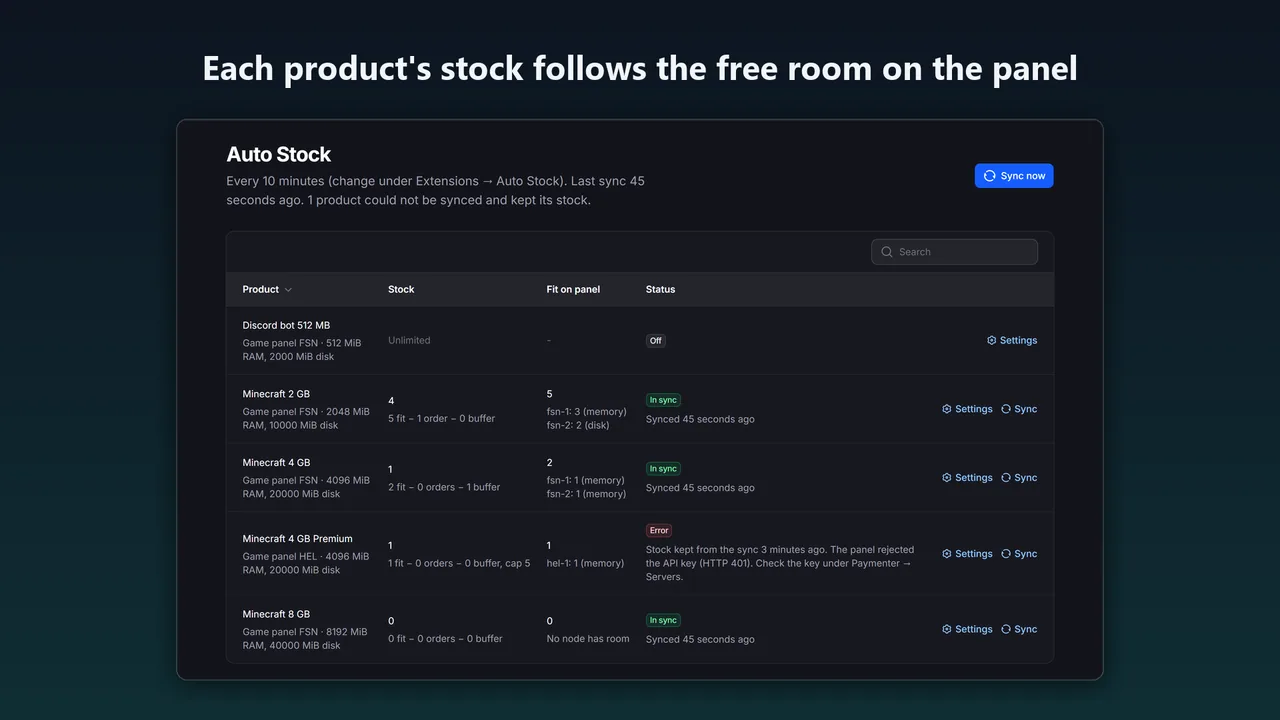
Stock is then servers that fit − orders not provisioned yet − buffer, never below 0 and never above the cap. When the panel is full, the shop shows the product as out of stock.
Things to watch
- Shared nodes: products that deploy to the same nodes each see the same free room. An order for one lowers the others on the next sync, so use a short interval or a buffer when nodes are nearly full.
- Configurable options: the count uses the product's own memory and disk. If customers can choose a larger size, set a buffer.
- Panel down or key revoked: Auto Stock keeps the last good stock and shows the error, instead of setting the stock to 0.
- Pterodactyl 2.0: Paymenter's built-in Pterodactyl extension cannot create servers on 2.0, which removed the nest endpoints it uses; see the nests error guide. Products on the free Pterodactyl 2.0 for Paymenter extension are counted on both panel versions.
FAQ
Does Paymenter update stock from Pterodactyl by itself?
No. Without an extension, Paymenter sells a product until you change its stock by hand. Auto Stock sets it from the free room on your nodes.
Does Auto Stock change anything in Pterodactyl?
No. It only reads nodes, allocations and eggs through the Application API.
Which API key permissions does it need?
Read access to nodes and allocations, and on Pterodactyl 2.0 to eggs. The key your server extension already uses has this.
More guides
Fix Paymenter after upgrading to Pterodactyl 2.0: "api/application/nests could not be found"
Pterodactyl 2.0 removed the nest endpoints that Paymenter's built-in extension calls. Switch to a 2.0-aware extension with one command; products and services stay.
Read the guide →How to offer free trial game servers in Paymenter, one per person
Paymenter 1.5.9 has no trials of its own. Make a separate trial product with a free plan, allow one trial per person at checkout, end it with Paymenter's own suspend and terminate, and let clients upgrade on the same server.
Read the guide →How to detect game server crashes in Pterodactyl and get alerts (Blueprint)
When Wings restarts a crashed server, the console is cleared and nobody is told. Compare state changes with the activity log to tell crashes from manual stops, keep the console lines from before the crash, and send alerts. Crash Detector does this on Blueprint panels.
Read the guide →