
Fix Paymenter after upgrading to Pterodactyl 2.0: "api/application/nests could not be found"
Updated 2026-10-19
The symptoms
After upgrading the panel to Pterodactyl 2.0, a Paymenter store that uses the built-in Pterodactyl extension shows one or more of these:
- New orders are paid but no server is created.
- The egg list on the product's Server tab is empty.
- Plan upgrades fail.
- The log or the admin panel shows
The route api/application/nests/1/eggs/1 could not be found.
Why it happens
Pterodactyl 2.0 replaced nests with tags and removed the /api/application/nests endpoints from the Application API. Paymenter's built-in extension (extensions/Servers/Pterodactyl) still calls them when it loads the product form, creates a server and upgrades one. Pterodactyl's own upgrade guide tells you to update your billing module before upgrading.
Pterodactyl 2.0 has /api/application/eggs and /api/application/tags instead. Egg IDs don't change in the upgrade, and each converted tag keeps the old nest's ID in legacy_nest_id, so existing products can keep working once the extension uses the new endpoints.
The fix
- Download Pterodactyl 2.0 for Paymenter (free, MIT) from GitHub or SourceXchange and copy the
Pterodactyl2folder toextensions/Servers/in Paymenter. - Switch your existing Pterodactyl servers to it. Settings, products and services stay:
php artisan tinker --execute="App\Models\Server::where('extension','Pterodactyl')->update(['extension'=>'Pterodactyl2']);"On Docker, put docker compose exec paymenter in front of the command.
- Paymenter → Admin → Servers → Test Connection.
- Open one product (Admin → Products → Server) and check that the egg is still selected.
To roll back, run the same command with the two extension names swapped.
Upgrading the panel? Do it in this order
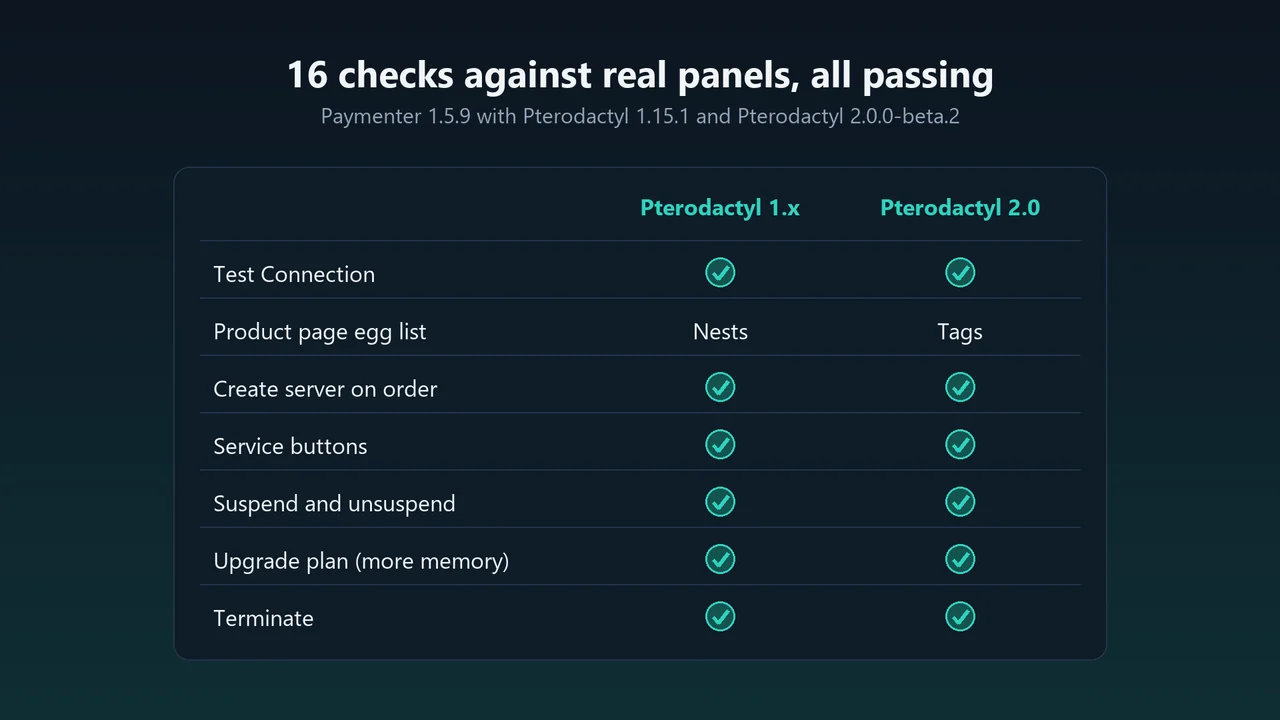
- Install the extension and switch your servers while the panel is still on 1.x. It works on both versions, so nothing changes for your customers.
- Upgrade the panel with the official guide.
- Run Test Connection, then check one product's egg.
Still failing?
- Still the nests error: that server still uses the built-in extension. Run the switch command again and check the server's extension in Admin → Servers.
- No tag filter on 2.0: give the Application API key read access to tags. The egg list works without it.
- 403 from the panel: the key needs read and write on servers, users, nodes, locations, allocations and eggs.
The issue is also reported upstream as Paymenter#1388. If core gets 2.0 support later, switching back is the same one command.
FAQ
Will my existing products keep working after the Pterodactyl 2.0 upgrade?
Yes, once the server uses a 2.0-aware extension. Egg IDs don't change in the upgrade, and the extension uses the same product options.
Can I switch before upgrading the panel?
Yes. The extension detects the panel version and uses nests on 1.x, so it is safe to switch first.
More guides
Solar2D and Google Play's 16 KB page size rule: find the library that fails
Apps targeting Android 15+ must support 16 KB memory pages. Check every 64-bit library in your build, find the plugin that ships each 4 KB-aligned one, and update or remove it.
Read the guide →How to add captions to WordPress videos without per-minute fees
Generate captions for a Media Library video with Whisper in your own browser, check them next to a live preview, and they appear in the core Video block with a clickable transcript.
Read the guide →How to add a PDF menu, brochure or flipbook to a Wix site
Add Karelia PDF from the Wix App Market, choose the PDF, pick a reader theme and colours, and decide whether visitors may download or print it. Pro adds the page-turn flipbook.
Read the guide →