
How to offer free trial game servers in Paymenter, one per person
Updated 2026-10-25
Why a free plan is not a trial
Paymenter 1.5.9 has no free trials of its own, and neither has its development branch. You can make a product with a plan of type Free, but nothing stops the same person from ordering it again, nothing ends it, and a client who likes the server has to buy a new one and move their files.
A trial needs four things: a time limit, one trial per person, a clean end, and a way to keep the server by paying.
Step 1: make a trial product
Create a product of its own for the trial, for example "Minecraft 4 GB – 3-day free trial", with one plan of type Free and the server settings the trial should have. The paid product keeps its own plans and prices.
Step 2: turn the free plan into a trial
- Upload the Free Trials for Paymenter zip under Admin → Extensions → Available Extensions → Upload Extension, click Install next to Free Trials (Karelia Labs), turn on Enabled and save.
- Open Admin → Free Trials → Trial products and click Settings on the trial product.
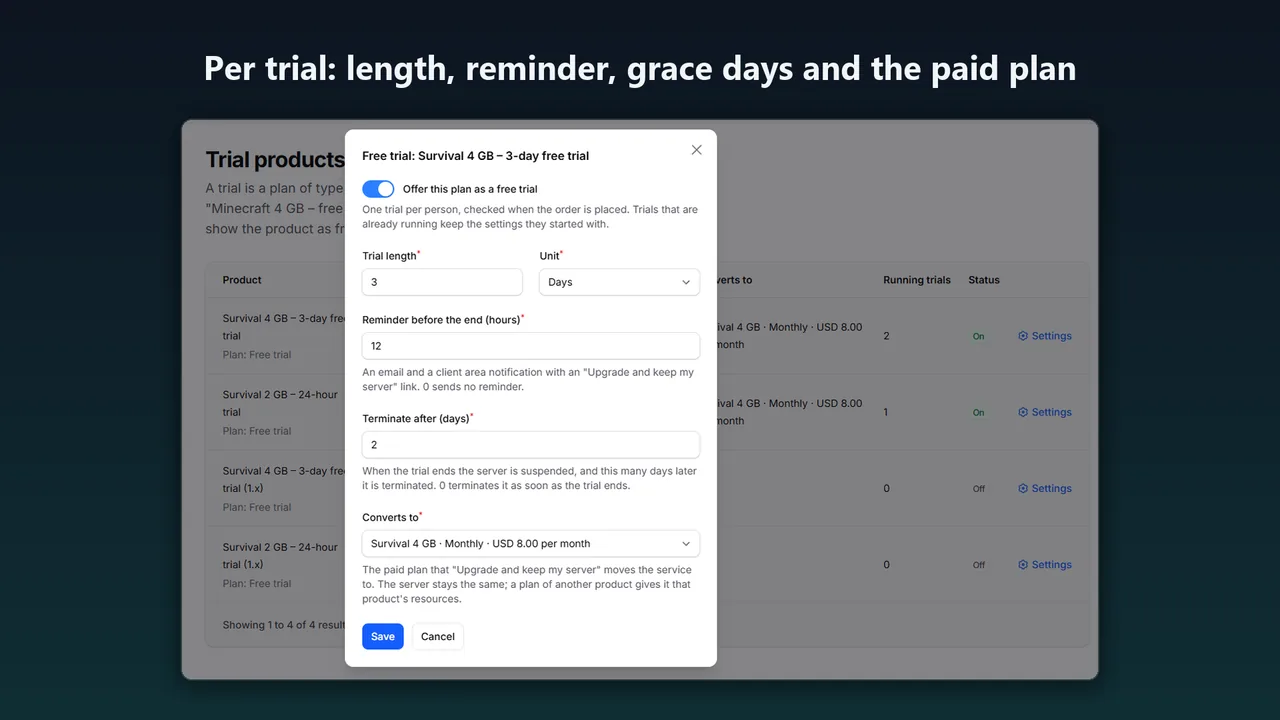
- Turn the trial on and set the length (for example 24 hours or 3 days), the reminder before the end, the grace days before termination (0 terminates at the end) and the paid plan it converts to.
Paymenter's scheduler and queue worker must run, as in Paymenter's install guide, and mail must be set up for the reminder and end emails.
Step 3: one trial per person
Free Trials checks every trial order on the server at checkout, and cancels a refused one with a clear message. A new trial is compared with earlier ones by:
- the account;
- the email address, normalized: lower case,
+tagsremoved, and the dots of gmail.com and googlemail.com; - the IP address within a window you set (30 days by default; IPv6 by /64);
- and a verified email address is required, unless you allow unverified ones.
Trial orders wait for one database lock, so two orders placed at the same moment, in two tabs or from two accounts on one mailbox, never both get a trial. You can allow one trial per person in total, or one per trial product.
Behind Cloudflare or another proxy, set Paymenter's Trusted Proxies (Admin → Settings → Security). Otherwise every client seems to come from the proxy's address, and the IP check refuses everyone after the first trial. If you cannot, set the IP window to 0.
What these checks cannot stop
They stop a second trial on the same account, on an alias of the same mailbox or from the same connection. They cannot stop someone with a different mailbox, a VPN or another network, and people behind one shared address count as one. There is no fingerprinting and no outside service; only keyed hashes of the account id, the email and the IP are stored.
Step 4: the end of the trial
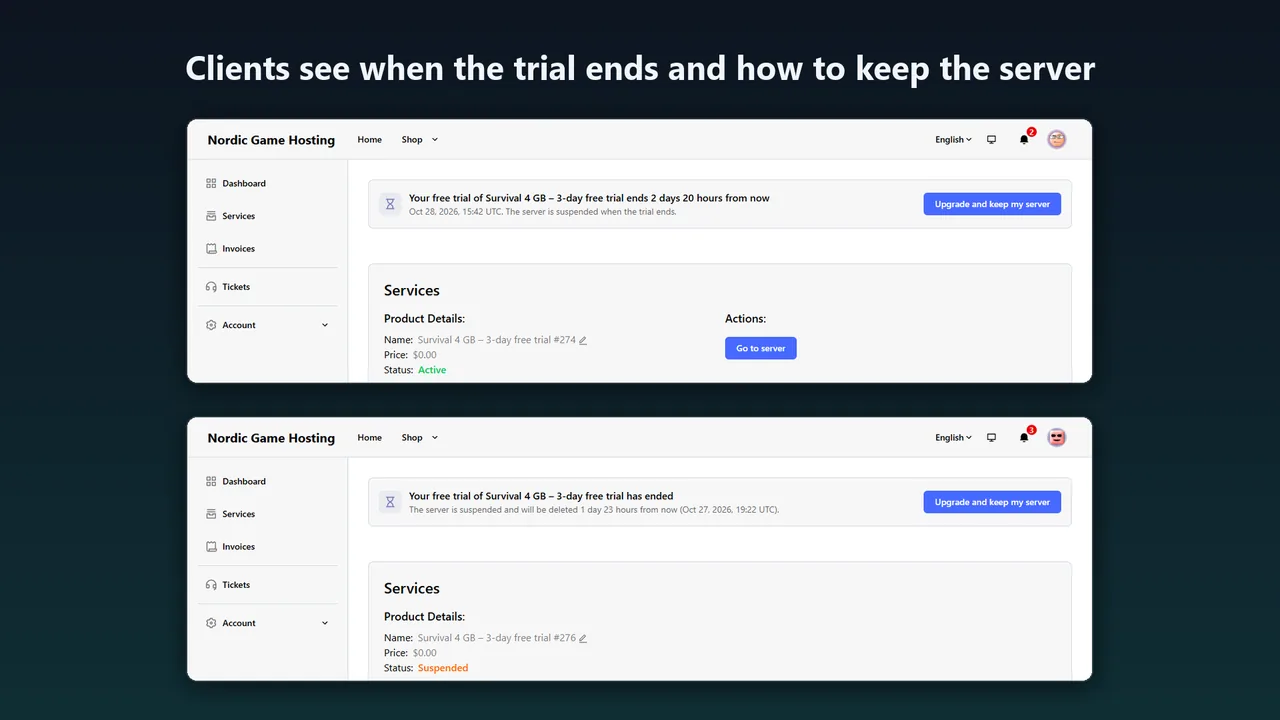
Before the end, the client gets a reminder email and a client area notification with an Upgrade and keep my server link, and every client page shows a banner while the trial runs. At the end, Paymenter's own suspend job suspends the server, so your server extension does the panel work exactly as for an overdue service. After the grace days, Paymenter's terminate job removes it.
Step 5: upgrade and keep the server
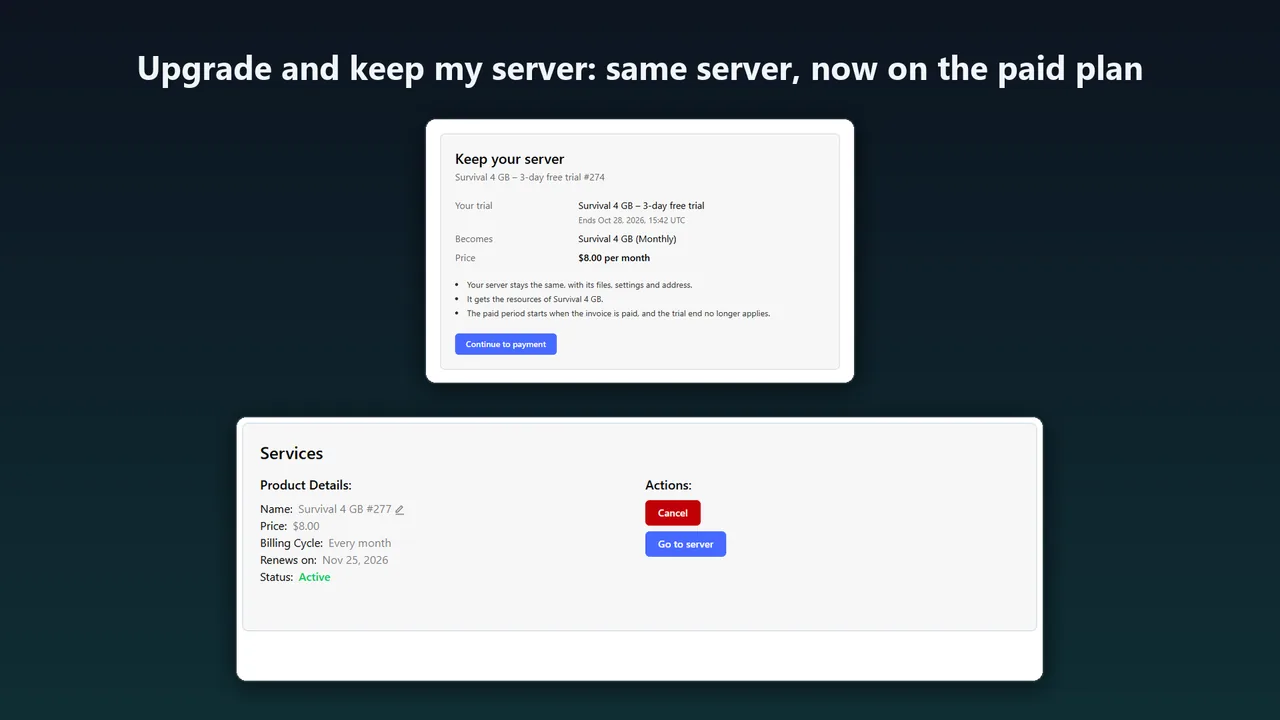
Upgrade and keep my server is an ordinary Paymenter invoice for the paid plan. Paying it moves the same service, and so the same panel server with its files and address, to the paid plan. It unsuspends an ended trial and, if the paid plan belongs to another product, gives the server that product's resources. From then on Paymenter bills it like any other service.
FAQ
Does the client get a new server when they upgrade?
No. The same service and the same panel server move to the paid plan.
What if a client pays after the trial ended?
The server stays suspended until then; paying unsuspends it. After the grace days it is terminated.
Can I change the reminder and end emails?
Yes, under Admin → Other → Notification Templates (free_trial_ending, free_trial_ended).
More guides
Fix Paymenter after upgrading to Pterodactyl 2.0: "api/application/nests could not be found"
Pterodactyl 2.0 removed the nest endpoints that Paymenter's built-in extension calls. Switch to a 2.0-aware extension with one command; products and services stay.
Read the guide →How to keep Paymenter stock in line with free Pterodactyl node capacity
Paymenter's stock only changes when you change it. Count what still fits on each node by the panel's own rule (memory, disk, overallocation and free ports), or let Auto Stock set every product's stock from it on Paymenter's scheduler.
Read the guide →How to detect game server crashes in Pterodactyl and get alerts (Blueprint)
When Wings restarts a crashed server, the console is cleared and nobody is told. Compare state changes with the activity log to tell crashes from manual stops, keep the console lines from before the crash, and send alerts. Crash Detector does this on Blueprint panels.
Read the guide →