
TSE for Dolibarr TakePOS: German KassenSichV with fiskaly, DSFinV-K and ELSTER
Under Germany's KassenSichV (§ 146a AO), every electronic till must secure each sale with a certified technical security system (TSE), print the signature on the receipt, and hand its data to a tax auditor in the DSFinV-K format. Dolibarr's own point of sale, TakePOS, does none of this by itself.
Submitted to DoliStore on 2026-10-20 and in review there. Tested on Dolibarr 20 to 24.
- Works with
- Dolibarr 20 to 24 with TakePOS
- Tested
- 42 automated browser checks on each of Dolibarr 20, 21, 22, 23 and 24, and the whole flow against fiskaly's TEST environment
- TSE
- fiskaly SIGN DE cloud TSE (fiskaly account required)
- Exports
- DSFinV-K 2.4, TSE export (TAR), ELSTER data (CSV)
- Languages
- German and English
- License
- GPL v3
This module connects TakePOS to fiskaly's certified cloud TSE. The cashier works exactly as before: the TSE transaction starts with the first line of a sale, is signed when the sale is paid, and the receipt gets the TSE block and QR code. If the TSE can't be reached, the sale goes on and is signed as soon as the connection is back.
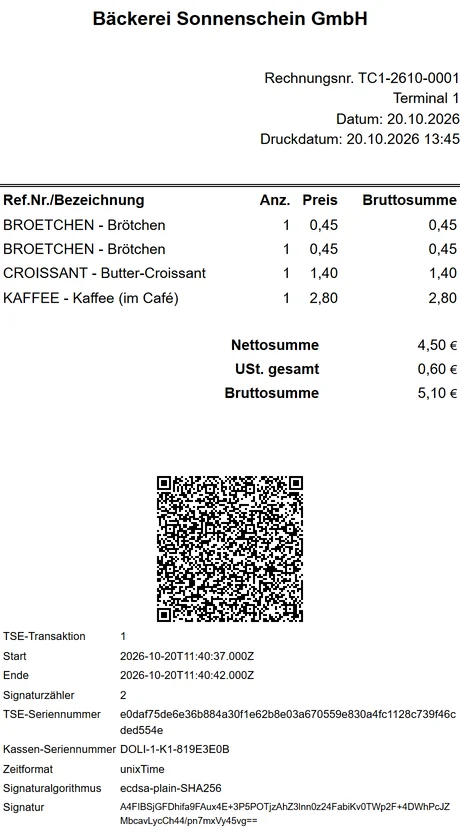
What TSE for TakePOS does
Every sale signed
Cash, card, split payments, credit notes, sales on account and cancelled sales, each with the amounts per VAT rate and the payments, as DSFinV-K defines them.
QR code on the receipt
The TSE block and the DSFinV-K QR code (version V0) at the bottom of the TakePOS receipt. In our tests the printed QR code is scanned and compared with the TSE's data.
Never blocks the till
A TSE outage is printed on the receipt and documented with start, end and number of receipts. A scheduled job signs the open sales when the TSE is back.
One-click setup
Paste the fiskaly API key, then one button creates the TSE, sets its admin PIN and initializes it. Each TakePOS terminal is registered as its own cash register. PIN, PUK and secret are stored encrypted.
DSFinV-K 2.4 and TSE export
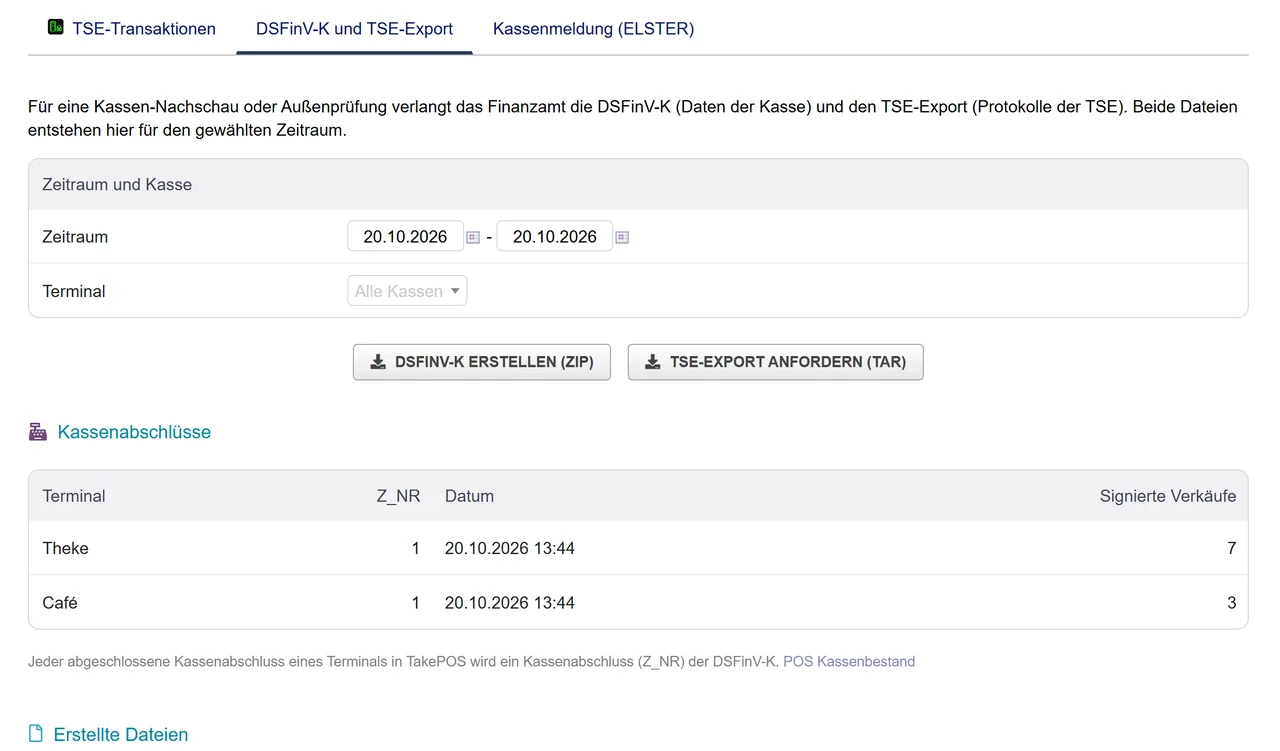
All 20 DSFinV-K tables with index.xml, organized by TakePOS cash closings, and the TSE export (TAR) from fiskaly, for a Kassen-Nachschau or a tax audit.
ELSTER notification
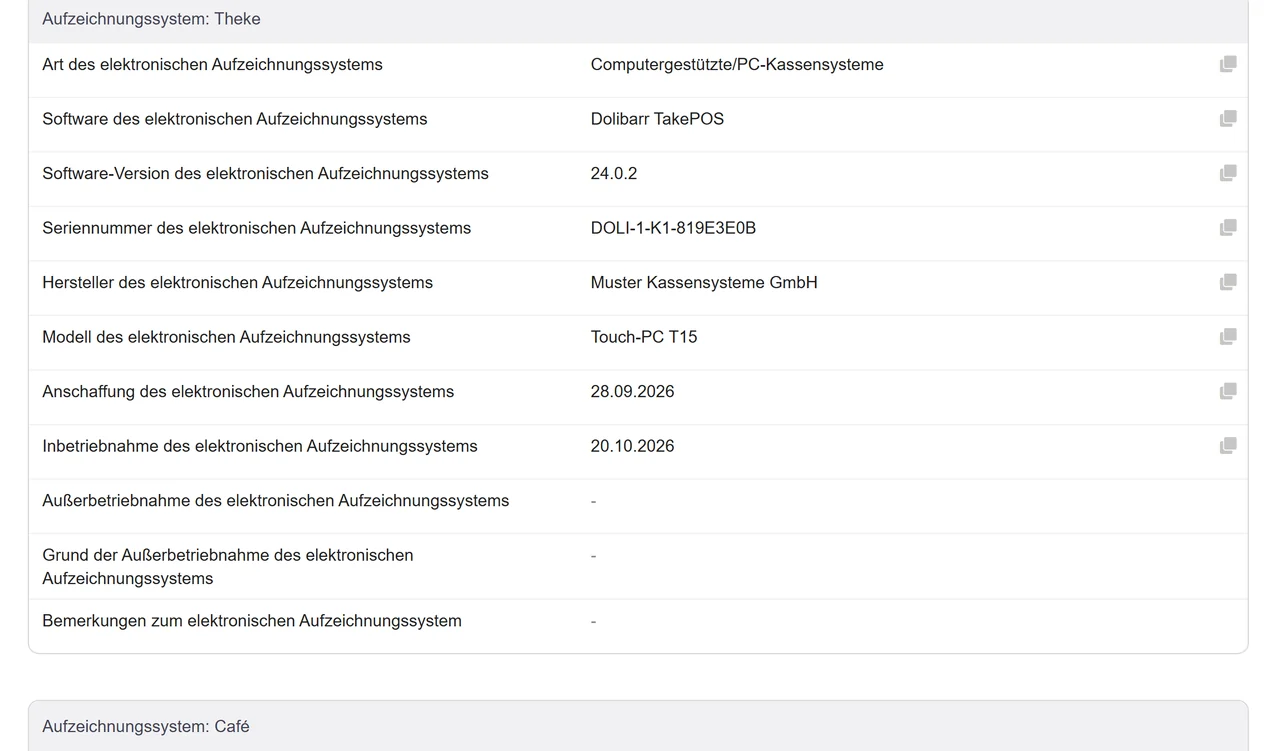
Every field of the § 146a (4) AO notification form with its official label, ready to copy into Mein ELSTER or download as CSV for your tax advisor.
How it works
- Get a fiskaly key. Create an API key for SIGN DE in the fiskaly dashboard. A TEST key is free to try.
- Create the TSE. Paste the key in the module's setup and click Create and initialize the TSE.
- Register the tills. Register each TakePOS terminal. The TSE block is added to the receipt footer automatically.
- Sell and close. Sell as usual and close the till in TakePOS each evening. Exports and the ELSTER data are under Billing → TSE.
Screenshots
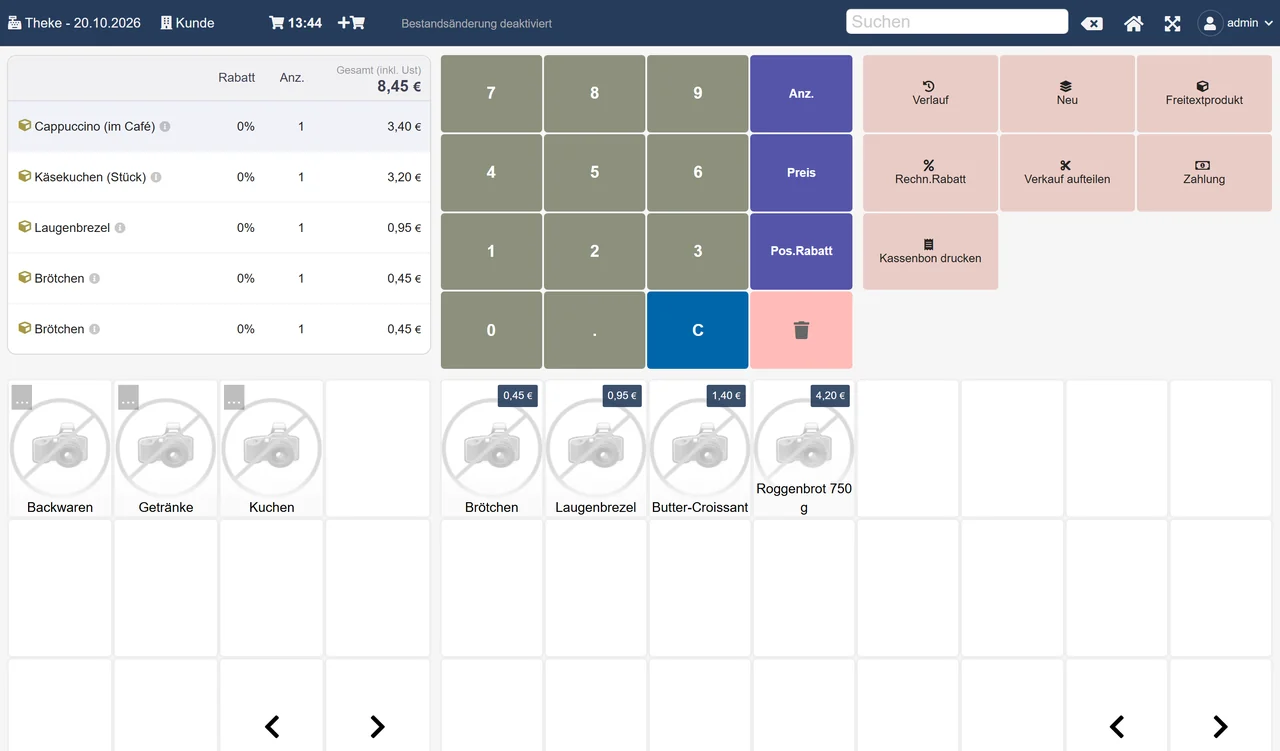
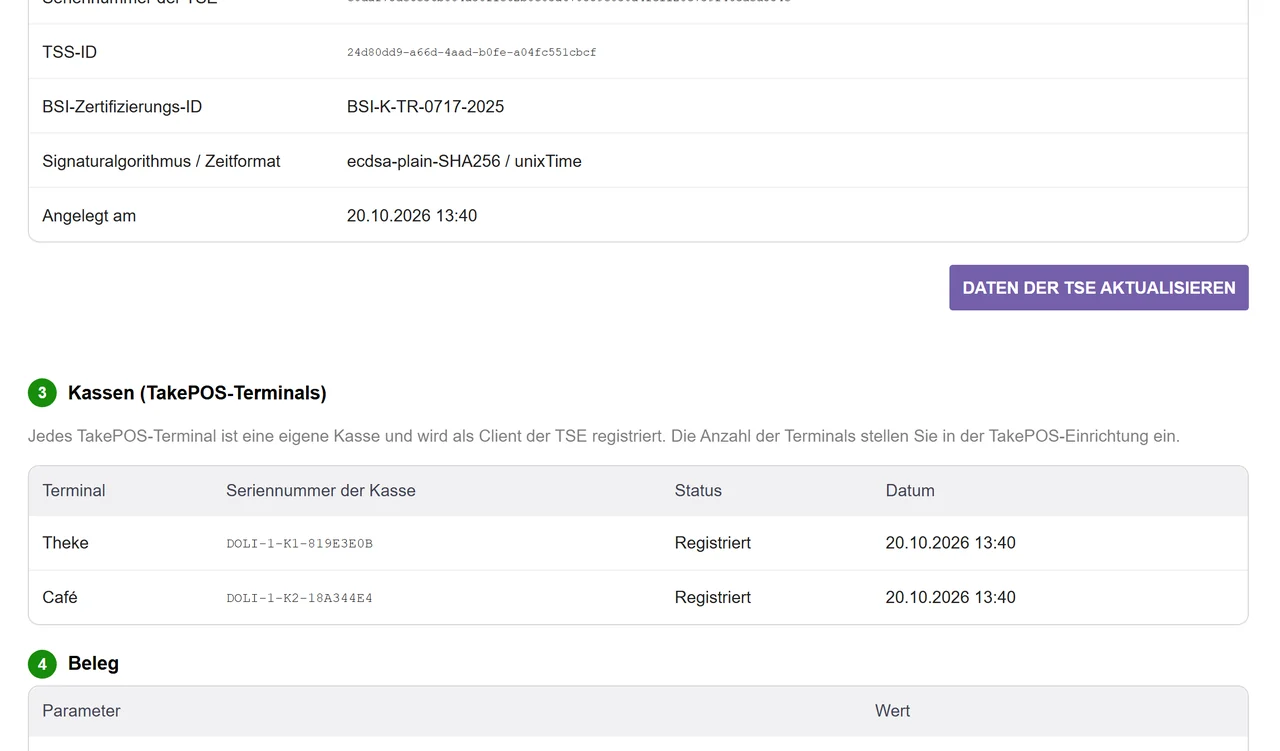
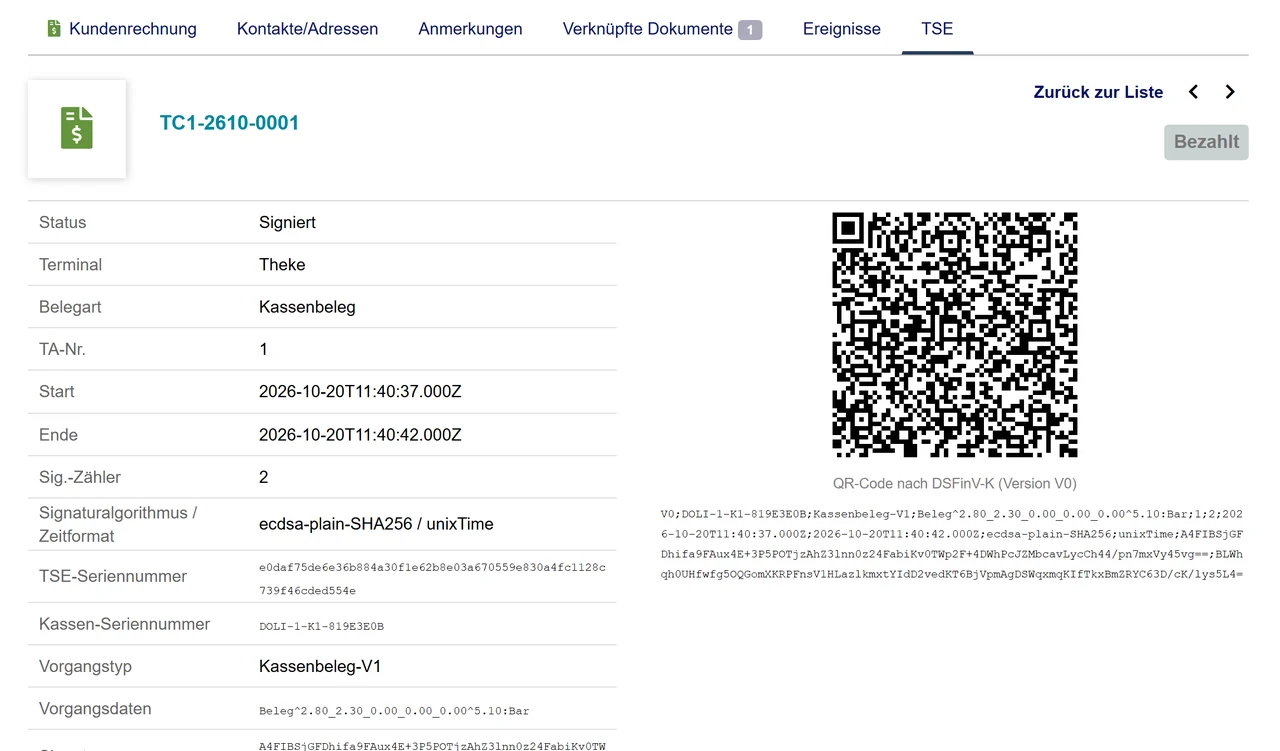
Good to know
- The module connects TakePOS to a certified TSE; it is not a TSE itself. The TSE is billed by fiskaly under your contract with them.
- On Dolibarr 20 and 21, TakePOS can't pay out a credit note. The credit note is signed when it is created and the refund stays open.
- You stay responsible for your procedural documentation (Verfahrensdokumentation) and for notifying the tax office.
Guides
Dolibarr TakePOS KassenSichV-konform machen: TSE, QR-Code und DSFinV-K
TakePOS signiert von sich aus nichts. Mit einer zertifizierten Cloud-TSE und einem Modul, das jeden Verkauf signiert, den QR-Code auf den Beleg druckt und die DSFinV-K erstellt, erfüllt die Kasse die KassenSichV.
Read the guide →Kassen-Nachschau mit Dolibarr: DSFinV-K, TSE-Export und ELSTER-Kassenmeldung
Für die Prüfung brauchen Sie zwei Dateien: die DSFinV-K (Daten der Kasse, gegliedert nach Kassenabschlüssen) und den TSE-Export (Protokolle der TSE). Dazu kommt die Meldung der Kassen über Mein ELSTER.
Read the guide →FAQ
Do I need a hardware TSE?
No. The module uses fiskaly's certified cloud TSE, so there is no USB stick or SD card to buy for each till.
What happens when the internet is down?
The sale goes on. The receipt says the TSE failed, the outage is recorded, and a scheduled job signs the open sales as soon as the TSE answers again.
Does it work with several tills?
Yes. Each TakePOS terminal is registered at the TSE as its own cash register with its own serial number, and the DSFinV-K export covers one or all of them.
What does the tax auditor get?
The DSFinV-K zip (20 tables with index.xml and the DTD) and the TSE export from fiskaly, both for the period they ask for.
Is it affiliated with fiskaly or Dolibarr?
No. It is an independent module; the names describe compatibility.
Related tools
Updated 2026-10-20