
How to track customer short payments and deductions in Odoo
Updated
What standard Odoo offers
- Register Payment accepts less than the invoice amount. Choose Keep open to leave the difference on the invoice, or Mark as fully paid to post it to a difference account.
- Partially Paid shows on an invoice that still has a balance after a payment.
- Credit notes reduce the invoice when you agree that a deduction is valid.
- Activities and the chatter on the invoice hold notes and reminders. There is no deduction reason, dispute status or recovered amount.
The usual workaround
Keep the difference open and list the short-paid invoices in a spreadsheet with the reason, the person chasing it and a follow-up date. Or mark the invoice as fully paid and post the difference to a write-off account, which closes it at once. The spreadsheet drifts away from Odoo, and a write-off hides the deduction in an expense account where nobody follows it up. Neither shows how much the customer actually paid back.
One case per deduction
- Install Karelia Recover on Odoo.sh or your own server (Odoo 18, 19 or 20).
- Run Recover / Discover Short Payments for an invoice-date range. It proposes draft cases from posted, partially paid customer invoices and skips invoices that already have a case. Deductions can also be imported from a CSV file in the documented format.
- Review each case: the invoice, the deducted amount, a reason such as pricing, short delivery or damage, an owner, a deadline and the evidence. Start investigation freezes the evidence; later correspondence goes in the chatter.
- Mark the case disputed with your rationale, or let a manager accept the deduction with an explanation. Accepting creates no accounting entry.
- When the customer pays, allocate the new bank-matched payment that is reconciled on the invoice. A manager confirms the cash recovery once the full deduction is covered.
- Follow open cases with the Deadline passed filter, group them by reason or customer, and print a case summary.
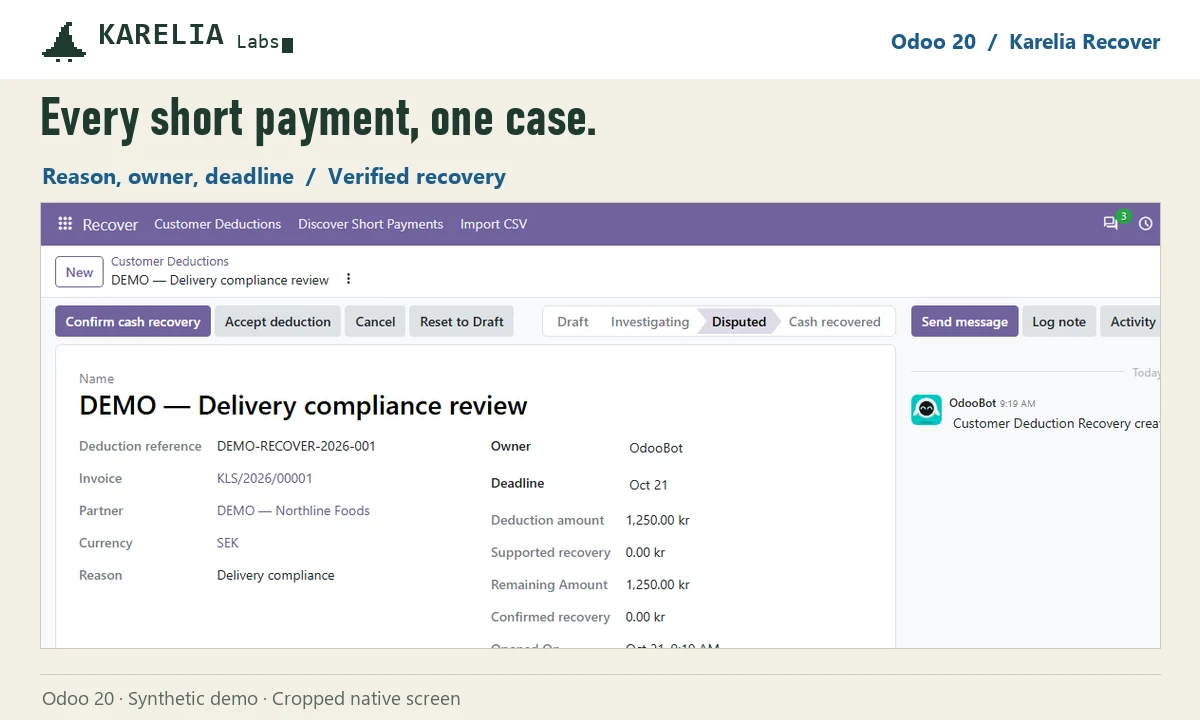
A partial payment can also be an agreed instalment. Discovered cases are drafts for your team to review; nothing is disputed, posted or sent to the customer automatically.
FAQ
How do I record a short payment in Odoo?
Register the payment for the amount received. In the payment dialog, choose Keep open to leave the difference on the invoice, or Mark as fully paid to post it to a difference account.
Does an accepted deduction count as recovered?
No. In Karelia Recover only new cash, matched to the bank and reconciled on the invoice, counts as recovered. Credit notes, write-offs and payments made before the investigation started do not.
Can it read remittance PDFs or EDI files?
No. Deductions are entered by hand or imported from a documented CSV format. PDF, EDI and retailer portals are not read.
More guides
Så exporterar du närvaro från Odoo till PAXml för lönesystemet
Swedish PAXml Export bygger en PAXml 2.0-fil av Odoos närvaro, godkända frånvaro och utlägg. Någon granskar raderna och låser underlaget innan .pax-filen laddas ned och importeras i lönesystemet.
Read the guide →How to charge late payment interest in Odoo
Odoo sends payment reminders but does not calculate interest on overdue invoices, in any version up to 20. Statutory interest follows a half-year reference rate, changes with every partial payment and allows one fixed compensation per late business invoice. You can calculate it by hand on a separate invoice, or let LateRate do it from your posted invoices.
Read the guide →Expense reports are gone in Odoo 19 and 20: how to group expenses again
Since Odoo 19 every expense is submitted, approved, posted and paid on its own; the Create Report button and the Expense Reports menu are gone in 20 too. To bill a client for several receipts, use re-invoicing through a sales order. To approve, print and pay a month of expenses as one report again, add Expense Report Sheets.
Read the guide →