
How to audit gas cylinder rental invoices in Odoo
Updated
What standard Odoo offers
- Vendor bills hold the rental lines with a quantity and a price. Nothing checks that quantity against the cylinders you actually had.
- Purchase can compare a bill with ordered or received quantities, but monthly rent is neither ordered nor received on a purchase order.
- Rental (Enterprise) is for renting your own products to customers, not for cylinders you rent from a supplier.
How whole-month rent is counted
On a whole-calendar-month tariff, any part of a month counts as a full month. Every cylinder you hold on the first of the month and every cylinder delivered during it is charged for that month. A cylinder returned mid-month is still charged that month and drops off the next. A same-class exchange swaps an empty cylinder for a full one and adds no rent. Check the tariff in your own agreement: daily and annual rates work differently.
The usual workaround
Start from the supplier's last statement and keep a spreadsheet per account and site: add the delivery notes, subtract the return notes and compare the cylinder-months with each month's bill. Then email the supplier and watch for the credit note. It goes wrong when an exchange is counted as an extra cylinder, a return at one site is set against another site's rent, or a credit note arrives and nobody knows which month it settles.
Audit the rent in Odoo
- Install Karelia CylinderCheck on Odoo.sh or your own server (Odoo 18, 19 or 20). It works with Invoicing alone; Inventory isn't needed.
- Under CylinderCheck / Rental accounts, create one account per supplier account number, delivery site and cylinder class, with the opening month, the opening cylinders from the supplier statement and the agreed monthly rate. A manager activates it.
- Record each signed delivery, return or exchange note under Signed movements. The note must show the same account and site, and a wrong entry is voided with a reason instead of edited.
- When a month has ended, open a monthly audit and add the posted vendor bill lines for that month's rent, with the quantity in cylinder-months. A manager reviews it: opening holdings, additions, returns, expected and billed cylinder-months, and the potential overcharge.
- Record the supplier's case reference and your dispute note, and print the audit evidence to send with your query. CylinderCheck sends nothing itself.
- When the supplier credits you, allocate the posted credit note lines to the month. The credited and still-uncredited amounts stay separate from the finding, and a bill or credit that is changed or reversed afterwards is flagged.
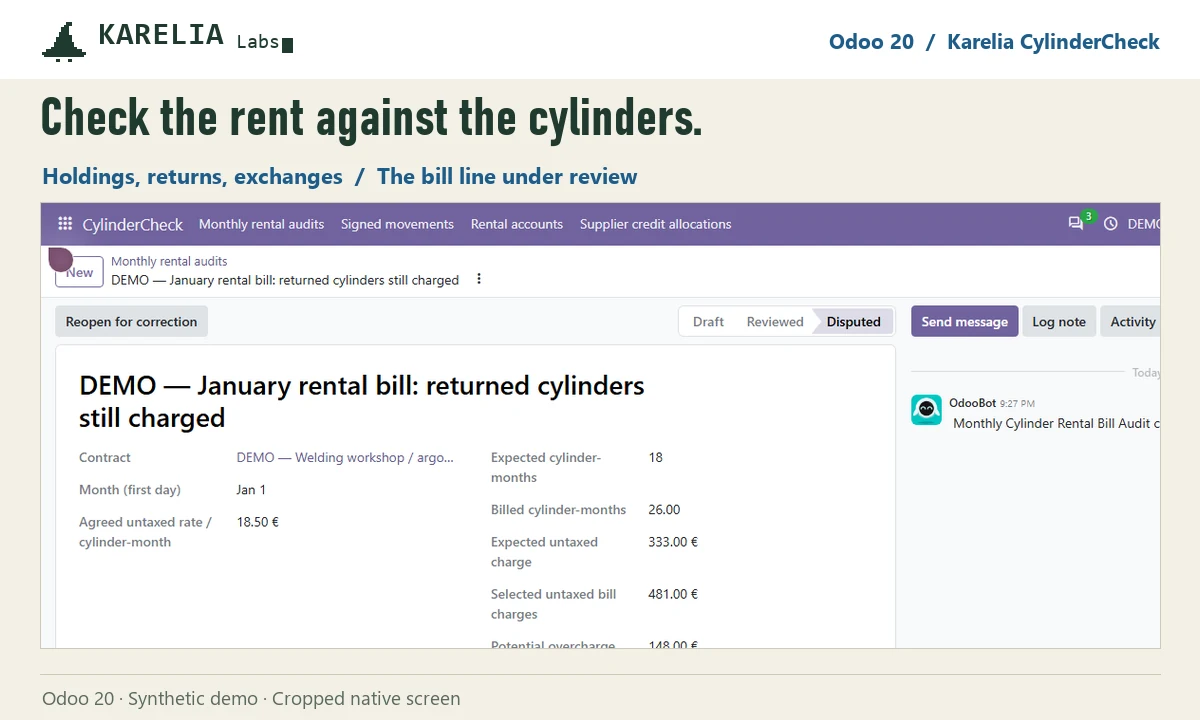
A difference is an audit finding to raise with the supplier, not a guaranteed refund, and a posted credit note is not cash received. This release supports one whole-calendar-month tariff; daily or annual rates and free-rental periods are outside it.
FAQ
Does a mid-month return lower that month's cylinder rent?
Not on a whole-month tariff: the month of the return is charged in full and the next month starts with fewer cylinders. CylinderCheck uses this rule, so check that it matches your supplier's terms.
Is a cylinder exchange an extra rented cylinder?
No. A same-class exchange swaps a cylinder without changing how many you hold. CylinderCheck records it apart from deliveries.
Does CylinderCheck connect to my gas supplier?
No. You enter the account details and the signed delivery, return and exchange notes. There is no live supplier connection.
More guides
Så exporterar du närvaro från Odoo till PAXml för lönesystemet
Swedish PAXml Export bygger en PAXml 2.0-fil av Odoos närvaro, godkända frånvaro och utlägg. Någon granskar raderna och låser underlaget innan .pax-filen laddas ned och importeras i lönesystemet.
Read the guide →How to charge late payment interest in Odoo
Odoo sends payment reminders but does not calculate interest on overdue invoices, in any version up to 20. Statutory interest follows a half-year reference rate, changes with every partial payment and allows one fixed compensation per late business invoice. You can calculate it by hand on a separate invoice, or let LateRate do it from your posted invoices.
Read the guide →Expense reports are gone in Odoo 19 and 20: how to group expenses again
Since Odoo 19 every expense is submitted, approved, posted and paid on its own; the Create Report button and the Expense Reports menu are gone in 20 too. To bill a client for several receipts, use re-invoicing through a sales order. To approve, print and pay a month of expenses as one report again, add Expense Report Sheets.
Read the guide →