
How to reconcile MSP licence seats with customer billing in Odoo
Updated
What standard Odoo offers
- Sales and Invoicing bill the quantity you put on the order or invoice.
- Subscriptions (Enterprise only) invoices a recurring quantity. You change it yourself when the seat count changes.
- Nothing imports the supplier's purchased or assigned seats, or compares them with what you invoiced for the period.
The usual workaround
Each month, export the licence report from the distributor or vendor portal and the customer invoice lines from Odoo, and match them in a spreadsheet. Apply each customer's included seats, minimums and part-month rules by hand, then add a quotation or change the subscription for the difference. A seat that doesn't match a row goes unbilled, and nothing stops the same month from being billed twice.
A reconciliation per period
- Install Karelia Seatwise on Odoo.sh or your own server (Odoo 18, 19 or 20).
- Under Seatwise / Customer Billing Rules, set up a rule for each customer agreement: the customer, a service product, pricelist and unit price, and the basis you bill on (a fixed contract quantity, purchased seats or assigned seats), with included seats, a minimum and optional proration by calendar day. The rule's reference is the key the supplier rows map to.
- Create a reconciliation for the period and upload the supplier rows as a CSV file in the documented format: source ID, contract reference, purchased, assigned and already billed quantity, and supplier unit cost. A manager can instead take the billed quantity from posted Odoo invoices and credit notes dated in the period, after confirming that invoice dates match the service period.
- Check the findings. Each row shows the billable quantity, what was already billed, the difference and the calculation, marked as potential underbilling, overbilling for credit review, price difference or matched.
- Submit for review. A manager approves, then creates draft quotations for the positive gaps, one per customer and pricelist. Confirm and invoice them in Sales as usual.
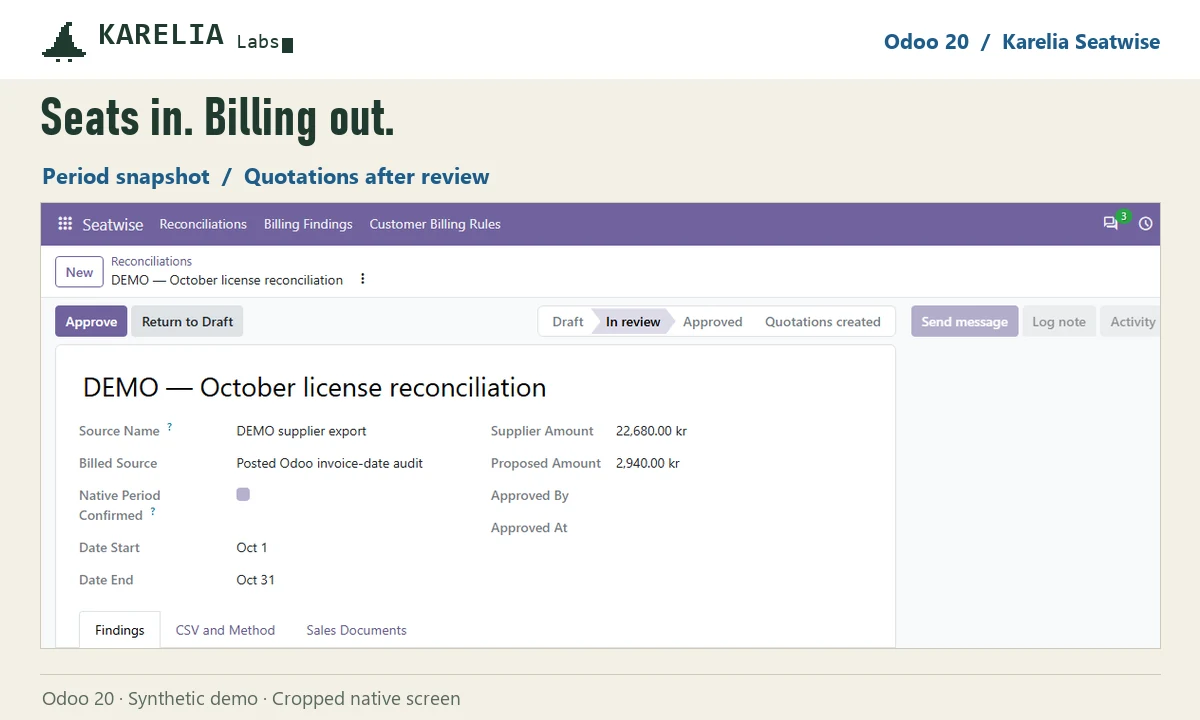
Overbilling and price-only differences are flagged for manual review; Seatwise creates no credit notes. A billing rule can't have two reconciliations for overlapping periods, and the same supplier row can't be imported twice.
FAQ
Does Odoo compare licence counts with what I invoiced?
No. Odoo bills the quantity on the order or subscription and has no import of supplier seat counts to compare it with.
Should I bill purchased or assigned seats?
Whatever the customer agreement says. In Karelia Seatwise each billing rule uses one basis: a fixed contract quantity, purchased seats or assigned seats.
Does it connect to Microsoft 365 or my distributor?
No. Supplier rows go in through a documented CSV format. There is no direct connection to Microsoft Graph, Pax8, NinjaOne or a PSA.
More guides
Så exporterar du närvaro från Odoo till PAXml för lönesystemet
Swedish PAXml Export bygger en PAXml 2.0-fil av Odoos närvaro, godkända frånvaro och utlägg. Någon granskar raderna och låser underlaget innan .pax-filen laddas ned och importeras i lönesystemet.
Read the guide →How to charge late payment interest in Odoo
Odoo sends payment reminders but does not calculate interest on overdue invoices, in any version up to 20. Statutory interest follows a half-year reference rate, changes with every partial payment and allows one fixed compensation per late business invoice. You can calculate it by hand on a separate invoice, or let LateRate do it from your posted invoices.
Read the guide →Expense reports are gone in Odoo 19 and 20: how to group expenses again
Since Odoo 19 every expense is submitted, approved, posted and paid on its own; the Create Report button and the Expense Reports menu are gone in 20 too. To bill a client for several receipts, use re-invoicing through a sales order. To approve, print and pay a month of expenses as one report again, add Expense Report Sheets.
Read the guide →