
How to claim short-dated deliveries from suppliers in Odoo
Updated
What standard Odoo offers
- Expiration Dates (an Inventory setting that needs lots or serial numbers) give each lot an expiration date and related best-before, removal and alert dates, set from the product or entered at receipt.
- FEFO removal sends out the lots that expire first, and expired lots are flagged.
- Returns and credit notes: the Return button on a receipt sends goods back to the vendor, and a credit note can be made from the vendor bill.
- Nothing compares the shelf life left at receipt with the supplier's minimum, or tracks how long you have to notify the supplier.
The usual workaround
Goods-in compares the best-before date with the supplier's minimum, photographs the label and tells the buyer. The buyer works out the deadline, writes to the supplier, notes the reply in the receipt's chatter and waits for a credit note. It works until a notice window runs out over a weekend, a six-month guarantee is counted as 180 days, or a credit note arrives for less than was agreed and nobody checks it against the claim.
Claim it from the receipt
- Install Karelia DateClaim on Odoo.sh or your own server (Odoo 18, 19 or 20). The product needs lot or serial tracking.
- Under DateClaim / Supplier guarantees, a manager enters the supplier's guarantee for the product and activates it: expiration or best-before date, the minimum remaining life in calendar days or calendar months, the notice window in hours, and the supplier's reference and terms.
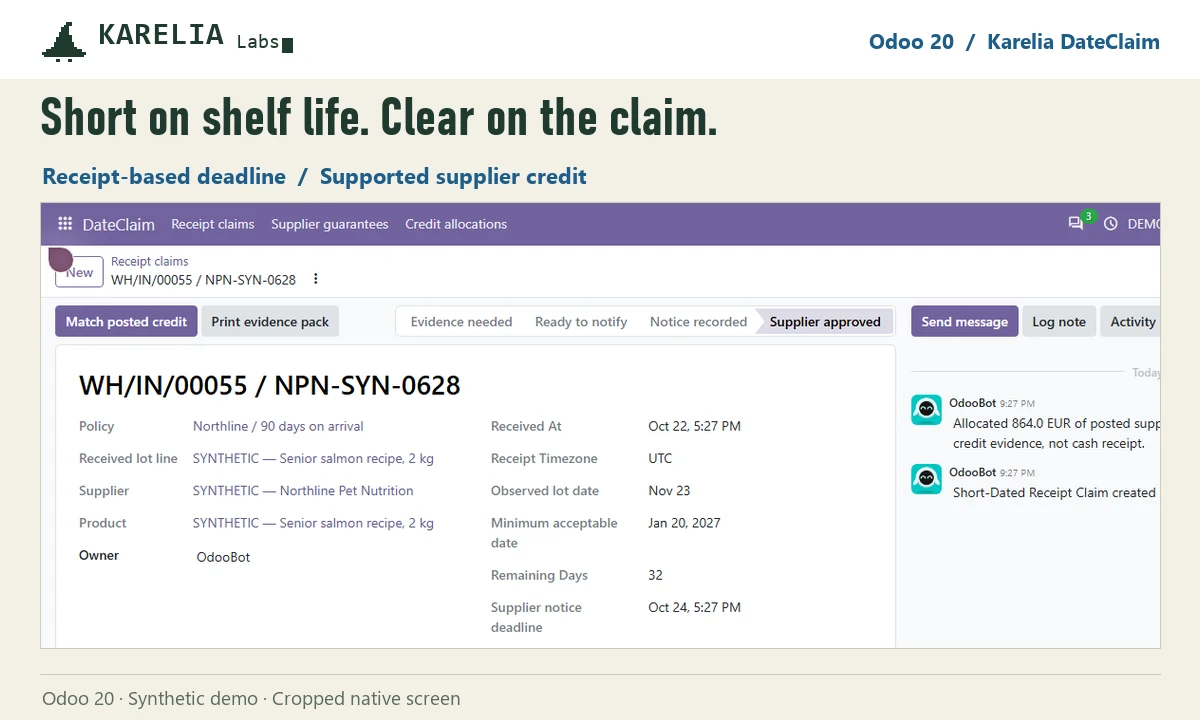
- Click Find short-dated receipts. Each completed receipt in the guarantee period from that supplier's purchase orders whose lot date falls short of the minimum becomes a case, with the remaining days and a notice deadline counted from the time of receipt.
- Add the claimed quantity, the posted vendor bill line, a photo or document and an inspection note, then review the evidence. The requested credit comes from the untaxed billed price.
- Notify the supplier through your usual channel and record when you did it and the reference. A late notice needs a manager and a reason.
- Record the supplier's decision, then match the posted vendor credit note lines. Requested, approved, credited and outstanding amounts stay separate, and Print evidence pack gives you a PDF for the supplier.
DateClaim sends no emails and posts no accounting entries. Your team notifies the supplier and posts the credit note as usual; a posted credit note is not cash received.
FAQ
Can Odoo reject a delivery with too little shelf life left?
Not in standard Odoo. It records the lot's expiration date at receipt but doesn't compare it with a minimum remaining shelf life. DateClaim makes that comparison on completed receipts and opens a claim.
Is a six-month shelf-life guarantee the same as 180 days?
No. Calendar months follow the calendar, so the minimum date moves with the length of the months. DateClaim keeps calendar-month and calendar-day rules apart; use the one written in the supplier agreement.
Does DateClaim replace FEFO or expiration dates?
No. Odoo keeps its normal lot and expiration tracking. DateClaim handles the supplier claim when stock is already short-dated on arrival.
More guides
Så exporterar du närvaro från Odoo till PAXml för lönesystemet
Swedish PAXml Export bygger en PAXml 2.0-fil av Odoos närvaro, godkända frånvaro och utlägg. Någon granskar raderna och låser underlaget innan .pax-filen laddas ned och importeras i lönesystemet.
Read the guide →How to charge late payment interest in Odoo
Odoo sends payment reminders but does not calculate interest on overdue invoices, in any version up to 20. Statutory interest follows a half-year reference rate, changes with every partial payment and allows one fixed compensation per late business invoice. You can calculate it by hand on a separate invoice, or let LateRate do it from your posted invoices.
Read the guide →Expense reports are gone in Odoo 19 and 20: how to group expenses again
Since Odoo 19 every expense is submitted, approved, posted and paid on its own; the Create Report button and the Expense Reports menu are gone in 20 too. To bill a client for several receipts, use re-invoicing through a sales order. To approve, print and pay a month of expenses as one report again, add Expense Report Sheets.
Read the guide →