
Tablewright: open Parquet, CSV and JSON Lines files with millions of rows, filter them and query them with SQL
Some data files are too big or too odd for a spreadsheet: a CSV export with tens of millions of rows, a Parquet file, or a whole folder of JSON Lines files.
For Windows 10 (version 2004 or later) and Windows 11, 64-bit. Works offline, with no account.
- Price
- $9.99 in the Microsoft Store
- Opens
- Parquet, CSV, TSV and JSON Lines files, or a folder of them as one table
- Saves
- CSV, TSV, Parquet, JSON Lines, JSON and Excel (.xlsx)
- Memory
- 4 GB minimum; 8 GB or more for files with tens of millions of rows
- Disk
- Free space in the temp folder of about the size of the largest CSV or JSON Lines data you open
- Windows
- Windows 10 version 2004 (build 19041) or later, or Windows 11, 64-bit (x64)
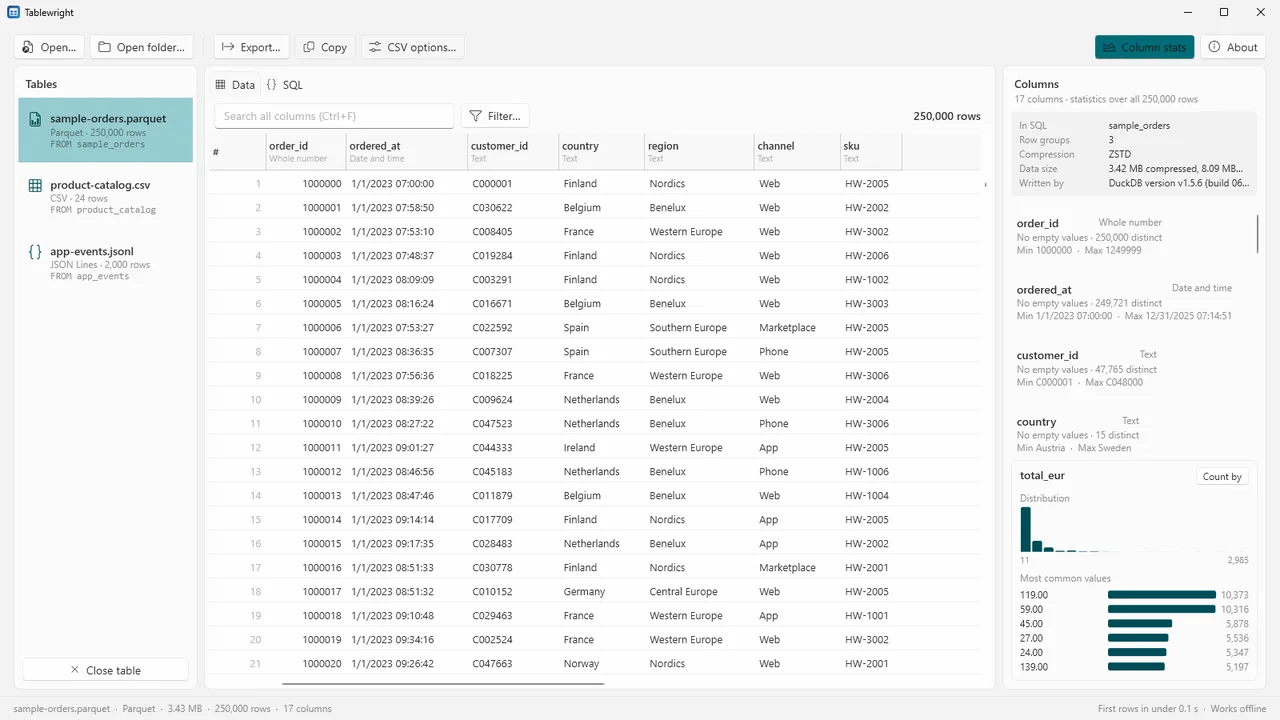
Tablewright opens Parquet, CSV, TSV and JSON Lines files on your own PC. Parquet files open at once, because it reads only the rows on screen; CSV and JSON Lines files show their first rows straight away while the rest loads in the background.
Check the columns, find the rows that matter with filters or SQL, and save a smaller result as CSV, Parquet, JSON or an Excel workbook. It is made for analysts and developers, and it works fully offline.
What Tablewright does
Millions of rows
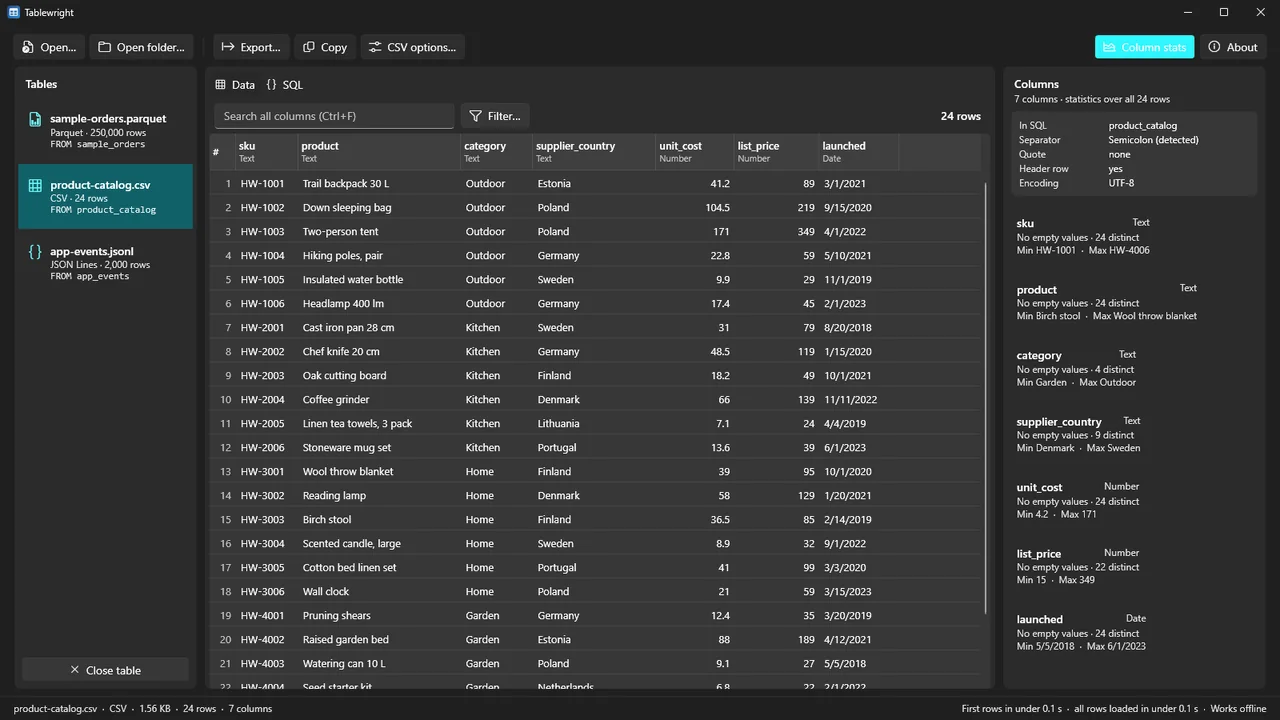
A grid that scrolls through millions of rows, with row numbers, the column types under each name and NULL shown as NULL.
Sort, filter, search
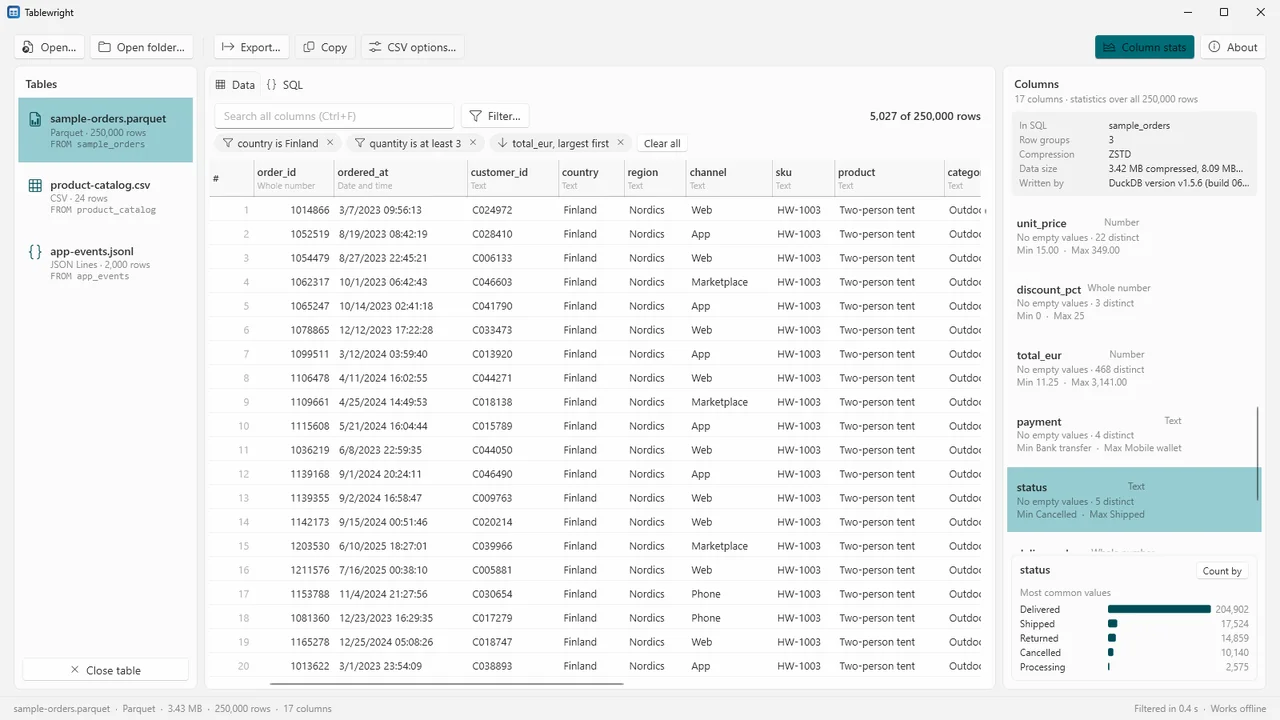
Click a column to sort, Shift+click to sort by more columns. Filter any column (contains, is, greater than, is empty and more) or search all columns at once. Filters show as chips you remove one by one.
Understand the columns
For every column: type, empty values, distinct values, smallest and largest value. Click a column for its most common values and, for numbers and dates, a distribution chart. "Count by" counts rows for each value in one click.
Parquet details
Row groups, compression, compressed and uncompressed size, and the program that wrote the file.
SQL across your files
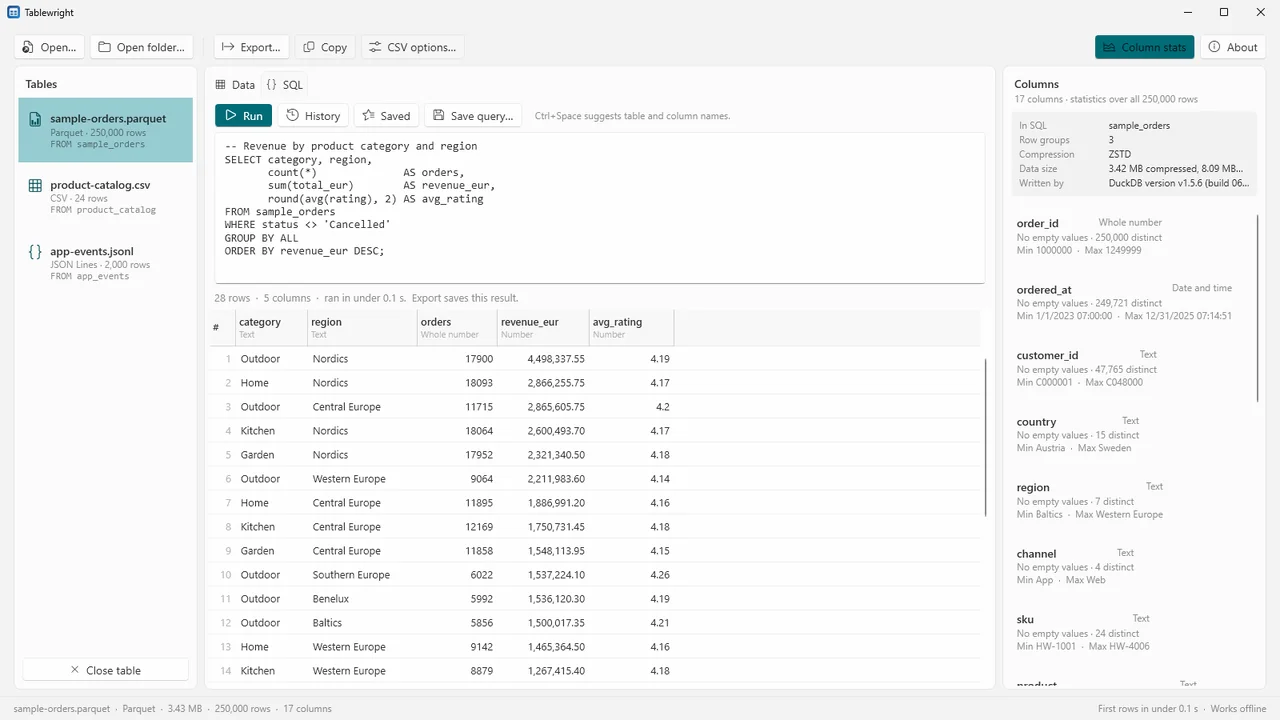
Every open file is a table you can query with SQL in the DuckDB dialect: joins across files, GROUP BY, WITH, PIVOT, SUMMARIZE and more. Names are suggested as you type (Ctrl+Space), errors point to the line and column, and long queries can be cancelled.
Folders and history
Open a whole folder of Parquet, CSV or JSON Lines files as one table. Query history, and queries you save for a file.
CSV as it really is
The separator, quote character, header row and encoding (UTF-8, UTF-16, Western/Latin-1) are detected, and you can set them yourself. When values further down do not fit the types seen in the first rows, the types are detected over the whole file instead of failing.
Export
Save the current view or a query result as CSV, TSV, Parquet, JSON Lines, JSON or an Excel workbook. Your original files are only read, never changed or overwritten.
How it works
- Open files. Open files or a folder (Ctrl+O, Ctrl+Shift+O), or drop them on the window.
- Explore. Sort, filter and search, look at the column statistics, or write SQL and run it with Ctrl+Enter.
- Export. Save the view or the query result (Ctrl+S) in the format you need.
Screenshots
How fast
Measured on our test PC with generated test files (8-core desktop processor, 32 GB memory, SSD). Your times depend on your PC and disk.
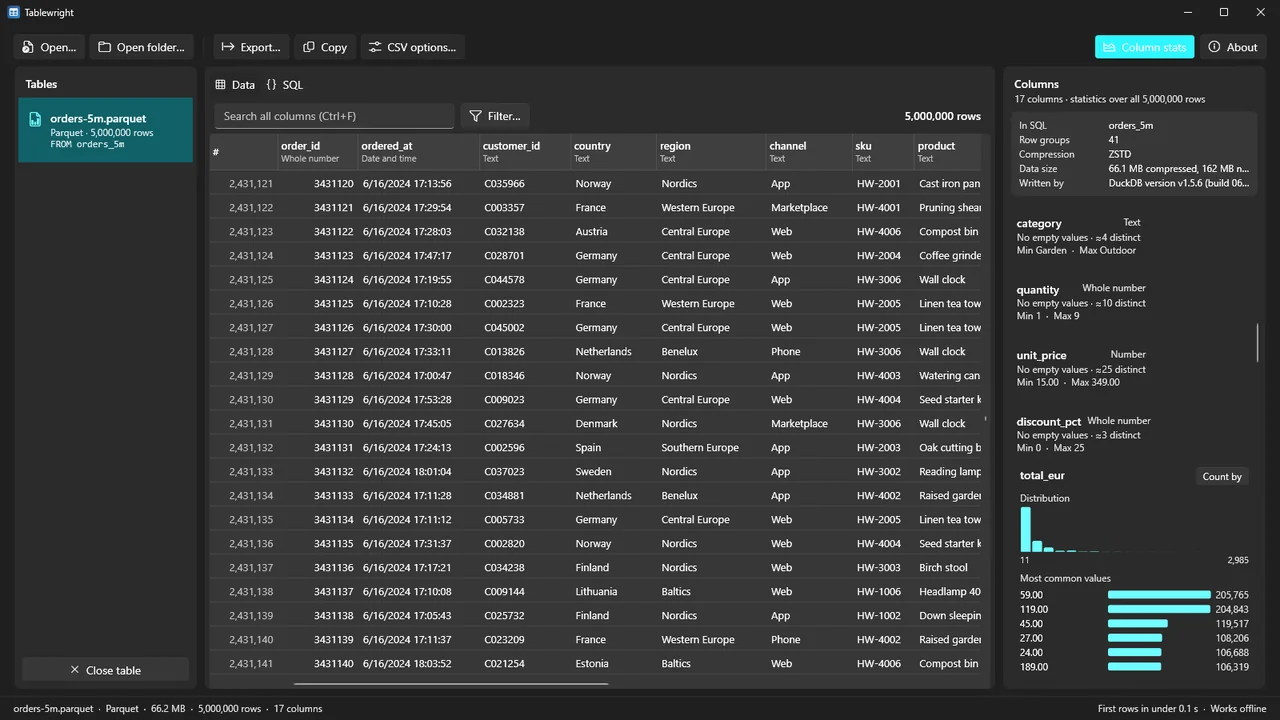
- A Parquet file with 5,000,000 rows showed its first rows in under 0.1 seconds.
- A 2.7 GB CSV file with 20,000,000 rows showed its first 100 rows after 0.2 seconds, and all rows were loaded for sorting and filtering in about 15 seconds.
- Scrolling a 5,000,000-row table in steps of three rows took a median of about 4 milliseconds per step. After a jump to a random place, the visible rows were filled in a median of 65 milliseconds or less.
Pricing
Tablewright for Windows 10 and 11, 64-bit.
Good to know
- Very large CSV and JSON Lines files need free disk space in your temp folder while they are open, about the size of the data.
- Files on network shares must be copied to a local drive first. Web addresses and network shares in a query are refused.
- Encrypted Parquet files are not supported.
- An Excel sheet holds 1,048,576 rows, so an Excel export takes a header row and up to 1,048,575 data rows; a bigger result must be saved as CSV, Parquet or JSON.
- The SQL is DuckDB's dialect.
Privacy
Tablewright does not collect, send or share any data. It works without an internet connection, has no account, no telemetry and no update check. The files you open are read on your PC and never uploaded.
Settings (recent folders, query history, saved queries) and a local error log are stored only in your user profile on this PC (%LOCALAPPDATA%\Karelia Labs\Tablewright). Temporary working data is stored in your temp folder and deleted when you close the app.
Guides
FAQ
How big a file can it open?
Files with millions of rows. Parquet files open at once at any size because only the rows on screen are read. Large CSV and JSON Lines files need free disk space in the temp folder of about the size of the data, and 8 GB of memory or more is recommended for tens of millions of rows.
Which SQL does it use?
DuckDB's dialect: joins across your open files, GROUP BY, WITH, PIVOT, SUMMARIZE and more. Table and column names are suggested as you type.
Can I get the result into Excel?
Yes, as an Excel workbook with a header row and up to 1,048,575 data rows: 1,048,576 rows, the most an Excel sheet holds. Copying selected cells and pasting them into a spreadsheet works too.
Does it go online?
No. Tablewright works without an internet connection; the database engine's add-on downloads and remote file access are switched off, and web addresses or network shares in a query are refused.
Will it change my files?
No. Your original files are only read, never changed or overwritten.
Related tools
Camtwright
Turn camt.052/053/054 and MT940/MT942 bank statement files into Excel and CSV on your own PC, with every statement's balances checked to the cent. Offline.
Ganttwright
Open .mpp, .mpx, Project XML and Primavera .xer plans without Microsoft Project: Gantt chart, critical path, what's late, PDF and Excel. Read-only, offline.
More from Karelia Labs
Updated