
How to copy a whole space or a page tree in Confluence Cloud
Updated
What Confluence does by itself
Confluence Cloud can copy a page with the pages below it. Open the page's ••• menu and choose Copy; the copy dialog lets you include the child pages and pick where the copy goes. It costs nothing and is often enough for a small tree.
After a built-in copy, open a few of the copied pages and check the links and the macros that show other pages. Some can still point at the original pages. Fix those by hand before people start working in the copy.
A whole space, without an app
Confluence Cloud has no button that copies a whole space. Copying an entire space is a long-standing request on Atlassian's public tracker (CONFCLOUD-3191). Without an app, the usual way is:
- Create the new space yourself and set its permissions.
- Copy each top-level page of the old space, with its child pages, into the new space.
- Check the links in every copied tree, including links from one tree to another.
Space settings, permissions and blog posts do not come along this way, and a large space means many copies and a lot of link checking.
With Treewright: copy a page tree in five steps
Treewright: Copy Page Tree, Space & Templates for Confluence shows what will be created before anything exists, points the links in the copy at the copied pages, and ends every job with a report.
- Open the page at the top of the tree, open its ••• menu and choose Copy page tree….
- Choose the destination space and, if you like, the page the copy should go under.
- Choose what comes along (attachments, labels, page properties, page restrictions) and how titles are made: keep them, add a prefix, or find and replace. If a title already exists, add a number such as "Plan (2)" or stop.
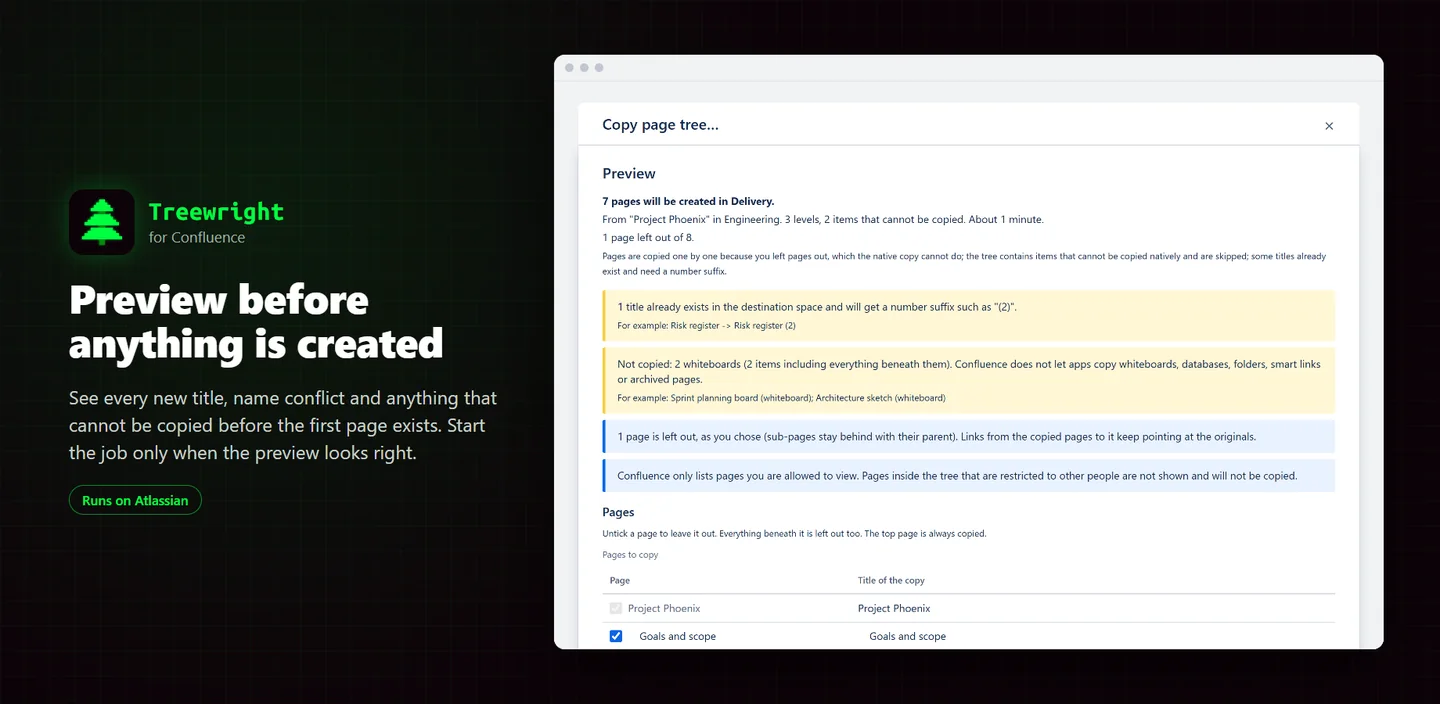
- Choose Preview. It lists every new title, the copy method and any content that cannot be copied. Nothing is created yet.
- Choose Start copying. The job runs in the background, so you can close the window and follow it under Apps > Treewright > Jobs.
What happens to the links
After the copy, Treewright maps every original page to its copy and rewrites the copies: page links, Include Page, Excerpt Include, Children Display and Page Tree macros, page URLs including short links, anchors, and page ids in macro queries. Links to pages outside the copied tree keep pointing where they did. The job report lists every rewritten link, before and after, and is kept for 90 days.
Copying a whole space
On the Copy a space tab under Apps > Treewright, you can copy all pages of a space in one job, into a new space or into one that already exists, with links rewritten across the whole space. It copies pages, not the space itself: space settings, space permissions, blogs and the theme are not copied. A new space gets Confluence's default permissions for the person who creates it, so review them afterwards. Creating a new space needs Confluence's permission to create spaces; without it, copy into an existing space.
Good to know
- One job copies up to 2,000 pages. For a bigger space, leave pages out or copy it tree by tree.
- Whiteboards, databases, folders, smart links used as pages and archived pages cannot be copied. They are listed in the preview and in the report.
- Treewright acts as you. Pages you are not allowed to see are not copied.
- When Confluence cannot copy a tree in one step, pages are copied one by one, roughly one to two pages per second.
- A stopped or failed job can be resumed. Pages that were already created are reused, never copied twice.
- To start every new project from the same tree, save it as a template with fields such as
{{Client}}and fill them in a short form.
FAQ
Can Confluence Cloud copy a whole space?
Not with a built-in button. You can create a new space and copy each top-level page with its children into it by hand, or use an app that copies all pages of a space in one job.
Are links updated when I copy a page tree?
Check them after a built-in copy. Treewright rewrites links between the copied pages, and macros such as Include Page, to point at the copies, and its report lists every change.
Does a space copy include permissions?
No. Treewright copies the pages with their hierarchy and the attachments, labels and properties you choose. Space settings, permissions, blogs and the theme are not copied.
What does Treewright cost?
It is free for up to 10 users. Larger sites see the price on the Atlassian Marketplace and can evaluate the app for 30 days, the Marketplace default for Cloud apps.
More guides
How to show Swagger and OpenAPI docs in Confluence Cloud
Confluence Cloud can store an OpenAPI or Swagger file as an attachment or show its text in a code block, but it does not turn the file into API documentation. Specfold reads the attached YAML or JSON file and shows it on the page as an API reference with search, models, examples and cURL commands, and it follows every new version of the file.
Read the guide →How to build a Q&A and FAQ knowledge base in Confluence Cloud
A short FAQ that a few people keep up to date works well as a normal Confluence page. A knowledge base that grows from the questions people really ask needs more: votes, one accepted answer, a list of unanswered questions and rules for who may ask and who may answer. The Questions & Answers app adds that inside Confluence, and its macro turns solved questions into an FAQ page.
Read the guide →Fix Paymenter after upgrading to Pterodactyl 2.0: "api/application/nests could not be found"
Pterodactyl 2.0 removed the nest endpoints that Paymenter's built-in extension calls. Switch to a 2.0-aware extension with one command; products and services stay.
Read the guide →