
How to build a Q&A and FAQ knowledge base in Confluence Cloud
Updated
Ways that need no app
- One FAQ page with expand sections. Write each question as a heading or as the title of an expand element, with the answer inside. Readers scan the questions and open the one they need. One person or team keeps it current, and readers cannot add a new question there.
- One page per question, with a label. Give each question its own page with a label such as
faq, and list them on an index page with the Content by Label macro. Confluence search finds every page. Someone still has to write each page. - Questions as page comments. People ask in the comments of a FAQ page and someone replies. It is quick to start, but a comment has no accepted answer and no status, and nothing lists the questions that are still waiting.
These ways work when the answers come from one team. When the answers come from many people, you also want votes, an accepted answer and a queue of open questions.
With Questions & Answers: ask, answer, accept
Questions & Answers, FAQ & Knowledge Base for Confluence keeps questions and answers as real Confluence content, so spaces and permissions work the way your team expects.
- Open Apps > Q&A for the whole site, or Q&A in the sidebar of a space.
- Choose Ask a question, pick the space and write a specific title. While you type, Already asked? suggests earlier questions that look similar.
- Add the details and up to five tags, then choose Post question.
- Others answer with Post answer, comment and vote. The person who asked, or a moderator, accepts one answer. It moves to the top and the question counts as solved.
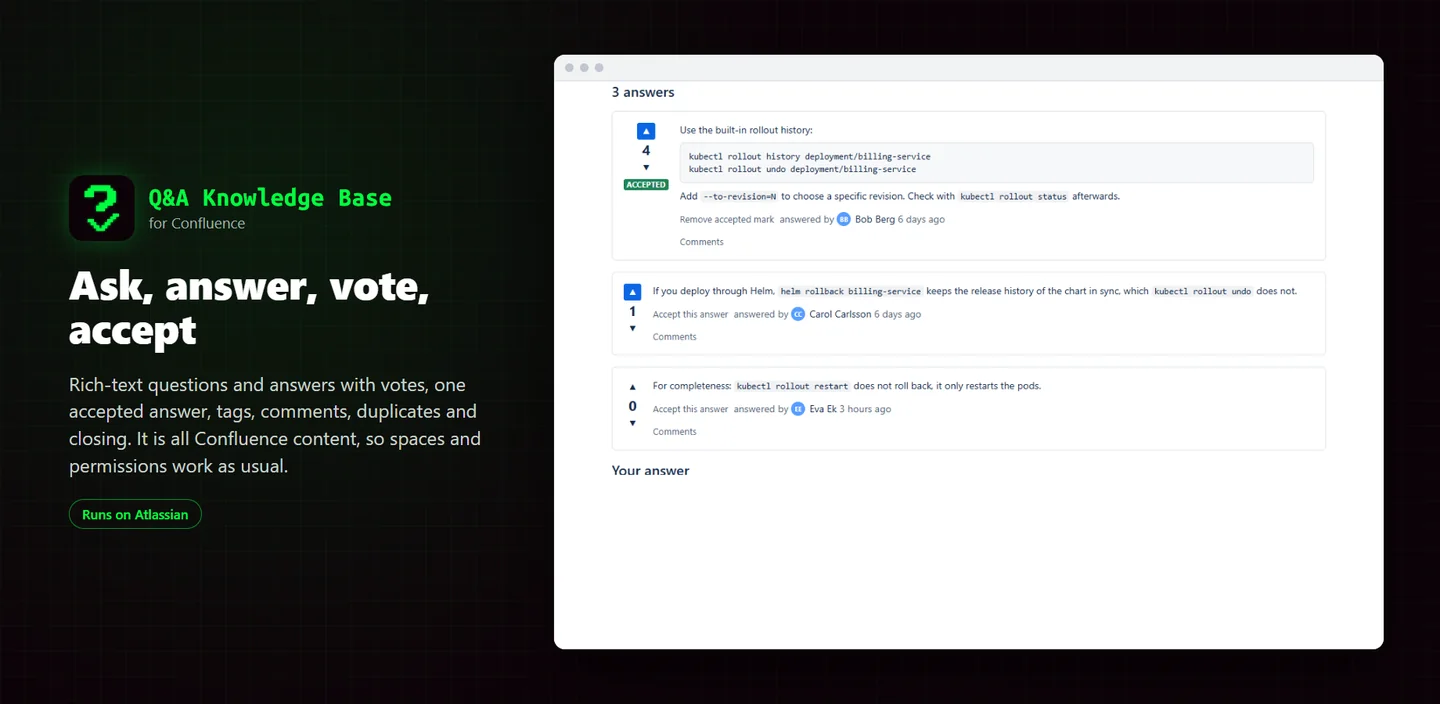
Every question has one status: unanswered, answered, solved, closed or duplicate. The Unanswered tab shows what still needs an answer.
Decide who may ask and who may answer
Under Settings > Manage apps > Q&A > Who can do what, three rules decide who may ask questions, who may answer and comment, and who moderates. Asking and answering are open to everyone who can see the space, or only to the groups you list. A space can have its own rules. Moderators can edit and delete any post, close a question with a note, mark duplicates and accept answers for others.
Turn solved questions into an FAQ page
Insert the Q&A question list macro on any page and choose the space, a tag, a status, the order and how many questions to show. Switch it to FAQ mode and it shows the solved questions with their accepted answer, so the FAQ page updates itself as questions are solved. Its Ask a question button opens the question form with the space and tag of the macro filled in.
Bring old questions in
A CSV import takes up to 5,000 rows and 3 MB. The preview lists problems by line number before anything is created, and rows with problems are skipped. The original author names, dates and votes are shown, while the posts are created by the person who runs the import. A CSV export writes the same columns, up to 2,000 questions per file, without comments.
Good to know
- Search reads titles, question text and answers, so a question is found even when your words are only in one of its answers.
- The app sends no email. People watch questions and get news in an Inbox inside the app, and @mentions are Confluence mentions.
- Confluence's own search box may not list Q&A content, a known Atlassian issue (CONFCLOUD-84122). The app's own search covers it.
- Posts cannot contain images or attachments yet. Links, code, lists and quotes work.
- Guests and anonymous users see nothing.
- If your site uses Rovo, an optional agent searches Q&A as the person asking and returns matching questions with their accepted or most voted answer and a link.
FAQ
Can I make an FAQ in Confluence without an app?
Yes. A page with expand sections, or one page per question listed with the Content by Label macro, works for a short FAQ that a few people keep up to date.
Who can accept an answer?
The person who asked, or a moderator. One answer can be accepted at a time, and the accepted answer is shown first.
Does the app send email notifications?
No. Watching a question puts the news in an Inbox inside the app. Mentions are normal Confluence mentions.
What does it cost?
It is free for up to 10 users. Larger sites see the price on the Atlassian Marketplace and can evaluate the app for 30 days, the Marketplace default for Cloud apps.
More guides
How to copy a whole space or a page tree in Confluence Cloud
Confluence Cloud can copy a page together with its child pages, one tree at a time. A whole space has no copy button of its own. Treewright copies a page tree or all pages of a space in one job, shows a preview first, rewrites the links to point at the copies and keeps a report of every change.
Read the guide →How to show Swagger and OpenAPI docs in Confluence Cloud
Confluence Cloud can store an OpenAPI or Swagger file as an attachment or show its text in a code block, but it does not turn the file into API documentation. Specfold reads the attached YAML or JSON file and shows it on the page as an API reference with search, models, examples and cURL commands, and it follows every new version of the file.
Read the guide →Fix Paymenter after upgrading to Pterodactyl 2.0: "api/application/nests could not be found"
Pterodactyl 2.0 removed the nest endpoints that Paymenter's built-in extension calls. Switch to a 2.0-aware extension with one command; products and services stay.
Read the guide →