How to show Swagger and OpenAPI docs in Confluence Cloud
Updated
Ways that need no app
| Free way | What readers get | What it leaves undone |
|---|---|---|
| Attach the YAML or JSON file to the page | The file itself | No list of endpoints, no search and no examples. Readers open the file in another tool to browse it. |
| Paste the spec into a code block | The raw text on the page | Hundreds of lines to scroll, no search by endpoint, no models, and the copy goes out of date when the API changes. |
| Link to API docs hosted elsewhere | One click to the docs | The docs live outside Confluence, with their own access rules, and Confluence search does not see them. |
| Write the endpoints in a table by hand | Readable text you control | Slow to write and out of date after the next release. |
For a small, stable API, a code block and a link can be enough. For an API that changes every sprint, the page should read the file itself.
With Specfold: an API reference on the page
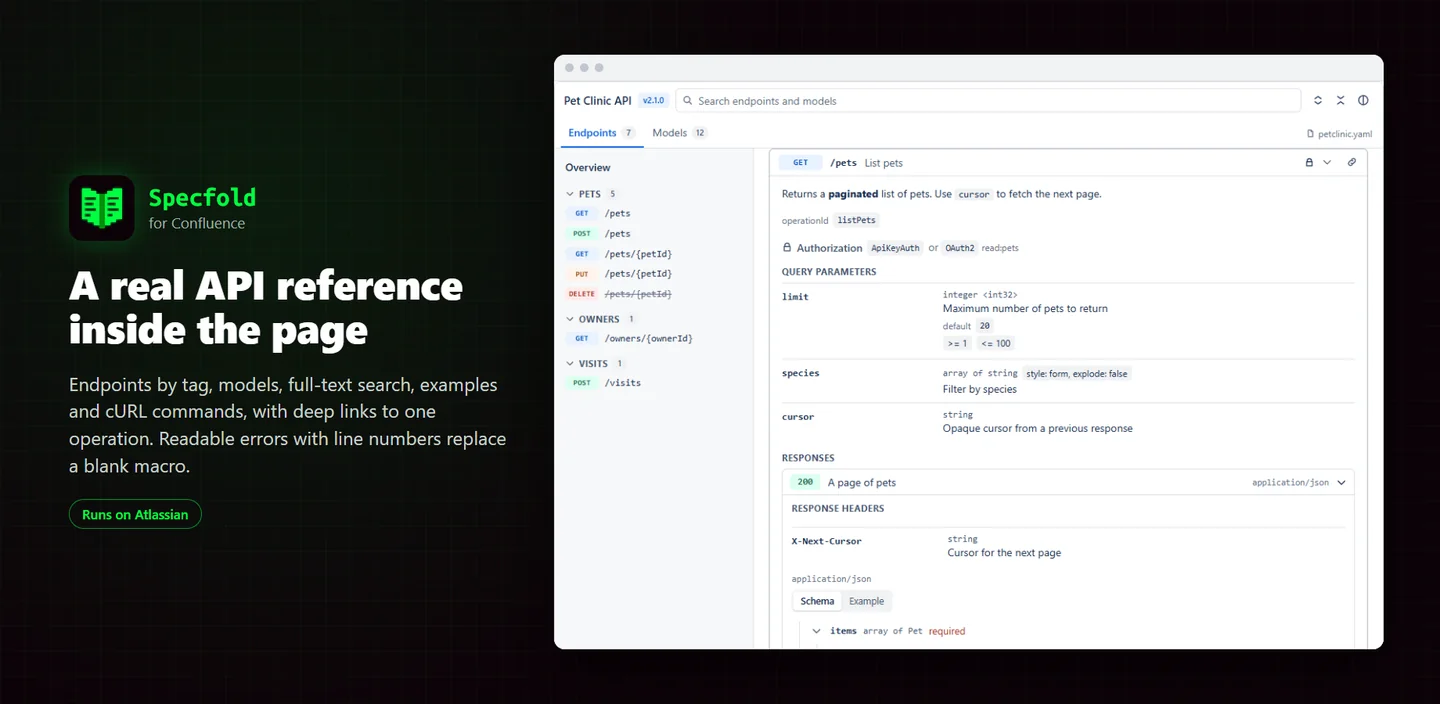
Specfold: Open API, Swagger & AsyncAPI Viewer for Confluence turns a file attached to the page into an API reference: endpoints grouped by tag, a models tab, examples and a cURL command for every operation. It reads OpenAPI 3.0 and 3.1, Swagger 2.0 and AsyncAPI 2 and 3, in YAML or JSON.
- Create or open a page and attach your specification file to it.
- In the editor, type /openapi and choose OpenAPI and AsyncAPI viewer.
- Under Where is the specification? keep A file attached to this page and pick the file. A check line below it says what Specfold found, such as the number of operations and models, and any problems.
- Choose Save and publish the page.
No file to attach? Choose Text pasted here and paste the specification. Confluence stores pasted text in the page itself, so attach larger specifications as a file.
What readers can do
- Search by method, path, summary, operation id, tags and parameters.
- Read the schemas on the Models tab: allOf is merged, and oneOf and anyOf show their discriminators.
- Copy an example or a cURL command. Examples come from the spec or are generated from the schema. Nothing is ever sent to your API.
- Copy a link that opens one operation, when the macro has a fixed height.
- Switch between the light and the dark theme.
Keep it current
The viewer always shows the newest version of the attached file. To update the docs, upload a new version of the same attachment; the page itself does not need to change. A CI job can do this after every release through Confluence's REST API for attachments.
To see what changed, pick an older attachment under Compare with (optional). A Changes tab lists added, removed and changed operations and models and marks changes that may break existing clients as potentially breaking. The mark is a heuristic, so read the changes yourself before a release.
Good to know
- Specfold reads one self-contained file. A
$refto another file or a URL is not followed, so bundle the spec into one file first. - A file can be up to 4 MB, and pasted text up to 200,000 characters.
- There is no Try it out button and no loading from a URL. That is what lets the app run on Atlassian without sending your data anywhere.
- A broken file gets a readable message with line and column, and unknown fields get a "did you mean" suggestion.
- Readers need a Confluence account with access to the page. Anonymous access is not supported.
- Using an older macro built on Atlassian Connect? Atlassian ends support for Connect apps on 31 January 2027. Download the spec file, attach it, insert the viewer and remove the old macro.
Swagger and the other product names are trademarks of their respective owners. Specfold reads files in these formats and is not affiliated with or endorsed by them.
FAQ
Can Confluence Cloud show an OpenAPI file without an app?
It can keep the file as an attachment and show its text in a code block. It does not turn it into an API reference with search, models and examples.
Does Specfold call my API?
No. It shows the spec and builds cURL commands you can copy, but it never sends a request.
Does it work with Swagger 2.0 files?
Yes. Swagger 2.0 files are converted for display, next to OpenAPI 3.0 and 3.1 and AsyncAPI 2 and 3.
What does Specfold cost?
It is free for up to 10 users. Larger sites see the price on the Atlassian Marketplace and can evaluate the app for 30 days, the Marketplace default for Cloud apps.
More guides
How to copy a whole space or a page tree in Confluence Cloud
Confluence Cloud can copy a page together with its child pages, one tree at a time. A whole space has no copy button of its own. Treewright copies a page tree or all pages of a space in one job, shows a preview first, rewrites the links to point at the copies and keeps a report of every change.
Read the guide →How to build a Q&A and FAQ knowledge base in Confluence Cloud
A short FAQ that a few people keep up to date works well as a normal Confluence page. A knowledge base that grows from the questions people really ask needs more: votes, one accepted answer, a list of unanswered questions and rules for who may ask and who may answer. The Questions & Answers app adds that inside Confluence, and its macro turns solved questions into an FAQ page.
Read the guide →Fix Paymenter after upgrading to Pterodactyl 2.0: "api/application/nests could not be found"
Pterodactyl 2.0 removed the nest endpoints that Paymenter's built-in extension calls. Switch to a 2.0-aware extension with one command; products and services stay.
Read the guide →