
Copy many tables between SQL Server databases in DataGrip
Updated
You have a set of tables in one SQL Server database (staging, a reference database, last month's copy) and you need the same rows in another one: production, a fresh test database, a reporting copy. A handful of tables is a chore; forty tables with foreign keys, identity columns and rows that already exist on the other side is where it goes wrong. This guide shows the ways to do it, what each one leaves to you, and how to do it with a script you can review before anything changes.
Three questions to answer first
- Does the target already have rows? Copying into empty tables is a plain insert. Copying into tables that already hold data means deciding, row by row, what to insert, what to update and what to delete.
- In which order? Foreign keys decide it: a child row can only be inserted after its parent, and deleted before it. Tables that reference themselves (a category tree, a manager column) and tables that reference each other (a customer with a default address that points back to the customer) need more than a simple order.
- What happens if it fails halfway? Forty separate copies that stop at table twenty-three leave the target in a state that matches neither side.
The manual T-SQL way
When both databases are on the same server, three-part names make a copy one statement per table:
SET IDENTITY_INSERT Target.dbo.Customer ON;
INSERT INTO Target.dbo.Customer (CustomerId, Name, CountryCode)
SELECT CustomerId, Name, CountryCode FROM Staging.dbo.Customer;
SET IDENTITY_INSERT Target.dbo.Customer OFF;
That works for empty tables on one server. Everything else is yours: the order of the tables, the column list of every table with an identity column (only one table at a time can have IDENTITY_INSERT on), rows that already exist (a plain insert fails on the first duplicate key), rows that differ, rows that should go, and a transaction around all of it. Between two servers you need a linked server, an export and import, or bcp, and the same questions remain.
Copying with DataGrip's own data transfer
DataGrip can copy table data from one data source to another with its import and export tools, and it is a good fit for a one-off copy into new or empty tables. It copies rows. It does not compare them with what the target already holds, and it does not give you a script to read before the target changes.
Compare and sync many tables with ReferenceFlow
ReferenceFlow is a JetBrains Marketplace plugin for DataGrip and other IDEs with Database Tools and SQL. It compares the tables of two data sources and writes the script that makes the target equal to the source.
- Install ReferenceFlow from the JetBrains Marketplace (Settings, Plugins, Marketplace) and restart the IDE. Add both SQL Server databases as data sources in the Database tool window and test the connections.
- Open the ReferenceFlow tool window. Choose the source (the data you want) and the target (the database the script will change).
- Choose the schema, for example
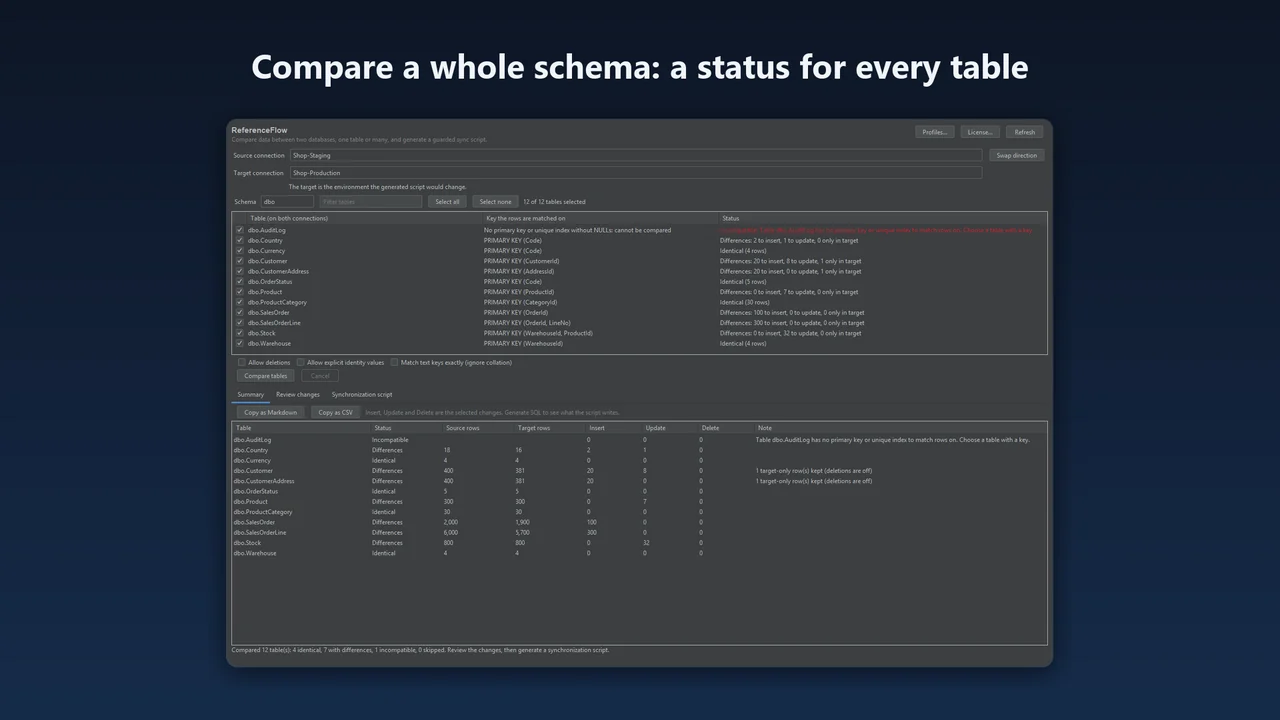
dbo, and press Select all. Every table that exists in both databases is listed; the status line says how many exist on only one side (create those tables first: ReferenceFlow copies data, not table definitions). - Press Compare tables. Each table shows its progress and then its status: identical, differences with the counts, incompatible with the reason (for example a table without a primary key or unique index), or skipped if you cancel. Tables whose target is empty are not read at all.
- Open Summary for the per-table counts. Use Copy as Markdown or Copy as CSV to paste them into a ticket or a change request.
- In Review changes, untick anything you do not want. Turn on Allow deletions if rows that exist only in the target should go, and Allow explicit identity values to keep the source's identity values.
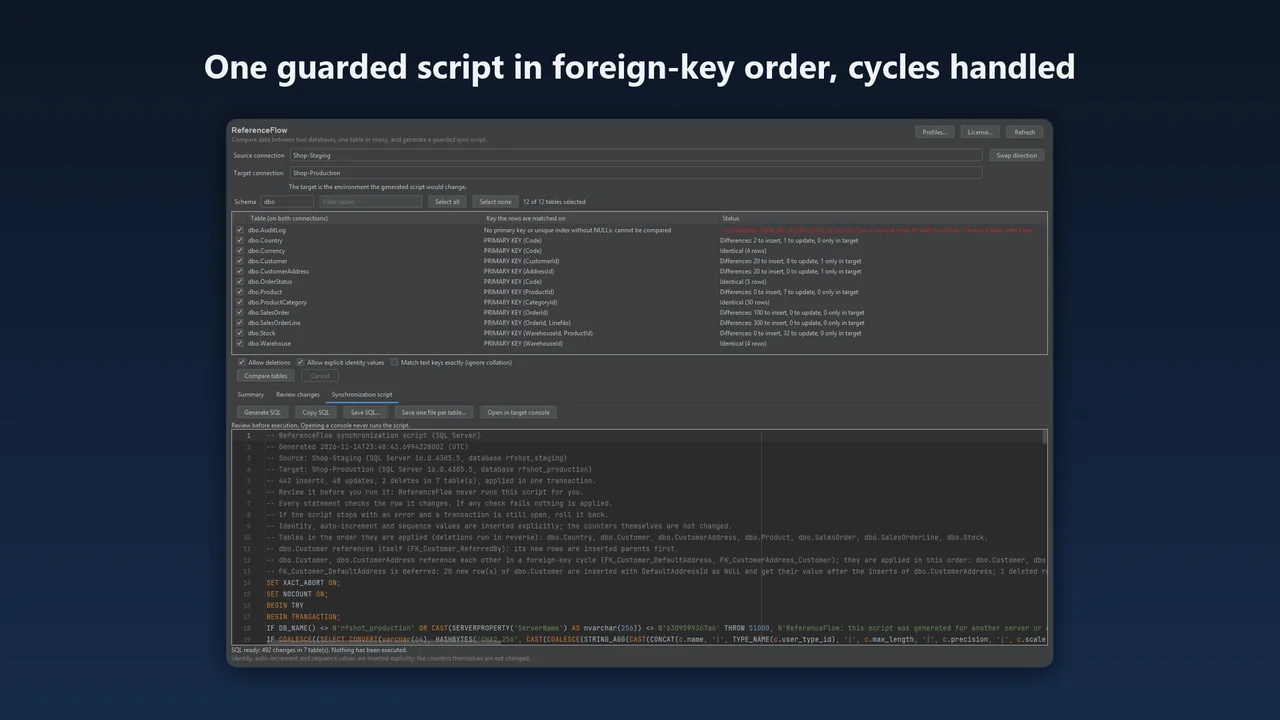
- Press Generate SQL. Read the header: it lists the tables in the order they are applied, the self-references and cycles and how each was handled, the tables left out of the script and why, and any rows that need manual ordering.
- Save the script as one file, or use Save one file per table to get numbered files you can run one by one. Then run it in the target, for example by opening it in the target's console. ReferenceFlow does not run it for you.
Why the script is safe to run
- One transaction. On SQL Server the whole script is one
BEGIN TRY ... BEGIN TRANSACTION ... COMMITwithSET XACT_ABORT ON; if anything fails, everything is rolled back. With one file per table, each file is its own transaction and the files are numbered in the order they must run. - Checks before it changes anything. The script refuses to run on another server or database than the one it was generated for, stops if a table's columns changed since the comparison, and stops if a table that was empty is no longer empty.
- Checks on every row. An insert only adds a key that is not taken yet, an update only touches a row that still has the values you reviewed, a delete only removes a row that still looks as you saw it. If any check fails, nothing is applied.
- Foreign keys. Inserts and updates run parents first, deletions children first, rows of a self-referencing table in reference order. In a cycle, a nullable key is inserted as NULL and set once the row it points to exists, and cleared before a deletion. Rows that no order can place are listed for manual ordering rather than dropped.
- Identity columns.
SET IDENTITY_INSERTis switched on for one table at a time, only while its rows are inserted. - Empty tables. Rows go into empty target tables in batches of up to 500, with a count check after each batch.
Before you run it
- Take a backup of the target, or run the script on a copy first.
- Read the header of the script, and the Summary: tables left out (for example tables with enabled triggers) and rows that need manual ordering are listed there.
- Identity counters are not changed by the script. If new rows will be added to the target later, check the identity seed of the copied tables (
DBCC CHECKIDENT).
Which databases
SQL Server 2019, 2022 and 2025, PostgreSQL, MySQL and MariaDB. Source and target must be the same kind of database. ReferenceFlow 2026.2.1 was tested against SQL Server 2022, PostgreSQL 16.15, MySQL 8.0.46 and MariaDB 11.8.9; SQL Server 2019 and 2025 were tested with version 2026.2.0.
ReferenceFlow costs $49 a year for individuals and $99 for organizations, with a 30-day trial: ReferenceFlow on JetBrains Marketplace.
FAQ
Can DataGrip copy tables between databases?
Yes, with its import and export tools, which suit a one-off copy into new or empty tables. They copy rows; they do not compare them with what the target already holds or give you a script to read first.
Does ReferenceFlow create missing tables?
No. It copies data, not table definitions. The status line says how many tables exist on only one side; create those first.
What happens if the script fails halfway?
On SQL Server the script is one transaction with SET XACT_ABORT ON, so if anything fails, everything is rolled back. With one file per table, each file is its own transaction and the files before it stay applied.
Are identity values kept?
Only if you turn on Allow explicit identity values; then IDENTITY_INSERT is switched on for one table at a time. The script does not change the identity counters, so check the seed with DBCC CHECKIDENT if new rows will be added later.
More guides
How to profile SQL Server queries in DataGrip, Rider or IntelliJ with Extended Events
Extended Events replaces SQL Server Profiler. Create a session for rpc_completed and sql_batch_completed, read the ring buffer, and drop the session when you are done, or let QueryScope do it inside your JetBrains IDE.
Read the guide →Find and fix SQL Server blocking in DataGrip
Most of the time SQL Server is not slow: one session holds locks that others wait for. How to find that head blocker from DataGrip, decide what to do with it, read the deadlocks SQL Server already recorded and stop it from coming back.
Read the guide →Run one SQL script on many SQL Server databases in DataGrip
DataGrip runs a SQL file against one data source at a time. How to run the same SQL Server script on twelve or eighty databases from DataGrip itself, with GO batches, SQLCMD variables, a stop policy and one result per database.
Read the guide →