
Run one SQL script on many SQL Server databases in DataGrip
Updated
DataGrip runs a SQL file against one data source at a time. When the same change has to go to twelve customer databases on one SQL Server, or to eighty tenant databases on several servers, you either repeat the run by hand, script a loop around sqlcmd, or use a separate tool. This guide shows how to do it from DataGrip itself with FanOut, and what to watch for with SQL Server scripts.
What you need
- DataGrip (or IntelliJ IDEA Ultimate) 2025.1 or later with a data source for each database. Several data sources can point at the same server with a different database each.
- FanOut from JetBrains Marketplace, with a 30-day trial.
Step 1: write the script as you would for SSMS
FanOut runs SQL Server scripts the way SSMS does:
GOends a batch.GO 3runs the batch before it three times.- PRINT and RAISERROR messages and every result set are shown in the order the server sent them.
- An error is shown as
Msg 50000, Level 16, State 1, Line 3with its message, and the rest of the batch still runs, as on the server. USE OtherDatabaseswitches the database for the rest of the script.
:setvar Table dbo.customer_audit
PRINT 'Starting on $(FanOutDataSource) in $(FanOutDatabase)';
IF OBJECT_ID('$(Table)') IS NULL
    CREATE TABLE $(Table) (id int IDENTITY PRIMARY KEY, note varchar(60));
GO
INSERT INTO $(Table) (note) VALUES ('checked');
IF OBJECT_ID('dbo.customers') IS NULL
    RAISERROR('Table customers is missing in %s', 16, 1, '$(FanOutDatabase)');
GO
SELECT COUNT(*) AS audit_rows FROM $(Table);
GO
Step 2: use SQLCMD variables for what differs
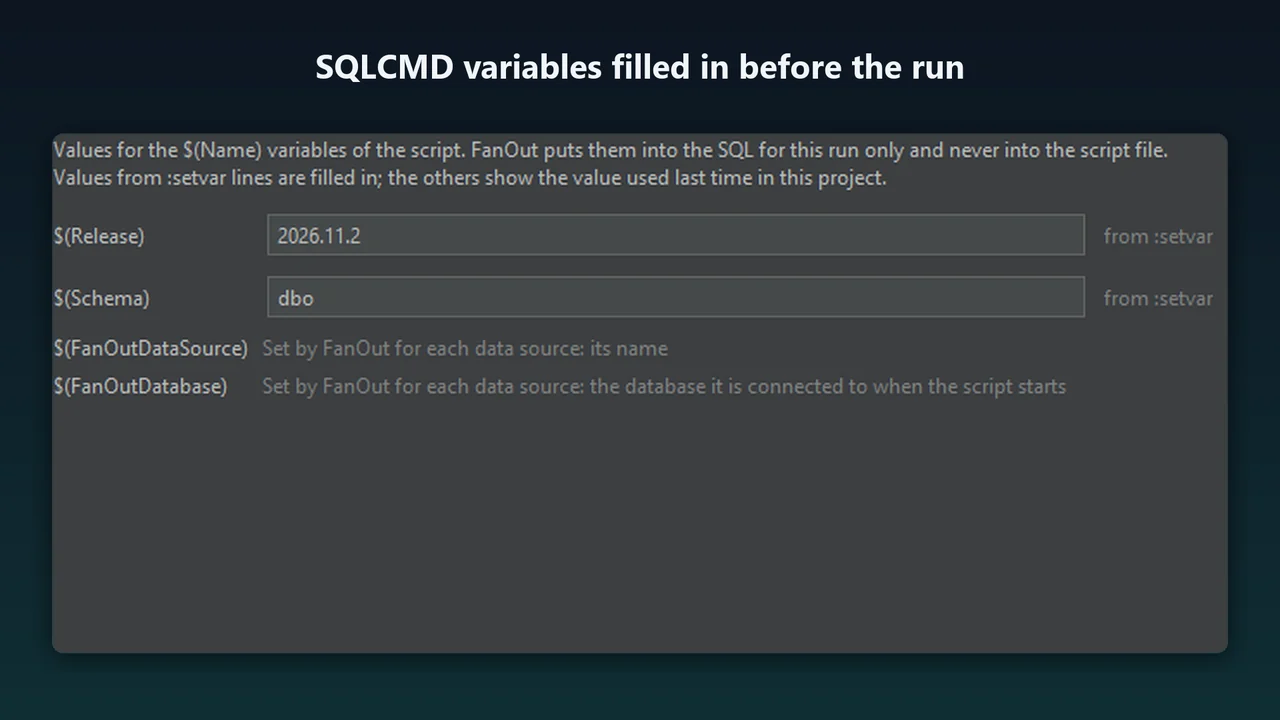
:setvar Table dbo.customer_audit and $(Table) work as in SSMS's SQLCMD mode. Before the run, FanOut lists every $(Name) with its value, so you can change it for this run without editing the script. Two variables are set for each database: $(FanOutDataSource) (the data source name) and $(FanOutDatabase) (the database it is connected to). Other SQLCMD commands such as :r and :connect are not supported, and FanOut says so before anything runs.
Step 3: pick the databases and the stop policy
- Right-click in the editor and choose Run Script on Many Data Sources....
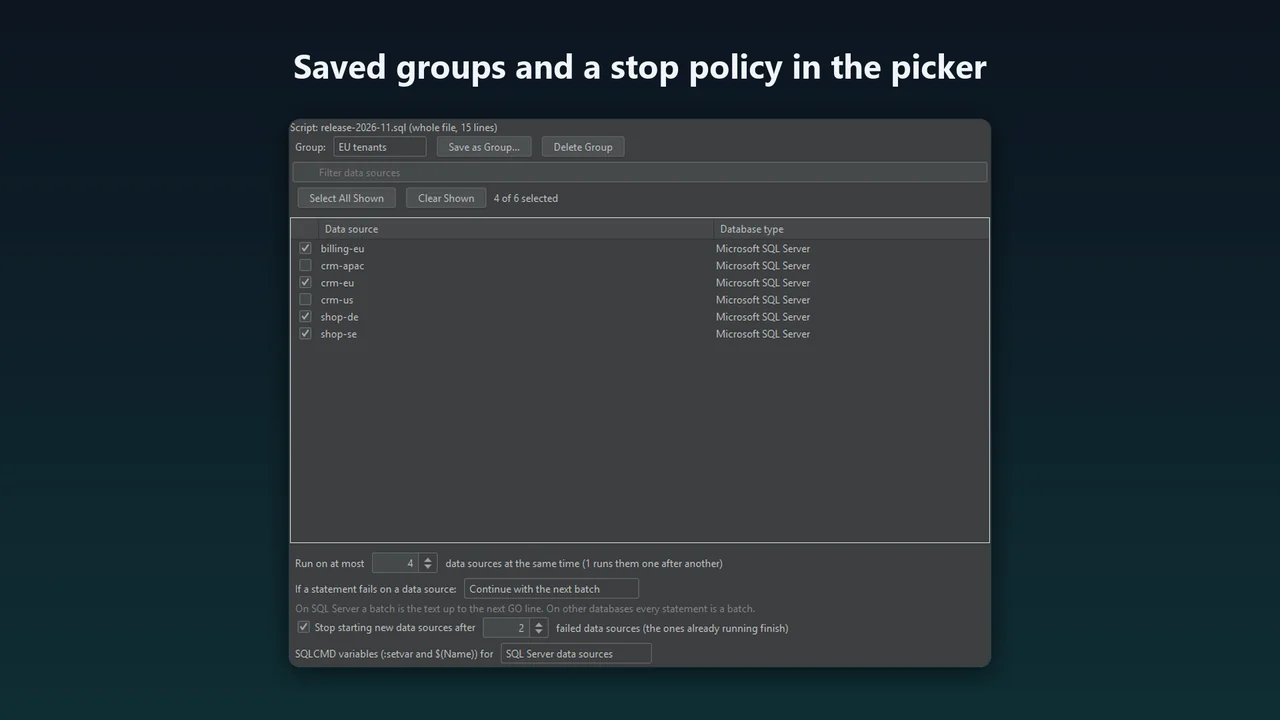
- Tick the databases, or choose a saved group. Save as Group... keeps the selection, for example "EU tenants".
- Choose how many databases run at the same time. 1 runs them one after another.
- Choose what happens when a batch fails: stop at the first error on that database, or continue with the next batch. You can also stop starting new databases after, say, 2 have failed.
- Press Run, check the variable values, and confirm the list of databases.
Step 4: read the results
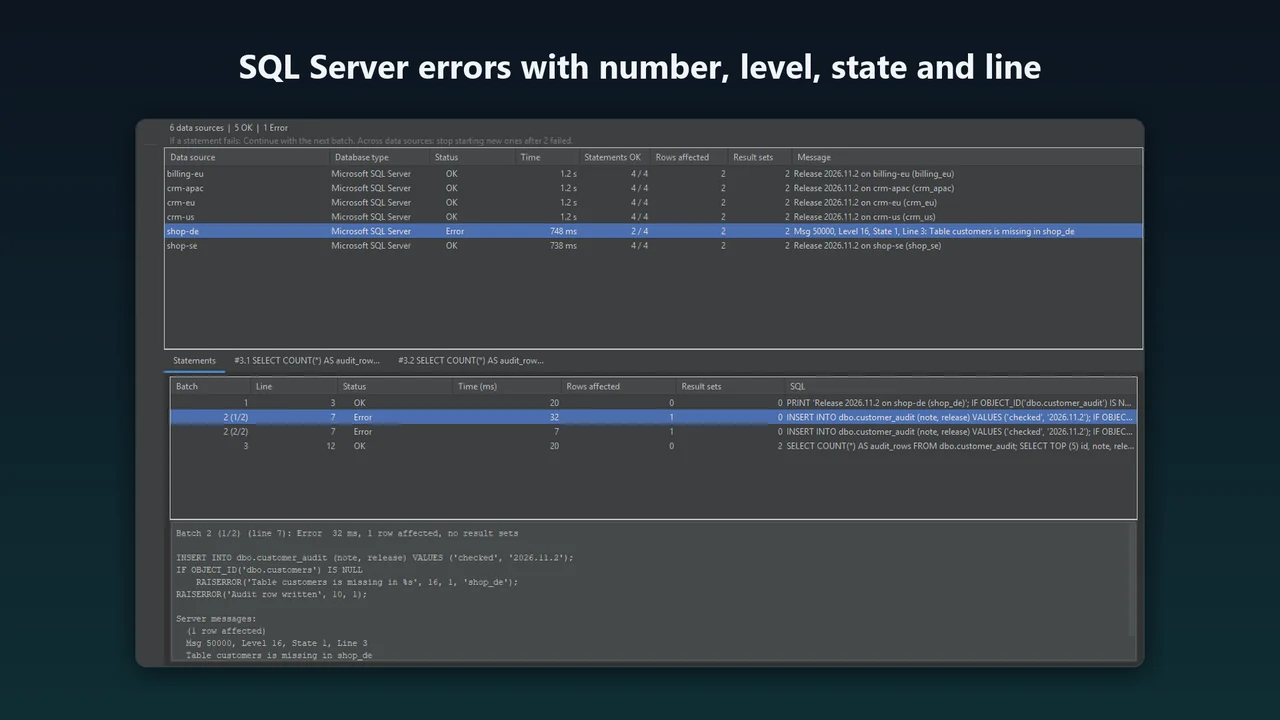
The FanOut tool window shows one row per database: status, time, batches completed, rows affected and the first error or message. Select a database to see each batch with its messages, row counts and errors, and every result set as a grid. If a script leaves a transaction open, FanOut rolls it back at the end and marks that database, so no session holds locks after the run. Export the summary as CSV or Markdown for the change record.
Tips
- Write scripts that can run twice (
IF OBJECT_ID(...) IS NULL CREATE ...), so a partial run does no harm. - Start with a read-only batch, for example
SELECT @@VERSION, DB_NAME(), to check that every database answers. - Use Cancel All to stop long statements on every database at once.
- For many data sources, give each data source's driver a small heap (Data Sources and Drivers, Advanced, VM options, for example
-Xms16m -Xmx128m); the IDE runs one driver process per data source.
Compared with other ways
SSMS can run a query on every server of a registered server group, sqlcmd runs one connection at a time unless you script a loop, and Redgate SQL Multi Script runs scripts on many SQL Server databases as a separate tool. DataGrip 2026.3's Workspace merges the result of one SELECT across data sources. FanOut is for the case in between: a full script with DDL, several batches, several result sets and a separate outcome for each database, run from the IDE and the data sources you already use, on SQL Server and on the other databases the IDE supports.
FanOut costs $39 a year for individuals and $79 for organizations, with a 30-day trial: FanOut on JetBrains Marketplace.
FAQ
Can DataGrip run one script on several databases?
DataGrip runs a SQL file against one data source at a time. FanOut adds Run Script on Many Data Sources... to the editor and shows one result row per database.
Does FanOut support SQLCMD mode?
:setvar and $(Name) work, with a dialog for the values before the run. Other SQLCMD commands such as :r and :connect are not supported; FanOut names the line and nothing runs.
What happens when the script fails on one database?
You choose: stop that database's script at the first error, or continue with the next batch. You can also stop starting new databases after a number of them have failed.
What if a script leaves a transaction open?
FanOut rolls it back at the end and marks that database as an error, so no session holds locks after the run.
How many databases can it run on?
It was tested with up to 50 data sources in one run. The IDE runs each data source's JDBC driver in its own process, about 100 MB of memory each.
More guides
How to profile SQL Server queries in DataGrip, Rider or IntelliJ with Extended Events
Extended Events replaces SQL Server Profiler. Create a session for rpc_completed and sql_batch_completed, read the ring buffer, and drop the session when you are done, or let QueryScope do it inside your JetBrains IDE.
Read the guide →Find and fix SQL Server blocking in DataGrip
Most of the time SQL Server is not slow: one session holds locks that others wait for. How to find that head blocker from DataGrip, decide what to do with it, read the deadlocks SQL Server already recorded and stop it from coming back.
Read the guide →Copy many tables between SQL Server databases in DataGrip
A handful of tables is a chore; forty tables with foreign keys, identity columns and rows that already exist on the other side is where it goes wrong. The questions to answer first, the manual T-SQL way, DataGrip's own data transfer and a sync script you review first.
Read the guide →