
How to profile SQL Server queries in DataGrip, Rider or IntelliJ with Extended Events
Updated 2026-10-19
Why Extended Events
Microsoft has deprecated SQL Trace and SQL Server Profiler for the database engine. Extended Events is the replacement: lighter on the server and able to capture the same things, including every completed batch and remote procedure call your application sends.
By hand in T-SQL
Create a session that captures completed RPC calls and batches, with the SQL text, database and application name:
CREATE EVENT SESSION [capture_queries] ON SERVER
ADD EVENT sqlserver.rpc_completed (
    ACTION (sqlserver.sql_text, sqlserver.database_name, sqlserver.client_app_name)),
ADD EVENT sqlserver.sql_batch_completed (
    ACTION (sqlserver.sql_text, sqlserver.database_name, sqlserver.client_app_name))
ADD TARGET package0.ring_buffer;

ALTER EVENT SESSION [capture_queries] ON SERVER STATE = START;
Read what it captured as XML:
SELECT CAST(t.target_data AS xml) AS captured
FROM sys.dm_xe_session_targets AS t
JOIN sys.dm_xe_sessions AS s ON s.address = t.event_session_address
WHERE s.name = 'capture_queries';
And clean up when you are done, so the session doesn't keep running on the server:
ALTER EVENT SESSION [capture_queries] ON SERVER STATE = STOP;
DROP EVENT SESSION [capture_queries] ON SERVER;
Creating a session needs the ALTER ANY EVENT SESSION permission on the server. Add predicates such as a minimum duration or a database name on busy servers.
Inside your JetBrains IDE
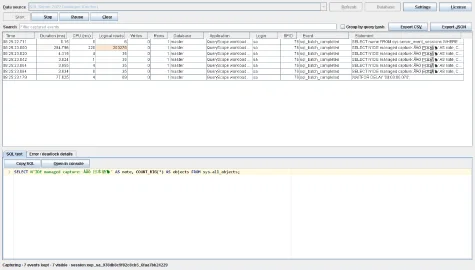
Reading ring-buffer XML by hand gets old quickly. QueryScope does the same capture from a tool window in IDEs with Database Tools, such as DataGrip, Rider and IntelliJ IDEA Ultimate, using the SQL Server data source you already configured.
- Install QueryScope from JetBrains Marketplace (30-day free trial).
- Open the QueryScope tool window and pick your SQL Server data source.
- Start the capture and use your application as usual.
- Read duration, CPU, logical reads, writes and rows per query, filter by database, application, login or minimum duration, and group by query hash.
- Stop. The temporary session is removed. Export to CSV or JSON if you want to keep the results.
FAQ
Is SQL Server Profiler gone?
It is deprecated for the database engine. It still exists in older tooling, but Extended Events is the supported way to capture queries.
Which SQL Server versions does QueryScope support?
SQL Server 2022 is verified. Other versions and Azure are experimental.
More guides
Fix Paymenter after upgrading to Pterodactyl 2.0: "api/application/nests could not be found"
Pterodactyl 2.0 removed the nest endpoints that Paymenter's built-in extension calls. Switch to a 2.0-aware extension with one command; products and services stay.
Read the guide →Solar2D and Google Play's 16 KB page size rule: find the library that fails
Apps targeting Android 15+ must support 16 KB memory pages. Check every 64-bit library in your build, find the plugin that ships each 4 KB-aligned one, and update or remove it.
Read the guide →How to add captions to WordPress videos without per-minute fees
Generate captions for a Media Library video with Whisper in your own browser, check them next to a live preview, and they appear in the core Video block with a clickable transcript.
Read the guide →