
How to move WordPress media folders from FileBird or Real Media Library
Updated 2026-10-25
Why folders are hard to move
Most media folder plugins keep their folders in their own database tables or their own taxonomy. When you switch plugins, the folders do not come along, and rebuilding hundreds of them by hand is the reason many sites never switch.
Which plugins can be imported
Shelfwright reads the folders of these plugins:
- FileBird
- Real Media Library
- Media Library Folders
- Folders
- HappyFiles
- WP Media Folder
- Wicked Folders
- Media Library Assistant
Enhanced Media Library needs no import at all: Shelfwright uses its media_category taxonomy directly. See the Enhanced Media Library guide.
Import in four steps
- Make a backup of the site.
- Install and activate Shelfwright. Leave the other folder plugin installed for now; its data must be there to be imported.
- Open Media → Library. The folder tree shows an import card for every folder plugin it finds, with the number of folders and files. Click Import.
- Check the folders and their file counts. When you are happy, deactivate the other plugin.
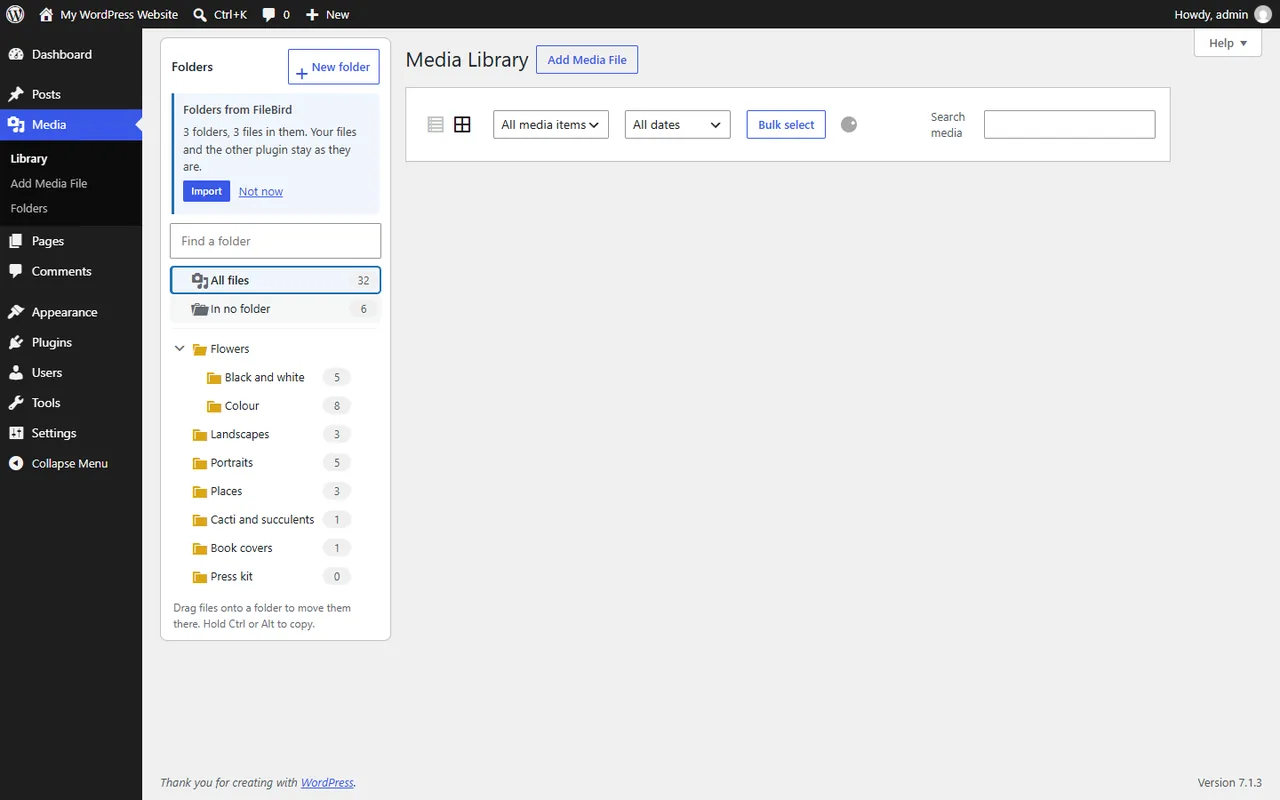
What happens during the import
- Folders are created first, in batches, with a progress count, then the files are put in them page by page. Large libraries import without running into time limits.
- The other plugin's tables are only read. Nothing in them is changed, so you can switch back.
- If an import stops with an error, clicking Import again continues where it stopped.
- Files that could not be added and folders that could not be matched are counted in the final message.
After the move
Shelfwright's folders are a standard WordPress taxonomy, so backups, exports and other plugins understand them, and no new database tables are added. Files never move on the server: folders are virtual, so URLs and image sizes stay exactly as they are.
FAQ
Does the import change my FileBird or Real Media Library data?
No. Shelfwright only reads the other plugin's data. You can deactivate Shelfwright and go back at any time.
Are subfolders kept?
Yes. The whole tree is imported, subfolders and all, with every file in its folder.
How long does it take?
It depends on the size of the library. The import runs in batches with a progress count, so large libraries are imported step by step instead of in one long request.
More guides
Enhanced Media Library alternative: keep your media categories on WordPress 7
Shelfwright reads the same media_category taxonomy as Enhanced Media Library, so your categories appear as folders the moment it is active. Check the folder tree, then deactivate Enhanced Media Library.
Read the guide →Fix Paymenter after upgrading to Pterodactyl 2.0: "api/application/nests could not be found"
Pterodactyl 2.0 removed the nest endpoints that Paymenter's built-in extension calls. Switch to a 2.0-aware extension with one command; products and services stay.
Read the guide →Solar2D and Google Play's 16 KB page size rule: find the library that fails
Apps targeting Android 15+ must support 16 KB memory pages. Check every 64-bit library in your build, find the plugin that ships each 4 KB-aligned one, and update or remove it.
Read the guide →