
Where did project profitability go in Odoo 20?
Updated 2026-10-25
What changed
In Odoo 19 Community a project shows revenue and costs in a profitability panel. Odoo 20 removed that panel from Community. Enterprise has its own budget and margin reports.
What you can still do in standard Odoo 20
- Open the project's analytic account and list its analytic items: invoices, bills and timesheets that were posted with that account.
- Group them by category to separate customer invoices from vendor bills, and read the totals.
- Timesheets carry their cost per line, from the employee's hourly cost.
That works, but it is per account, by hand, with no margin or overview across projects.
A profitability tab again
- Install Project Profit Panel on Odoo.sh or your own server.
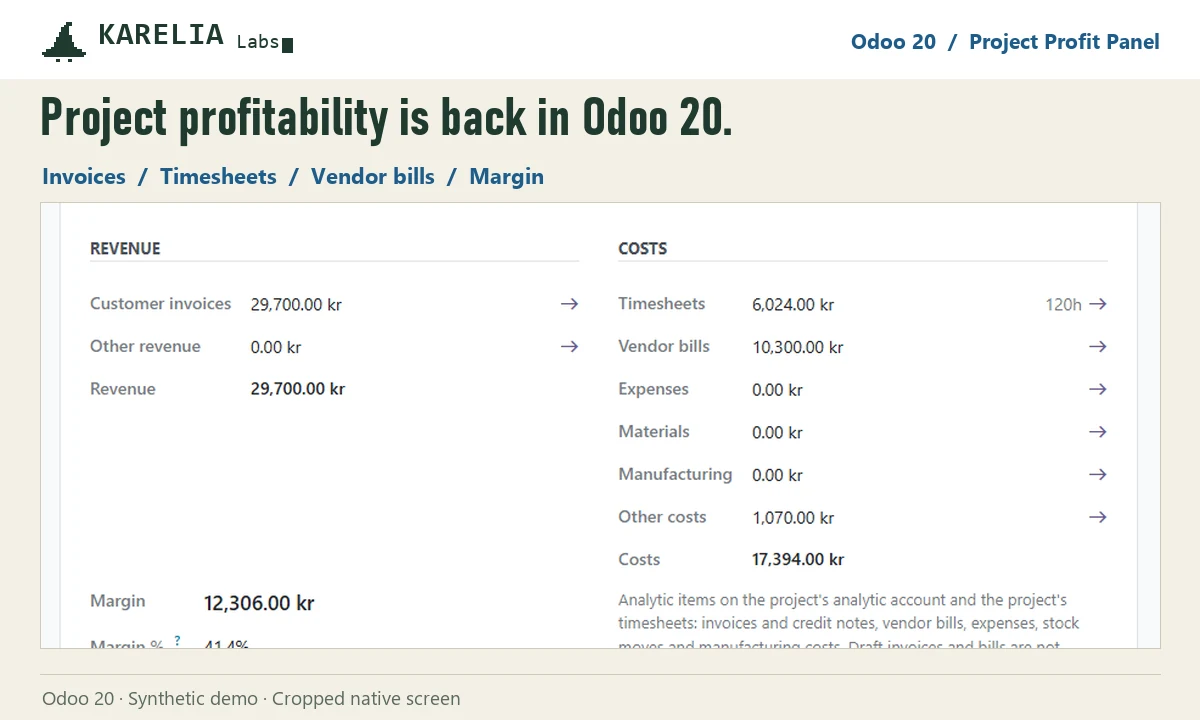
- Open a project with an analytic account and go to the Profitability tab: revenue, timesheet cost and hours, vendor bills, expenses, materials, margin and margin percentage.
- Open Invoicing / Reporting / Project Profitability for every project in one pivot.
FAQ
Is the profitability panel in Odoo 20 Community?
No. Odoo 19 Community has it; Odoo 20 removed it.
Where are a project's costs stored in Odoo 20?
As analytic items on the project's analytic account: invoices, bills, expenses, stock moves and timesheets.
More guides
Fix Paymenter after upgrading to Pterodactyl 2.0: "api/application/nests could not be found"
Pterodactyl 2.0 removed the nest endpoints that Paymenter's built-in extension calls. Switch to a 2.0-aware extension with one command; products and services stay.
Read the guide →Solar2D and Google Play's 16 KB page size rule: find the library that fails
Apps targeting Android 15+ must support 16 KB memory pages. Check every 64-bit library in your build, find the plugin that ships each 4 KB-aligned one, and update or remove it.
Read the guide →How to add captions to WordPress videos without per-minute fees
Generate captions for a Media Library video with Whisper in your own browser, check them next to a live preview, and they appear in the core Video block with a clickable transcript.
Read the guide →