
Project Profit Panel for Odoo 20: revenue, costs and margin on every project again
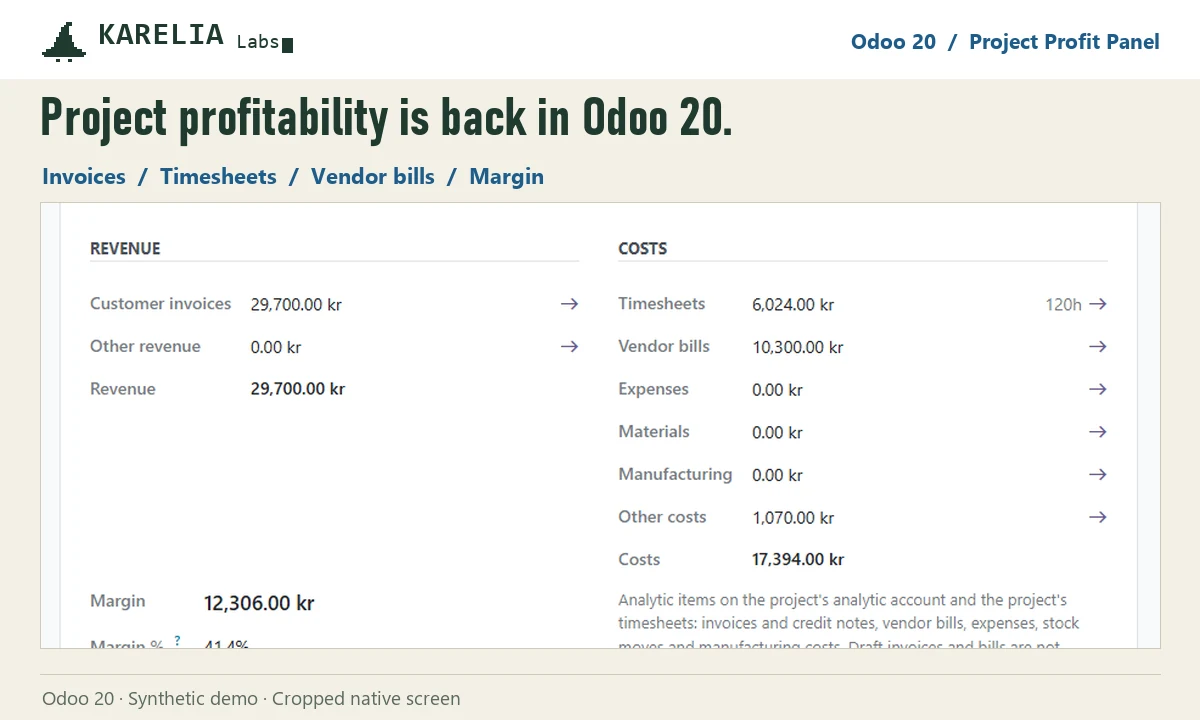
Odoo 19 Community showed a profitability panel on projects; Odoo 20 removed it. Project Profit Panel brings it back as a Profitability tab on every project, with revenue from customer invoices against timesheet costs, vendor bills, expenses, materials and manufacturing, the margin and margin percentage, and a pivot across all projects.
- Odoo version
- 20.0
- Editions
- Community and Enterprise
- Hosting
- Odoo.sh or your own server
- Licence
- OPL-1, one-time purchase
What Project Profit Panel does
A profitability tab
Revenue and costs side by side on each project, with the margin, margin percentage and timesheet hours.
All projects in one pivot
Revenue, cost and margin per project, by month or section, with filters, graph and Excel export.
From analytic accounting
Analytic items on the project's account in any analytic plan, plus the project's timesheets. Draft invoices and bills are not included.
Click through
Invoicing and accounting users open the items behind every figure, grouped by section.
Shared accounts handled
Projects sharing an analytic account each show the whole account, with a notice.
Works without Timesheets
Timesheet cost and hours appear when Timesheets is installed; invoices and bills show either way.
Good to know
- Amounts still to invoice from sales orders, forecasts and budgets are not included.
- Totals on a project are converted to its company currency at today's rate; the report lists each item in its own currency.
- Odoo Online can't install custom Python add-ons, so it needs Odoo.sh or your own server.
Guides
FAQ
Where did project profitability go in Odoo 20?
Odoo 19 Community has a profitability panel on projects; Odoo 20 removed it. Project Profit Panel gives Odoo 20 a panel and a report of its own.
Does it change my accounting?
No. It only reads analytic items and writes nothing.
Who sees the figures?
Project managers and invoicing or accounting users see the totals; the items behind them and the all-projects report are for invoicing and accounting users.
Related tools
Expense Report Sheets
Bring expense reports back to Odoo 19 and 20: group an employee's expenses, submit and approve them together, post one entry and pay in one go.
LateRate
Statutory late payment interest in Odoo: half-year reference rates, the fixed EU compensation once per invoice, and one draft interest invoice per customer.
Updated 2026-10-25