
How to record spare parts on maintenance requests in Odoo
Updated 2026-10-25
What standard Odoo offers
- Maintenance tracks equipment, requests and preventive plans, without parts.
- Inventory with Maintenance links equipment to a location and serial number.
- Repairs has parts lines, but it is built for repairing customers' products.
The usual workaround
Create an internal transfer or scrap order for the parts and put the request in the source document. Stock is right, but the cost doesn't appear on the request or the machine, and unused parts have to be put back by hand.
Parts on the request
- Install Maintenance Spare Parts on Odoo.sh or your own server.
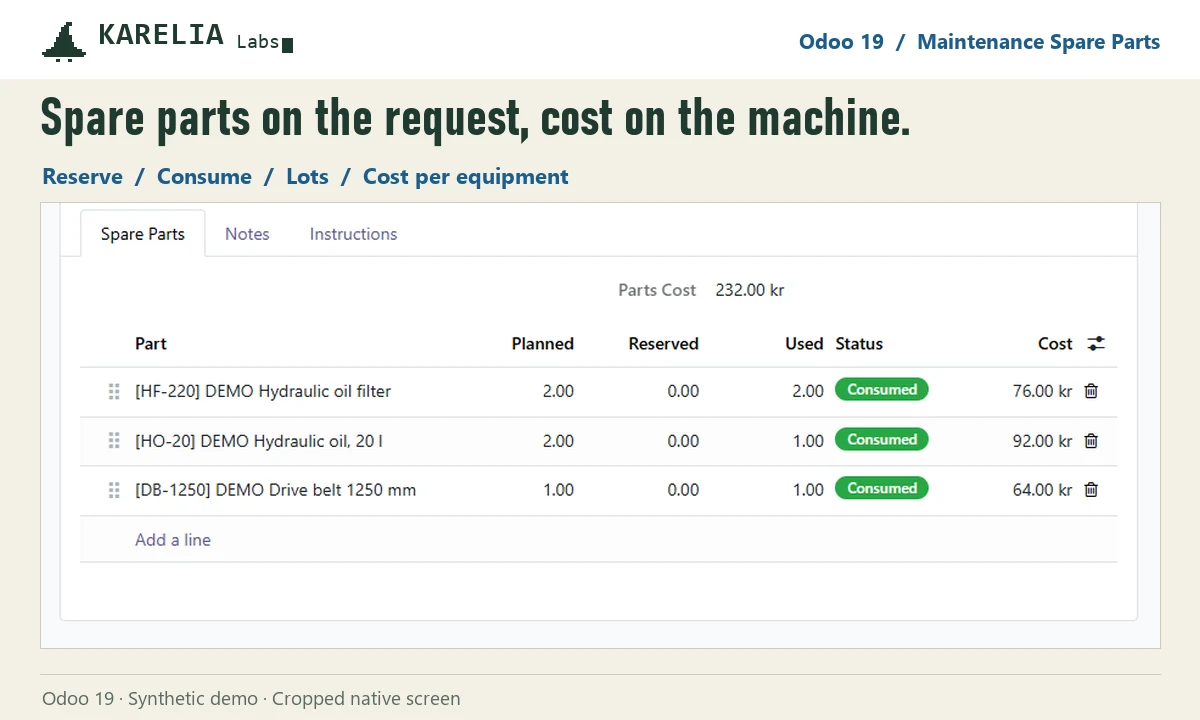
- Add the parts you need in the Spare Parts tab of the maintenance request.
- Reserve them: an internal transfer to a Maintenance location reserves the parts, lots included.
- After the job, enter what was used and consume it. Unused parts are released.
- See the parts cost on the request, on the equipment and in Maintenance / Reporting / Spare Parts.
FAQ
Can Odoo Maintenance track spare parts out of the box?
No. Requests have no parts list in Odoo 18, 19 or 20.
Do I need the Repairs app?
No. Maintenance Spare Parts works with the Maintenance app and Inventory.
More guides
Fix Paymenter after upgrading to Pterodactyl 2.0: "api/application/nests could not be found"
Pterodactyl 2.0 removed the nest endpoints that Paymenter's built-in extension calls. Switch to a 2.0-aware extension with one command; products and services stay.
Read the guide →Solar2D and Google Play's 16 KB page size rule: find the library that fails
Apps targeting Android 15+ must support 16 KB memory pages. Check every 64-bit library in your build, find the plugin that ships each 4 KB-aligned one, and update or remove it.
Read the guide →How to add captions to WordPress videos without per-minute fees
Generate captions for a Media Library video with Whisper in your own browser, check them next to a live preview, and they appear in the core Video block with a clickable transcript.
Read the guide →