
How to give every product with a tag the same price in Odoo
Updated 2026-10-25
What Odoo's pricelist rules can target
In standard Odoo 18, 19 and 20 a rule applies to one product variant, one product, a product category (with its subcategories) or all products. Product tags exist on products, but pricelists can't use them.
The usual workarounds
- One rule per product. Works for a handful of products. Every new product needs its own rule, and a price change means editing them all.
- A category per price group. Pricing then dictates your category tree, which is also used for accounting and reporting, and a product can only be in one category.
- A separate pricelist. Only helps when the whole customer group gets the same deal on everything.
One rule for a tag
- Install Pricelist by Product Tag on Odoo.sh or your own server.
- Enable Pricelists in the Sales settings and open a pricelist.
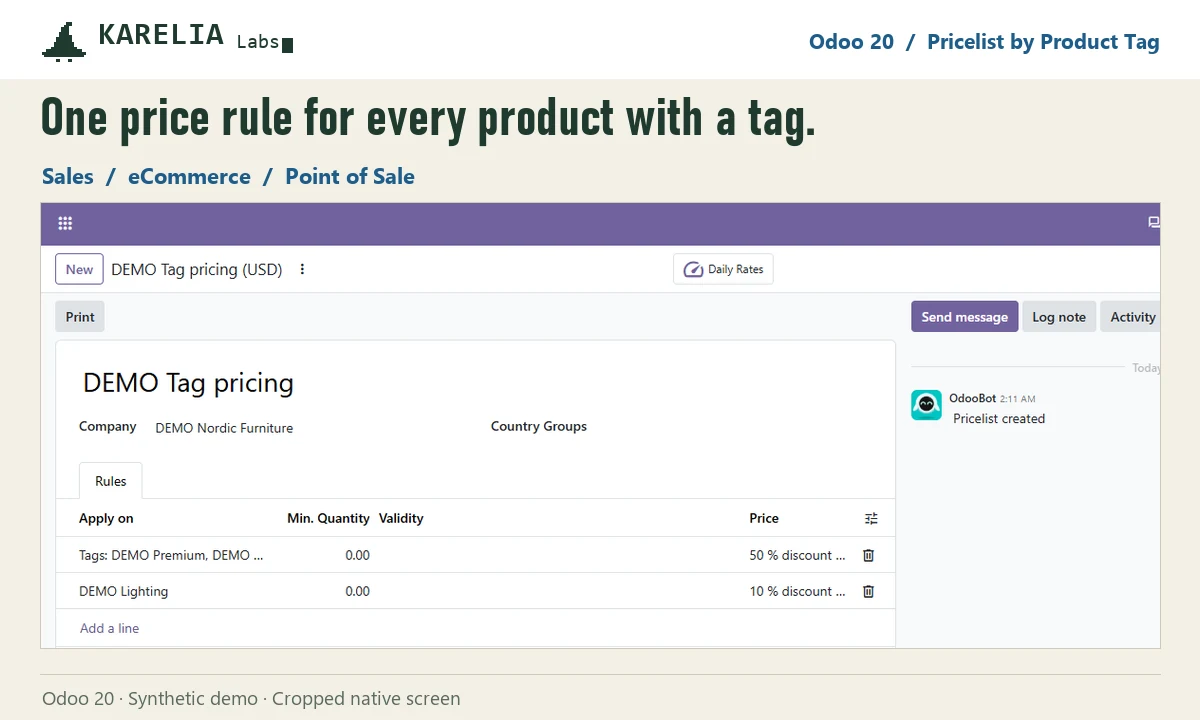
- Add a rule and pick one or more product tags as its target, with the discount or fixed price you want.
- Tag products. Every product, or single variant, with one of the tags now gets the price in quotations, sales orders and the shop.
- Using Point of Sale? Add the free companion module so the till applies the same rule.
Which rule wins
Odoo uses the most specific matching rule: variant, then product, then product tag, then category, then all products. Minimum quantities and validity dates apply as usual, and when several tag rules match, the higher minimum quantity and then the most recent rule win.
FAQ
Can standard Odoo apply a pricelist rule to a product tag?
No. Rules target variants, products, categories or all products. Pricelist by Product Tag adds tags.
Does a product's own rule still win?
Yes. A rule on the product or variant is more specific than a tag rule.
Does it work at the Point of Sale?
Yes, with the free companion module Pricelist by Product Tag - Point of Sale.
More guides
Fix Paymenter after upgrading to Pterodactyl 2.0: "api/application/nests could not be found"
Pterodactyl 2.0 removed the nest endpoints that Paymenter's built-in extension calls. Switch to a 2.0-aware extension with one command; products and services stay.
Read the guide →Solar2D and Google Play's 16 KB page size rule: find the library that fails
Apps targeting Android 15+ must support 16 KB memory pages. Check every 64-bit library in your build, find the plugin that ships each 4 KB-aligned one, and update or remove it.
Read the guide →How to add captions to WordPress videos without per-minute fees
Generate captions for a Media Library video with Whisper in your own browser, check them next to a live preview, and they appear in the core Video block with a clickable transcript.
Read the guide →