
How to restore a deleted entry in Statamic
Updated 2026-10-20
Why there is no undo
When an editor deletes an entry, term, asset, global set or form submission in Statamic's Control Panel, it is removed for good. There is no trash and no undo, and an entry's revisions are removed with it.
Where the content can come back from depends on how the site stores it: as files in content/ (the default, flat files) or as rows in a database (the Eloquent driver).
Flat-file site with git
If the site's content is in a git repository and the item was committed before it was deleted, git still has it.
- Find the commit that deleted the file. This lists every commit that removed something under
content/collections, with the file names:
git log --diff-filter=D --name-only -- content/collections/- Restore the file from the commit before that one, using the commit and the path from step 1:
git checkout <commit>~1 -- content/collections/pages/about-us.md- Let Statamic pick the file up again:
php please stache:refreshTerms live in content/taxonomies, globals in content/globals and form submissions in storage/forms. Assets are restored the same way from wherever the container keeps its files, if those files are in git. A page's place in the tree is stored in the structure file, so a restored page may need to be put back in the tree by hand.
Database site (Eloquent driver)
With the Eloquent driver, a deleted entry is a deleted database row. There is no git history to fall back on, so the only way back is your database backup: restore it to a copy and move the row across, or restore the whole database if nothing else has changed since.
Give editors a trash
Karelia Trash keeps a copy of everything deleted in the Control Panel, on flat-file and database sites alike, so getting it back no longer needs git, a backup or a developer.
- Install it in your site's folder:
composer require karelialabs/statamic-trash. - Delete as usual. Everything deleted in the Control Panel goes to Tools → Trash.
- Open the trash, click an item to preview it, and choose Restore.
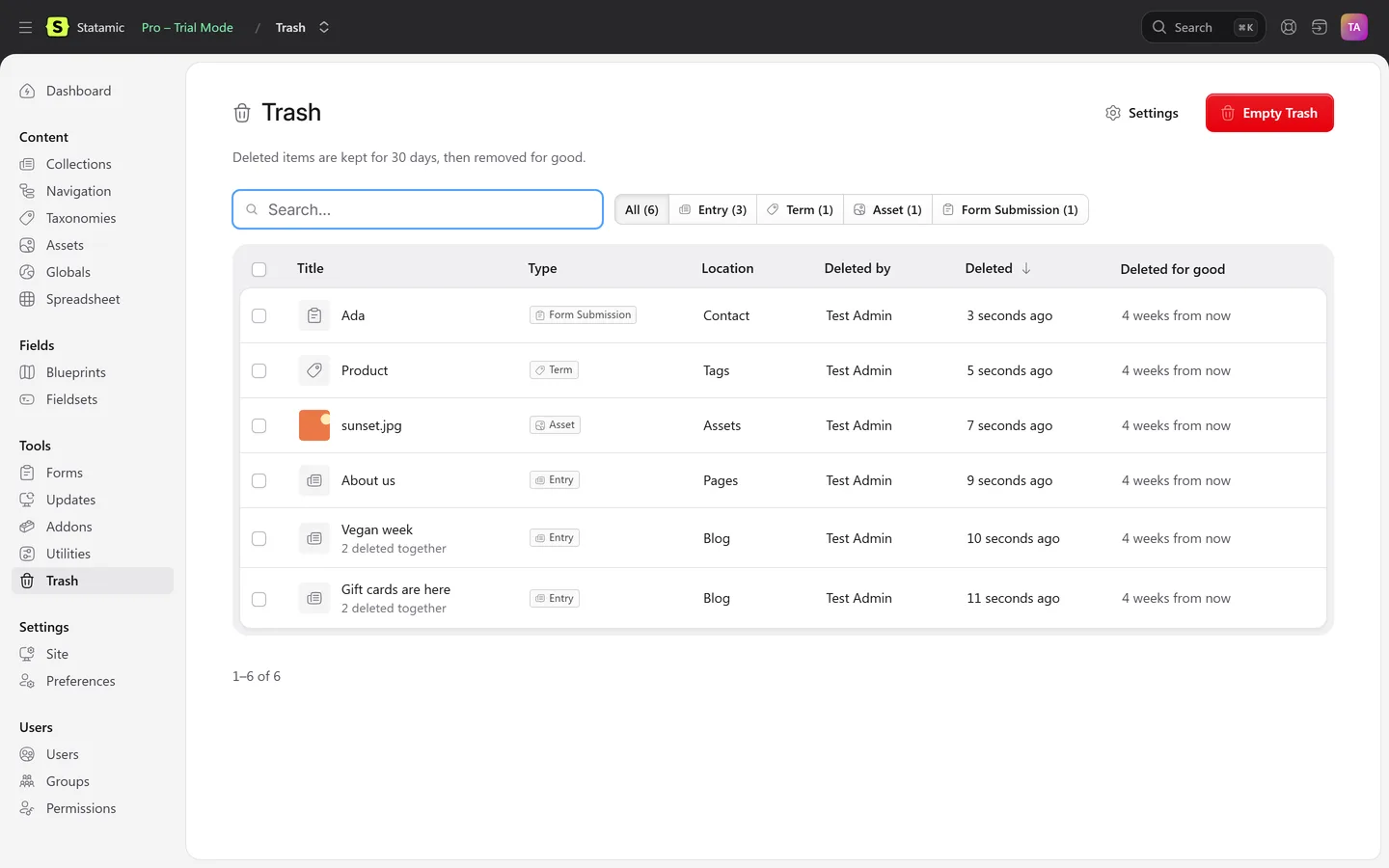
- A page comes back to the same place in the page tree, and the child pages Statamic moved up go back under it.
- An entry and its translations, or every asset in a deleted folder, come back in one go.
- Nothing is overwritten: a taken slug gets a number, a file name in use gets
-restored. - Items are removed for good after 30 days, or the period you choose.
What a trash cannot do
- Bring back something deleted before it was installed, or deleted outside Statamic (directly on disk or by git).
- Replace revisions: it keeps the last saved version of what was deleted, not its history. Revisions are a Statamic Pro feature.
- Replace backups. Keep them anyway.
FAQ
Does Statamic have a trash or recycle bin?
No. Deleting in the Control Panel removes the item for good. Karelia Trash adds one under Tools.
Can I get a deleted entry back from revisions?
No. An entry's revisions are removed together with the entry.
I deleted a page on a flat-file site without git. What now?
Restore the file from a server backup, put it back in content/collections, and run php please stache:refresh.
Does the git method work for assets?
Only if the asset files themselves are committed. Many sites keep uploads out of git, and then only a file backup has them.
More guides
Fix Paymenter after upgrading to Pterodactyl 2.0: "api/application/nests could not be found"
Pterodactyl 2.0 removed the nest endpoints that Paymenter's built-in extension calls. Switch to a 2.0-aware extension with one command; products and services stay.
Read the guide →Solar2D and Google Play's 16 KB page size rule: find the library that fails
Apps targeting Android 15+ must support 16 KB memory pages. Check every 64-bit library in your build, find the plugin that ships each 4 KB-aligned one, and update or remove it.
Read the guide →How to add captions to WordPress videos without per-minute fees
Generate captions for a Media Library video with Whisper in your own browser, check them next to a live preview, and they appear in the core Video block with a clickable transcript.
Read the guide →