
Karelia Image Hotspots: clickable hotspots on images for your Wix site
A photo with a caption tells visitors little. A "shop the look" picture, a floor plan or a labelled diagram works better when visitors can tap a spot and see what it is. Karelia Image Hotspots turns any picture into one: a visitor taps a marker and a small card opens with a title, text, a picture and a button.
- Requires
- Nothing else; Wix Stores for product hotspots (Pro)
- Works in
- Wix Harmony, Wix Studio and the classic Wix Editor
- Price
- Free plan; Pro $4.99/month or $49/year, billed by Wix
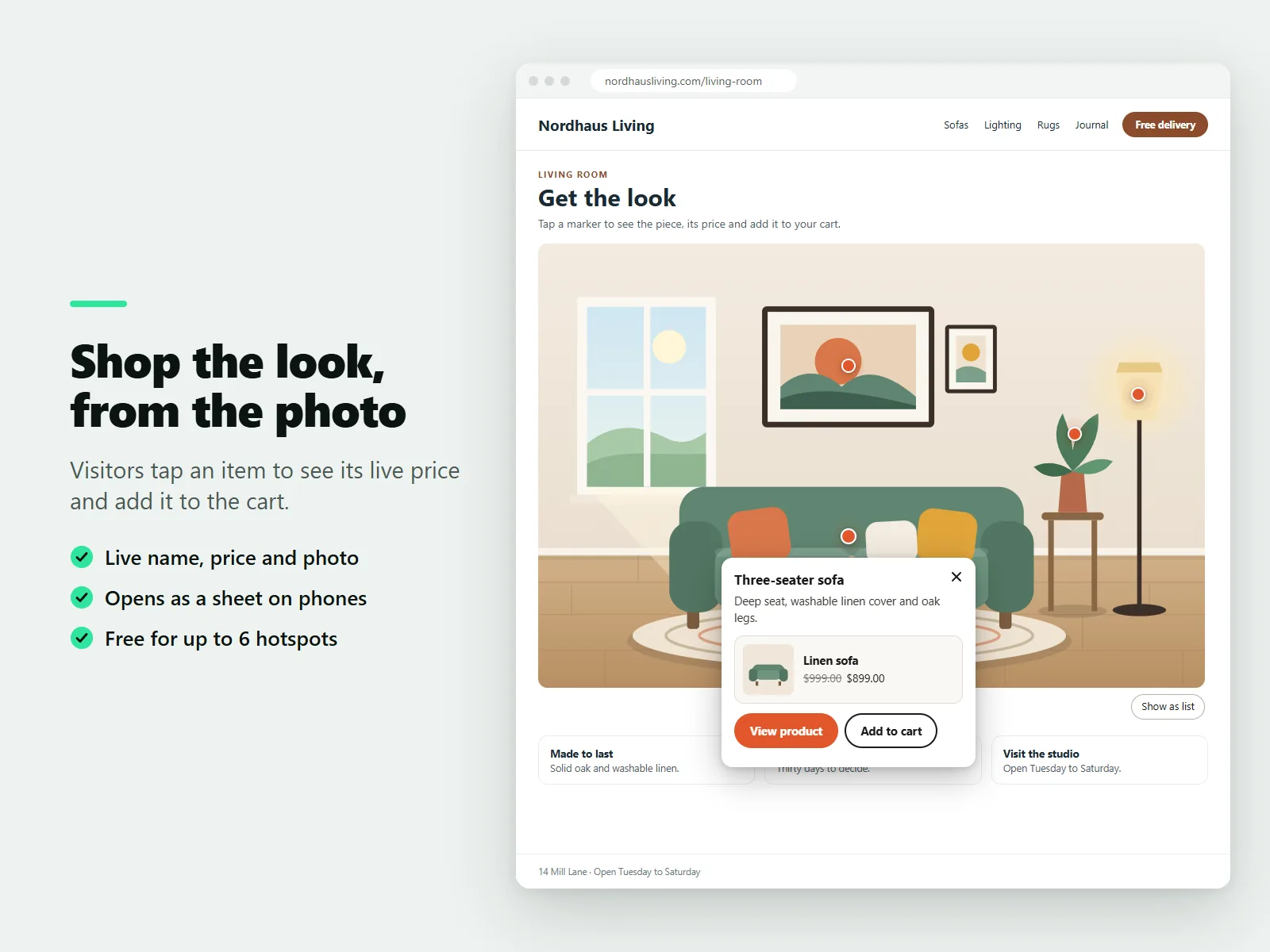
You place markers by clicking the live preview in the settings and drag them to move them. Positions are saved as percentages, so every marker stays on the right spot on a phone, a tablet and a wide screen.
What Karelia Image Hotspots does
Click to place, drag to move
Click the live preview to add a marker, drag it, and reorder or delete in the list.
Cards that stay on screen
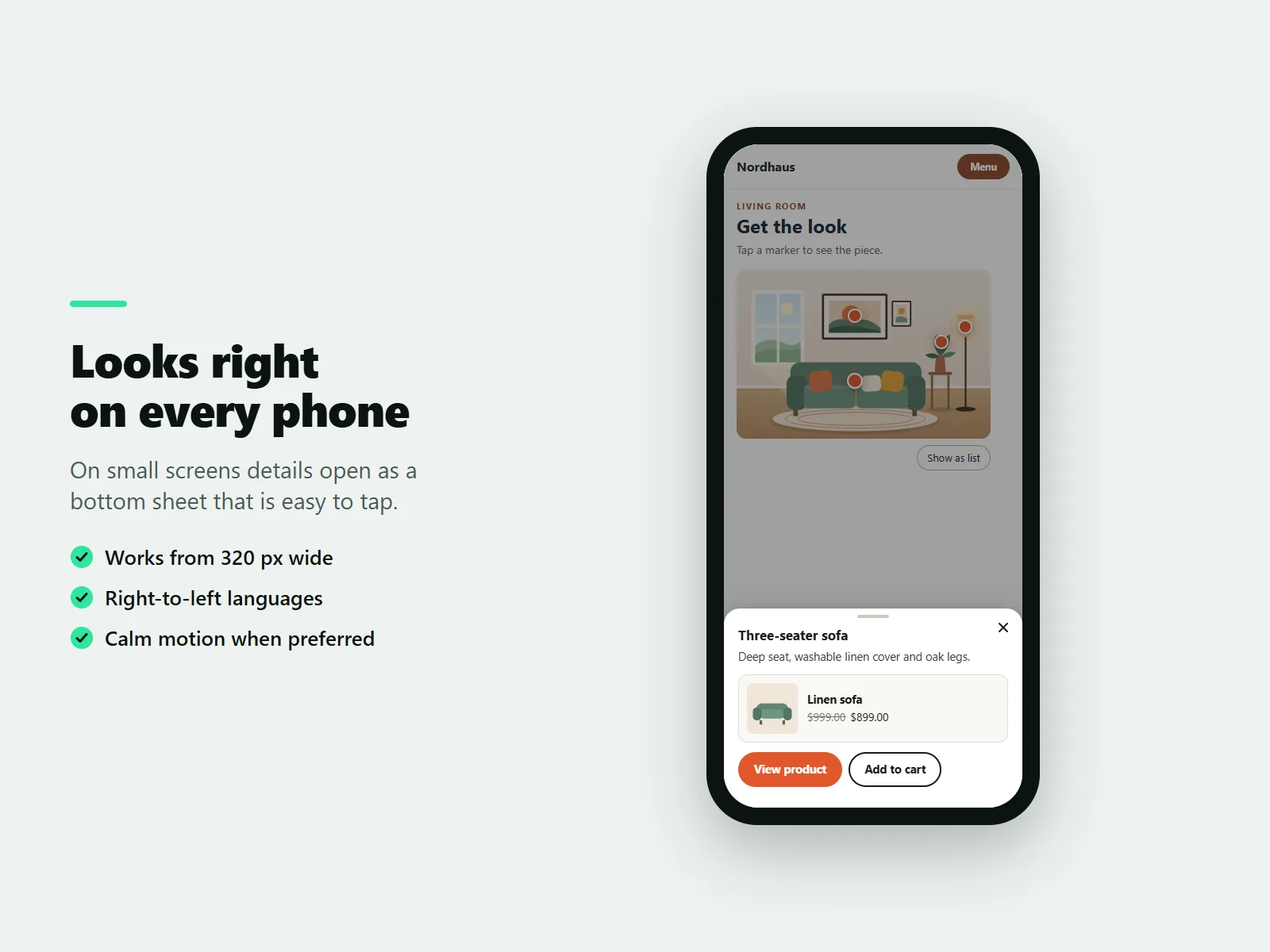
The card opens next to the marker and stays fully visible. On small screens it becomes a bottom sheet that is easy to tap.
Marker styles
Dot, pulsing dot, number or plus, in one color for the whole picture or per hotspot.
Accessible by design
Each marker is a real button, cards are dialogs that close with Escape, and a list view shows all hotspots as plain text.
Store products (Pro)
Link a hotspot to a store product and the card shows its live name, price and photo with View product and, for simple products, Add to cart.
Pro extras
Unlimited hotspots, custom marker icons and entrance animations.
How it works
- Add the widget. Install the app. In the Wix editor choose Add, then Apps and place Image Hotspots on a page.
- Choose a picture and place hotspots. Pick a photo, click it in the live preview to add markers and write what each one says.
- Style and publish. Choose a marker style and color, then publish.
Screenshots
Pricing
Unlimited widgets, up to 6 hotspots per picture, all marker styles and colors, and text, picture and button in every card.
Or $49/year, billed by Wix. Unlimited hotspots, hotspots linked to store products, custom marker icons and entrance animations.
Good to know
- The Free plan has no time limit and allows up to six hotspots per picture.
- Product hotspots need the Pro plan and a Wix Stores catalog.
Privacy
Last updated: 8 November 2026
Karelia Labs ("we", "us") makes Karelia Image Hotspots, an app that adds pictures with clickable hotspots to websites. This policy explains what the app stores and where. Contact: karelialabs@outlook.com. Website: https://karelialabs.com.
What we collect. We do not collect personal data about you or your visitors. The app has no analytics, no advertising, no tracking pixels and sets no cookies.
What the app stores. Your widget content. The pictures' addresses, hotspot positions, texts, button links, marker settings and linked product ids are stored in the settings of the widget on your own website, inside your Wix site. We do not keep a copy on our own servers.
Your plan. To know whether your site has the Free or Pro plan, the app asks Wix for the plan of your site. We use the answer only to decide which features are available and do not store it.
Shop products. If you link a hotspot to a product, the app reads that product's public name, price, picture and page address from your online store when a visitor opens the hotspot and shows it. This data is not stored by us. The app only reads products that are visible in your store.
What is stored in a visitor's browser. To keep your pages fast, the widget keeps two small items in the visitor's own browser: the plan of the site (Free or Pro, kept for up to one hour) and, for product hotspots, the product's name, price and address (kept for five minutes). They contain no personal information and never leave the browser except for the same requests described above. In the dashboard, the app remembers in your browser that you closed the review reminder and how many times you opened the page.
Add to cart. When a visitor presses Add to cart, the product is added to that visitor's cart of your store using Wix's own cart. We do not see or store the cart.
Where data is processed. The app runs on Wix's infrastructure. Wix processes the data of your site according to its own terms and privacy policy.
Sharing. We do not sell, share or give your data to anyone. We read only the information described above and only to make the app work.
Your choices and deletion. Remove the widget from a page to remove its content. Uninstalling the app removes the app from your site. Because we hold no personal data, there is nothing else for us to delete. For any question or request, write to karelialabs@outlook.com.
Changes. If we change this policy we will update the date above.
Terms of service
Last updated: 8 November 2026
These terms apply to your use of Karelia Image Hotspots ("the app"), provided by Karelia Labs ("we", "us"). Contact: karelialabs@outlook.com. Website: https://karelialabs.com. By installing or using the app you agree to these terms.
The service. The app lets you add pictures with clickable hotspots to your website and, with the Pro plan, link hotspots to products of your online store. We may improve or change features over time.
Plans and payment. The app has a Free plan and a paid Pro plan. The Free plan is available without a time limit. The current content and prices of the plans are shown on the app's listing and in the app's dashboard. Payment, renewal, free trials and cancellation are handled by Wix under its own terms. If you cancel or the plan ends, your site returns to the Free plan: your content is kept, and features that need Pro, such as hotspots beyond the Free limit, product links, custom icons and animations, are not shown until you upgrade again.
Your content. You own the pictures and texts you add. You confirm that you have the right to use them and that they do not break the law or the rights of others. You are responsible for the accuracy of the texts and links you write. Product information that comes from your store is shown as it is in your store.
Acceptable use. Do not use the app for unlawful, misleading or harmful content, and do not try to disturb or misuse the app or its servers.
Availability and support. We aim to keep the app available and working but cannot promise that it will always be free of interruptions or errors. Support is provided by email at karelialabs@outlook.com.
Disclaimer and liability. The app is provided "as is". To the extent the law allows, we are not liable for indirect or consequential losses, lost profit or lost sales, and our total liability for any claim is limited to the amount you paid for the app in the three months before the claim. Nothing in these terms limits liability that cannot be limited by law.
Ending. You can stop using the app at any time by uninstalling it. We may suspend use that breaks these terms.
Changes. We may update these terms. The date above shows the latest version. Continued use after a change means you accept it.
Guides
FAQ
How do I add clickable hotspots to an image in Wix?
Install Karelia Image Hotspots, place the widget on a page, choose a photo and click it in the live preview to place markers. Write the text for each one and publish.
Can I make a shoppable image on Wix?
Yes. On the Pro plan a hotspot can link to one of your store products and the card shows its live name, price and photo with a View product button, and an Add to cart button for simple products.
Does it work on phones?
Yes. Markers keep their place at every screen size, and the card becomes a bottom sheet on small screens. It works from 320 pixels wide.
Can I use it for a floor plan or a map?
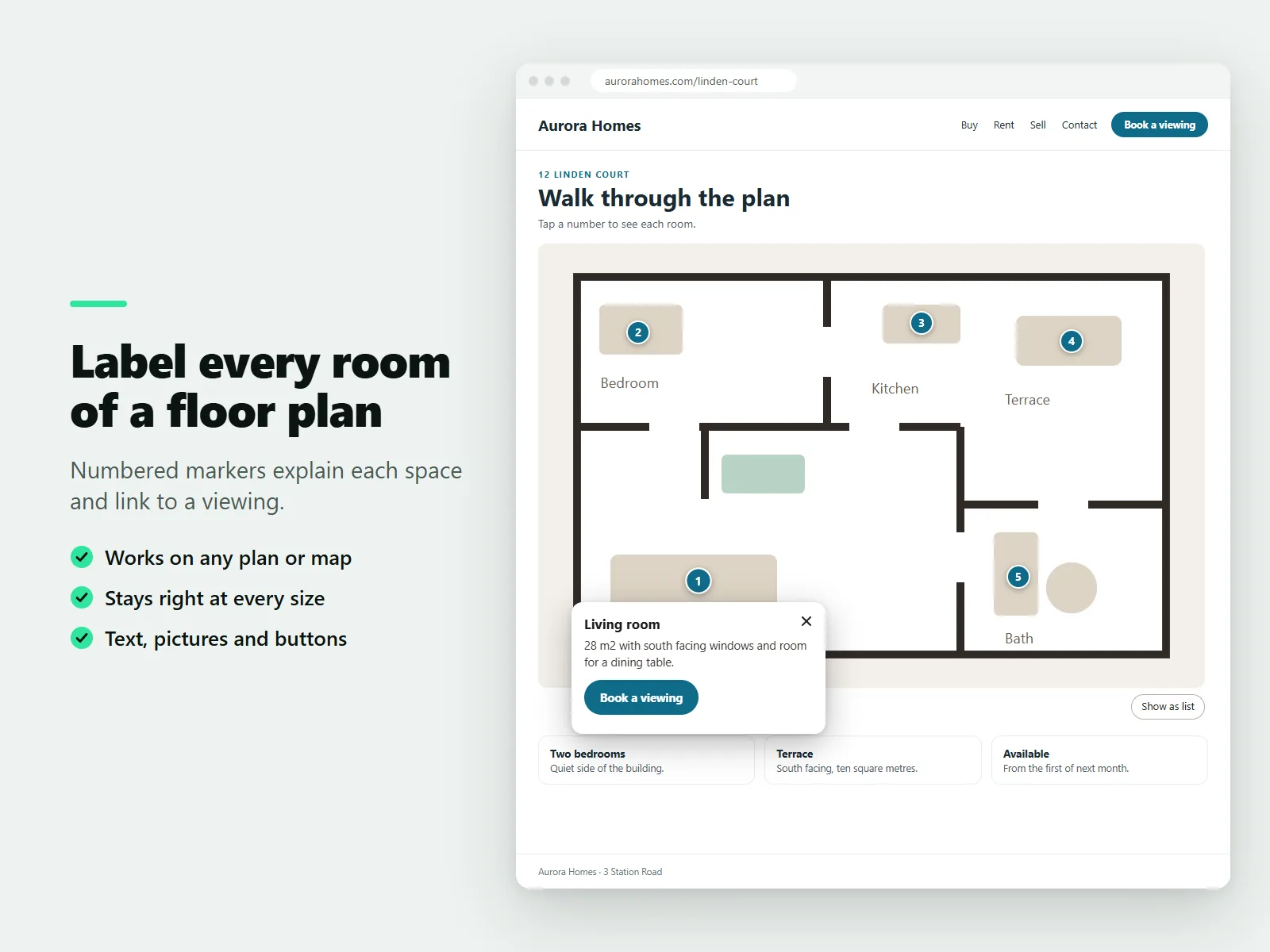
Yes. Number the spots on the plan, add text, pictures and buttons to each card, and link them to a viewing or a page.
Is it free?
Unlimited widgets with up to six hotspots per picture, every marker style and every color are free. Pro removes the hotspot limit.
Related tools
Karelia RSS Feed
Show posts from any blog, newsletter or YouTube channel on your Wix site. Paste a page address, the feed is found for you. Free plan, Pro $3.99/month.
Karelia Portfolio
Add a project portfolio to your Wix site: filterable grid, project view with gallery and lightbox. Free for 9 projects, Pro $5.99/month.
Karelia Countdown Timer & Sale Bar
Add a countdown timer to any Wix page, with Black Friday and other presets, or a sale bar on every page. Free plan, Pro $3.99/month.
Karelia Timeline
Add a timeline to your Wix site for a company story, event schedule or roadmap. Vertical and list layouts. Free for 10 events, Pro $3.99/month.
More from Karelia Labs
Updated