
Karelia Countdown Timer & Sale Bar: countdowns and a sale bar for your Wix site
A sale, a launch or a webinar works better with a clock on the page. Karelia Countdown Timer places a countdown anywhere on your Wix site, ready in a minute. Pick a holiday preset such as Black Friday, Cyber Monday, Christmas, New Year's Eve, Valentine's Day, a product launch or a webinar, and the date, text and colors are filled in for you.
- Requires
- Nothing else
- Works in
- Wix Harmony, Wix Studio and the classic Wix Editor
- Price
- Free plan; Pro $3.99/month or $39/year, billed by Wix
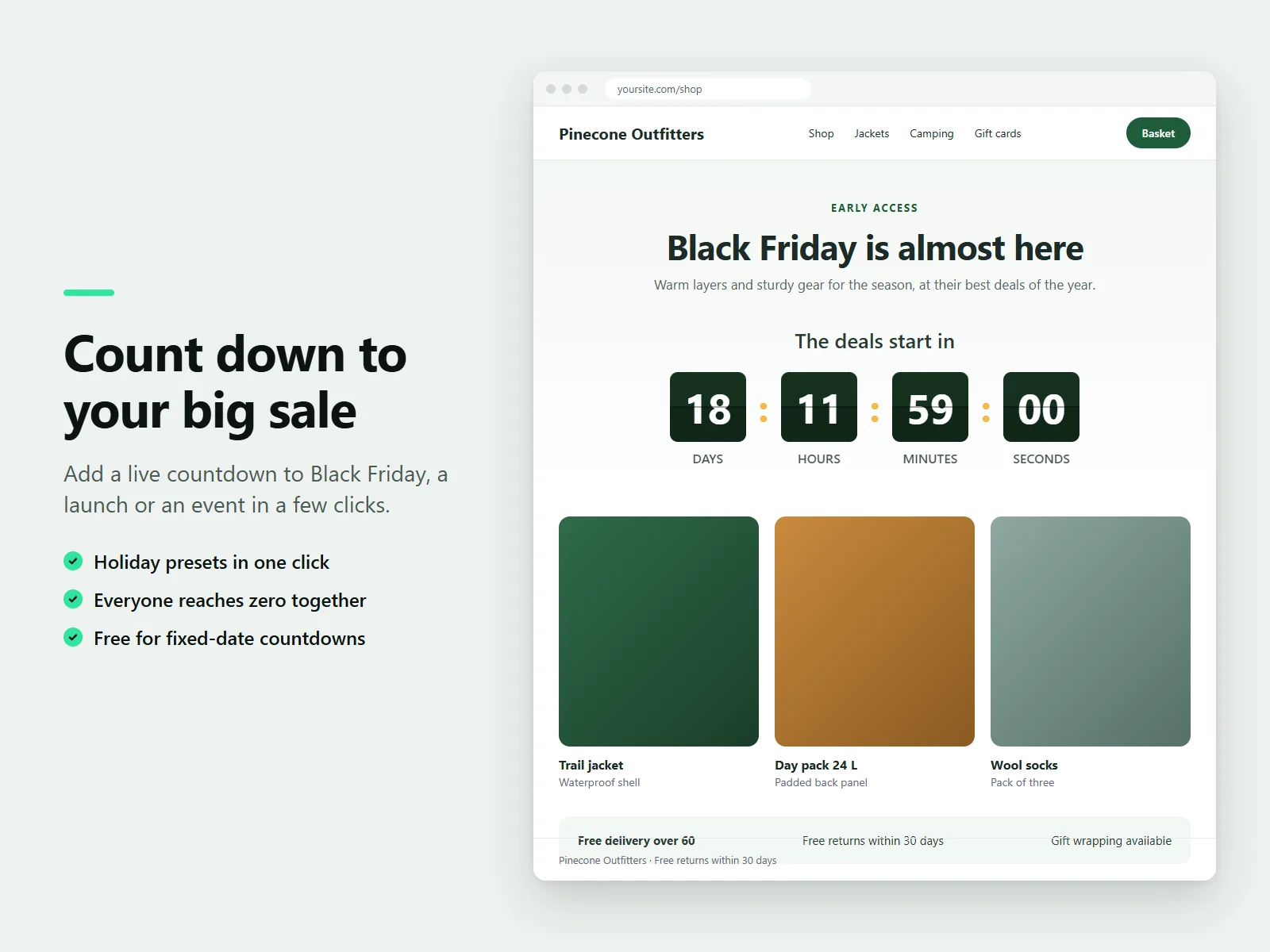
Everyone reaches zero at the same moment, in the time zone you choose, and the timer stays correct when the clocks change.
What Karelia Countdown Timer & Sale Bar does
Five styles, seven presets
Flip cards, clean numbers, circles, minimal text or a pill, with your own colors, fonts and sizes.
Same zero for everyone
Set the time zone. Show days, hours, minutes and seconds, or only the ones you need.
15 languages
The words next to the numbers follow your visitors' language, with the right plural forms, and right-to-left sites are supported.
You decide what happens at zero
Hide the timer, show a message or a message with a button. On Pro you can also send visitors to another page.
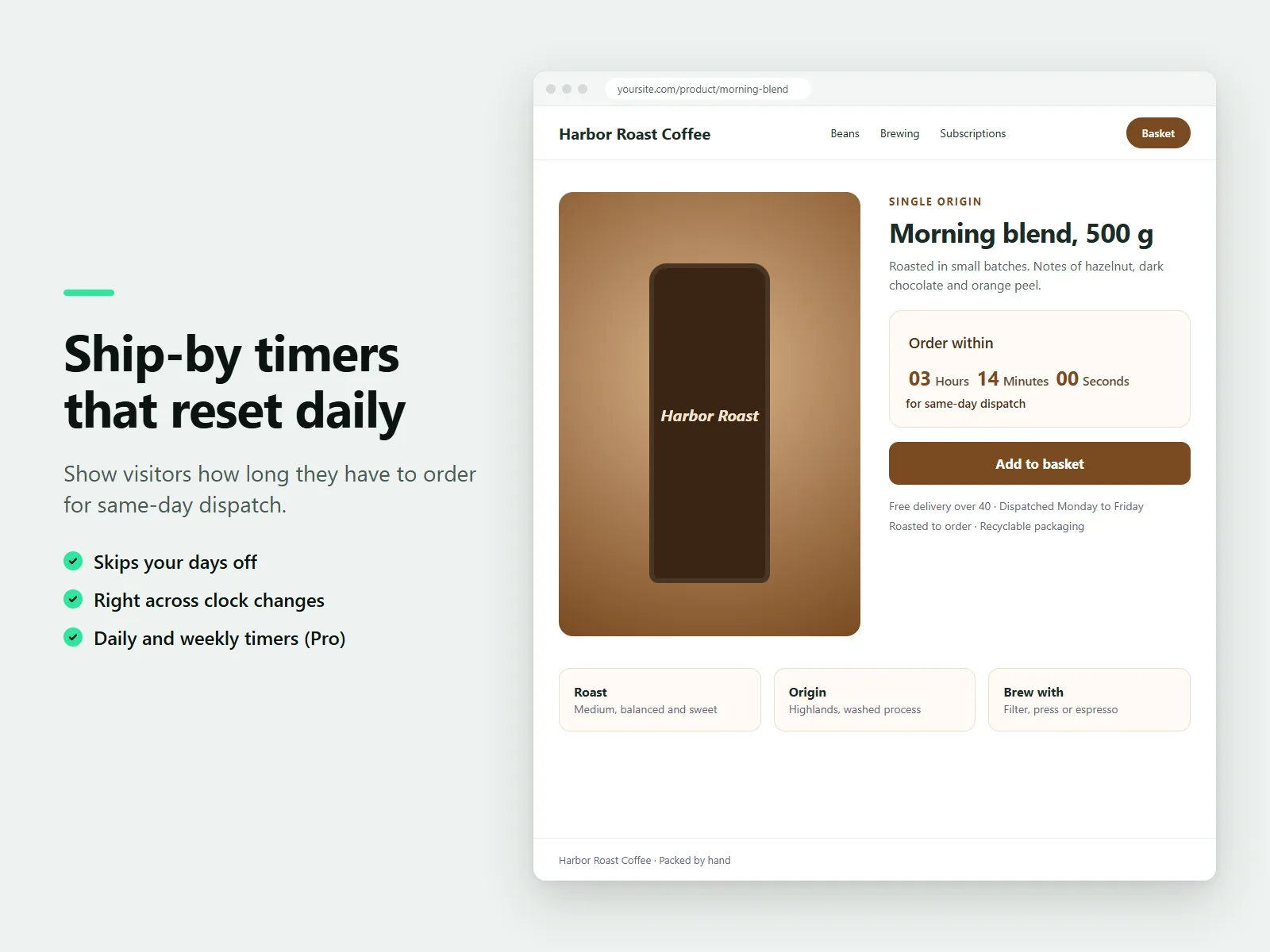
Daily and weekly timers (Pro)
A countdown that restarts every day or week, such as order within 3 hours for same-day dispatch, skipping your days off.
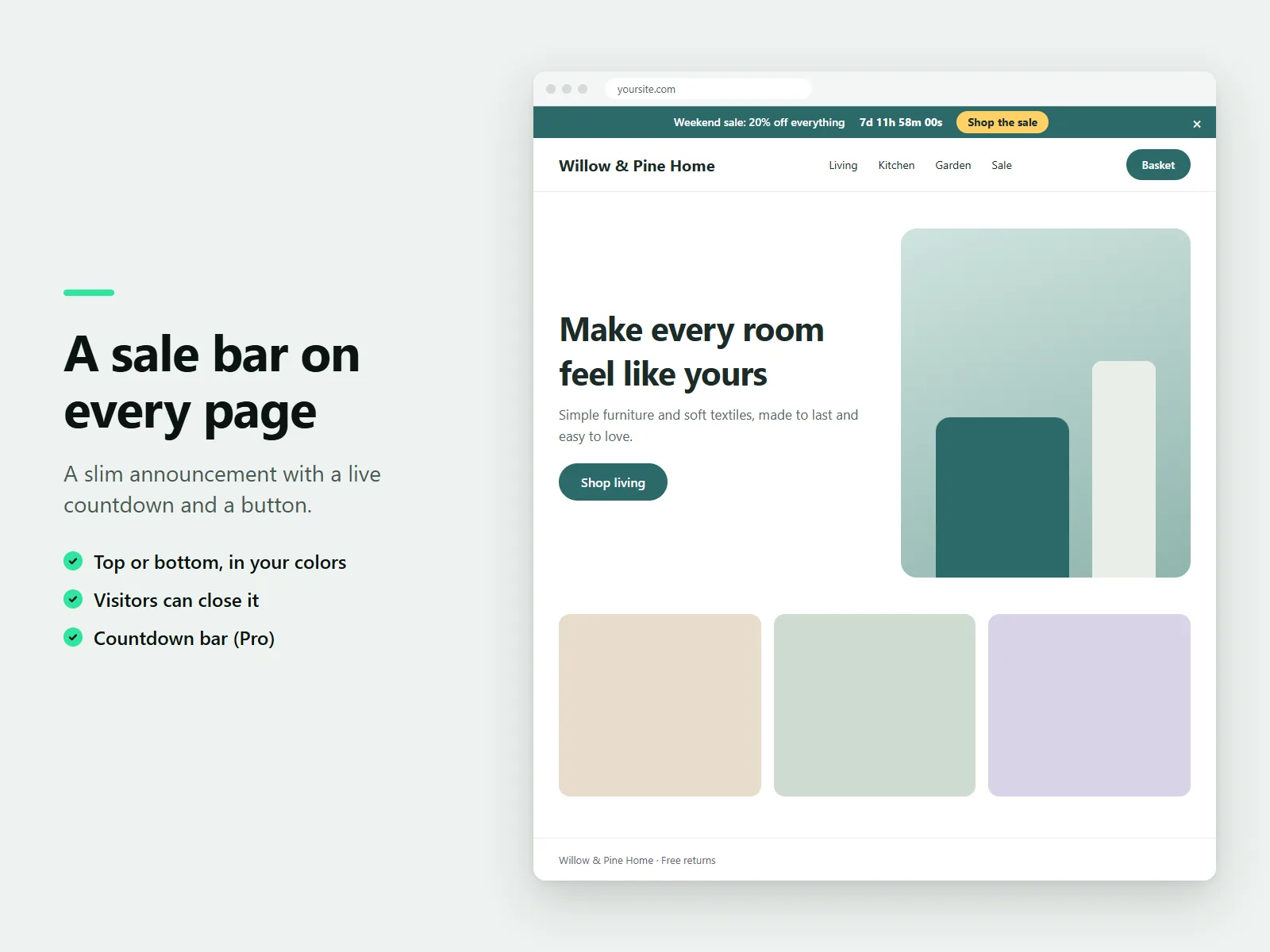
Sale bar (Pro)
A slim announcement with your message, a live countdown and a button, at the top or bottom of every page or only chosen pages. Visitors can close it.
How it works
- Add a countdown. Install the app. In the Wix editor choose Add, then Apps and place Countdown Timer on a page.
- Pick a preset or date. Choose a holiday preset or set your own date, time and time zone.
- Style it and publish. Choose a style, colors and what happens at zero, then publish. Turn on the sale bar from the dashboard if you have Pro.
Screenshots
Pricing
A countdown to a fixed date and time, all five styles, all presets, colors, fonts and languages, unlimited widgets and a message or button at zero.
Or $39/year, billed by Wix. Daily and weekly countdowns with days off, countdowns that start at each visitor's first visit, redirect at zero and the countdown bar.
Good to know
- Countdown bar, daily and weekly countdowns, first-visit countdowns and redirect at zero need the Pro plan.
- Ticking numbers stay out of the way of screen readers, which hear the time left once a minute. The flip animation stops for visitors who prefer reduced motion.
Privacy
Last updated: 8 November 2026
Karelia Labs ("we", "us") makes the app Karelia Countdown Timer & Sale Bar (the "app"). This policy explains what the app stores, where it stores it, and what it does not do. Contact: karelialabs@outlook.com, https://karelialabs.com.
Who this covers.
• Site owners who install the app on their site.
• Site visitors who see a countdown or the countdown bar on a site that uses the app.
What we do not do. The app does not collect names, email addresses, IP addresses or any other personal information about site visitors. It has no analytics, no advertising, no tracking pixels and no cookies. We do not sell or share data, and we do not send visitor data to any third party.
Site owners.
• Countdown settings (date, text, colors, fonts, style and the other options of each countdown) are saved inside the countdown component on your site, in your site's own data. We do not keep a copy.
• Countdown bar settings (message, button, end time, colors and pages) are saved as a parameter of the app's embedded script on your site, through the platform's app management service.
• Plan information. To know whether your site has the free or the paid plan, the app reads your app instance (its identifier and plan name) from the platform. It keeps the answer in memory for a few minutes. It is not stored permanently by us.
• Site time zone. To suggest holiday dates in your time zone, the app can read the time zone of your site from the site's properties. It is not stored.
• Support. If you write to us, we use your message and email address only to answer you.
Site visitors. The app may store the following small items in the visitor's browser. They never leave the device, and we cannot read them.
• Countdown start time (local storage, name starting with kct:ev:). Used only by the "starts at the visitor's first visit" countdown, so the countdown continues when the visitor returns.
• Plan answer (local storage, kct:plan). A yes or no for the paid plan, kept for up to an hour so pages load quickly.
• Bar closed (local storage, kcb:x). Remembers that the visitor closed the countdown bar, so it does not appear again for the same offer.
• Redirect guard (session storage, kct:redir:). Prevents a visitor from being sent to another page more than once during a visit.
The app follows the site's cookie banner. When the visitor has not allowed functional storage, the app does not write any of these items, and the countdown then simply starts again when the page is reloaded.
Where data is processed. The app runs on the platform's own infrastructure used by the site. Plan checks are requests from the visitor's browser to the app's backend on that platform. No other service is involved.
Retention and deletion. We keep no personal data. Settings stay on your site until you change them or remove the app. Items in a visitor's browser can be removed at any time by clearing the site's data in the browser. When you remove the app, the countdown component and its settings are removed with it.
Your rights. Because we do not hold personal data about visitors, there is usually nothing to access or delete. If you believe we hold information about you, write to karelialabs@outlook.com and we will respond promptly, and in any case within 30 days.
Children. The app is a tool for website owners and is not directed to children.
Changes. If we change this policy, the date above changes. Material changes will also be announced in the app's listing.
Contact. Karelia Labs, karelialabs@outlook.com, https://karelialabs.com
Terms of service
Last updated: 8 November 2026
These terms apply to your use of the app Karelia Countdown Timer & Sale Bar (the "app"), provided by Karelia Labs ("we", "us"). By installing or using the app you agree to them. Contact: karelialabs@outlook.com, https://karelialabs.com.
1. The app. The app lets you add countdown timers to your website and, on the Pro plan, a countdown bar. We may improve, change or remove features. We will try to give notice of changes that remove paid features.
2. Plans and payment. The app has a free plan and a paid plan (Pro). Prices and what each plan includes are shown in the app's listing and on the platform's upgrade page. Billing, renewals, trials, refunds and cancellations are handled by the platform under its own terms. If your paid plan ends, Pro features stop working and the app continues on the free plan; your settings are kept.
3. Your responsibilities.
• You are responsible for the content you enter, such as messages, offers and links, and for making sure it is accurate and lawful.
• Use countdowns honestly. A countdown to an offer must match a real deadline. Do not use the app to mislead visitors or to break consumer protection, advertising or marketing laws that apply to you.
• You must have the right to the pages you link to or redirect to.
4. Acceptable use. Do not use the app to distribute malware, to harm or deceive people, to infringe other people's rights, or to interfere with the app or the platform.
5. Accuracy of time. Countdowns use the clock of the visitor's device and the time zone you choose. If a visitor's device clock is wrong, their countdown will be wrong by the same amount. We cannot guarantee that a countdown reaches zero at the exact moment on every device.
6. Availability. We aim to keep the app available but do not promise that it will be uninterrupted or error-free. Countdowns that need no network connection keep working if our servers are unavailable. Plan checks that fail are treated as the free plan.
7. Intellectual property. We own the app and its code. You keep ownership of your content. You may use the app on the sites you operate for as long as it is installed.
8. Disclaimer and limit of liability. The app is provided "as is" without warranties of any kind, to the extent the law allows. To the extent the law allows, we are not liable for indirect or consequential losses, lost sales or lost profits arising from the use of the app, and our total liability is limited to the amount you paid for the app in the twelve months before the event.
9. Privacy. How the app handles data is described in the Privacy Policy.
10. Ending. You can stop using the app at any time by removing it from your site. We may suspend access if these terms are broken. Sections that by their nature should continue, continue.
11. Changes and law. We may update these terms; the date above shows the latest version. Continued use after a change means you accept it. These terms are governed by the laws of Finland, and disputes go to the competent court of that country, unless mandatory consumer law says otherwise.
12. Contact. Karelia Labs, karelialabs@outlook.com, https://karelialabs.com
Guides
FAQ
How do I add a countdown timer to my Wix site?
Install Karelia Countdown Timer, place it on a page from Add, then Apps, choose a preset or a date and publish.
Can I add a Black Friday countdown?
Yes. Black Friday and Cyber Monday are among the presets, and the date, text and colors are filled in for you.
Can I put a sale bar with a countdown on every page?
Yes, on the Pro plan. The countdown bar sits at the top or bottom of every page or chosen pages, with your message, a live countdown and a button.
Does the countdown show the same time to everyone?
Yes. Everyone reaches zero at the same moment, in the time zone you choose, and it stays correct when the clocks change.
Is it free?
Countdowns to a fixed date and time, with every style, preset, color, font and language, are free on as many pages as you like.
Related tools
Karelia Timeline
Add a timeline to your Wix site for a company story, event schedule or roadmap. Vertical and list layouts. Free for 10 events, Pro $3.99/month.
Karelia Cancel Subscription
Add a cancel form and a cancel link to your Wix site. Members and visitors cancel Pricing Plans online with a reference number. Free plan, Pro $9.99/month.
Karelia Accordion & FAQ
Add collapsible questions and answers to Wix Harmony, in your fonts and colors. Four layouts, links to any question. Free plan, Pro $3.99/month.
Karelia Text Mask
Fill Wix Harmony headline letters with a photo, a gradient or a looping video. Real text for search engines. Free plan, Pro $3.99/month.
More from Karelia Labs
Updated