
Karelia Tickets: sell event tickets from your Statamic site with Stripe Checkout, QR tickets and check-in on a phone
Most Statamic sites that run events send their visitors to a ticketing platform to buy, which takes a fee on every paid ticket and puts its own brand between you and your audience.
- Version
- 1.0.0
- Statamic
- 6.20 or later, Core and Pro
- PHP
- 8.3 or later
- Payments
- Stripe Checkout, in your own Stripe account
- Fees per ticket
- None from the addon
- Price
- $99 per site, then $39 a year for updates
- Get it on
- Statamic Marketplace
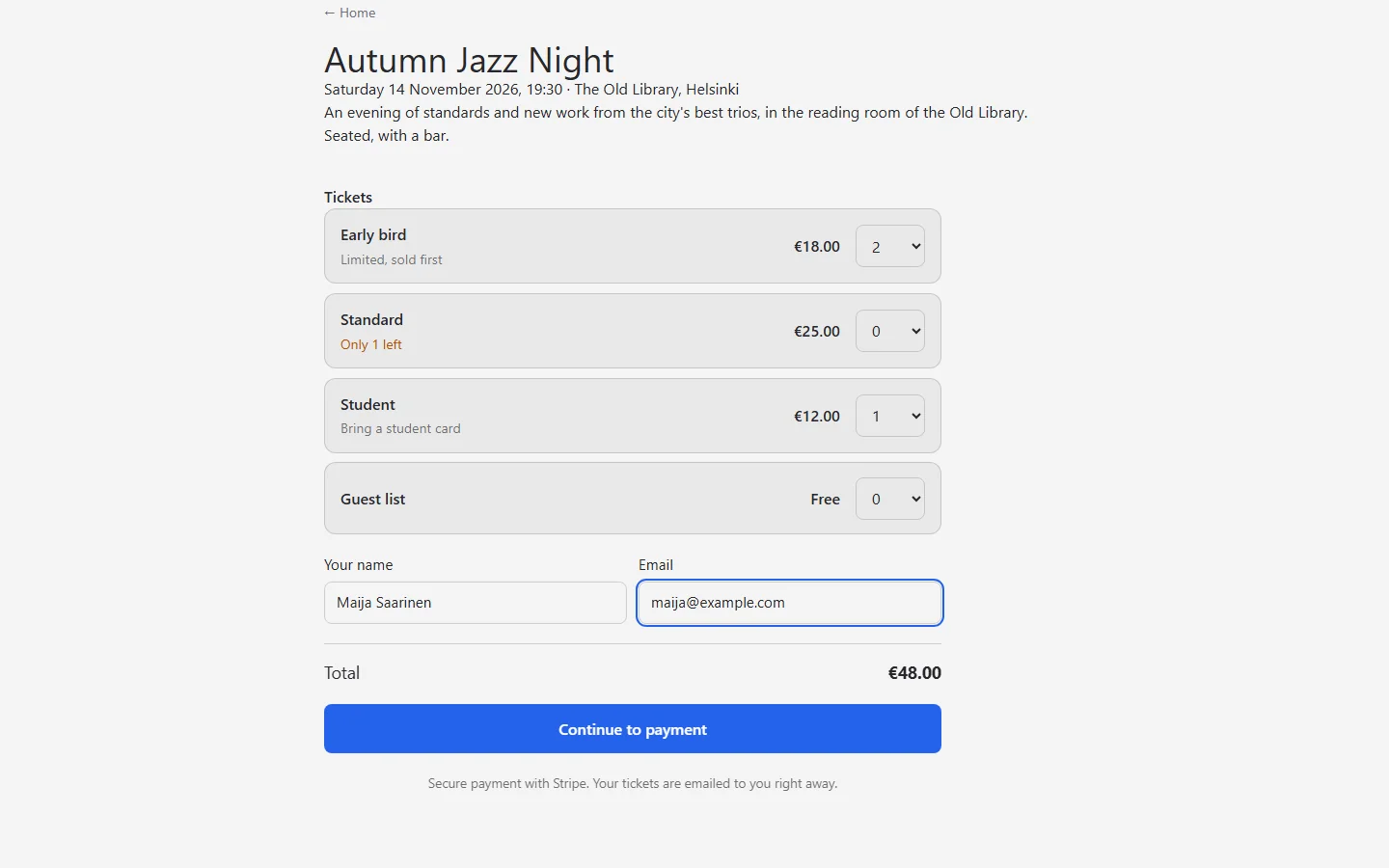
Karelia Tickets sells them on your own event page instead. Add ticket types to an event in the Control Panel and put one tag in the template. Buyers pay on Stripe Checkout and get QR tickets by email at once, and at the door staff scan them with a phone. The money goes straight to your own Stripe account.
What Karelia Tickets does
Ticket types per event
Early bird, standard, student or a free guest list, each with a price, how many there are, when sales end and the most per order. Free events work without Stripe.
One tag for the form
{{ tickets:form }} shows the ticket types with prices, what is left and a running total, and follows your site's font and colours. Use it as a pair for your own markup.
Stripe Checkout
Cards, Apple Pay, Google Pay and the other methods you switch on in Stripe, straight into your own account. Bank payments that arrive days later hold their tickets until they do.
Never sold twice
Tickets are held for 30 minutes while the buyer pays and go back on sale if they give up. The last seat cannot be sold to two people at once.
QR tickets by email
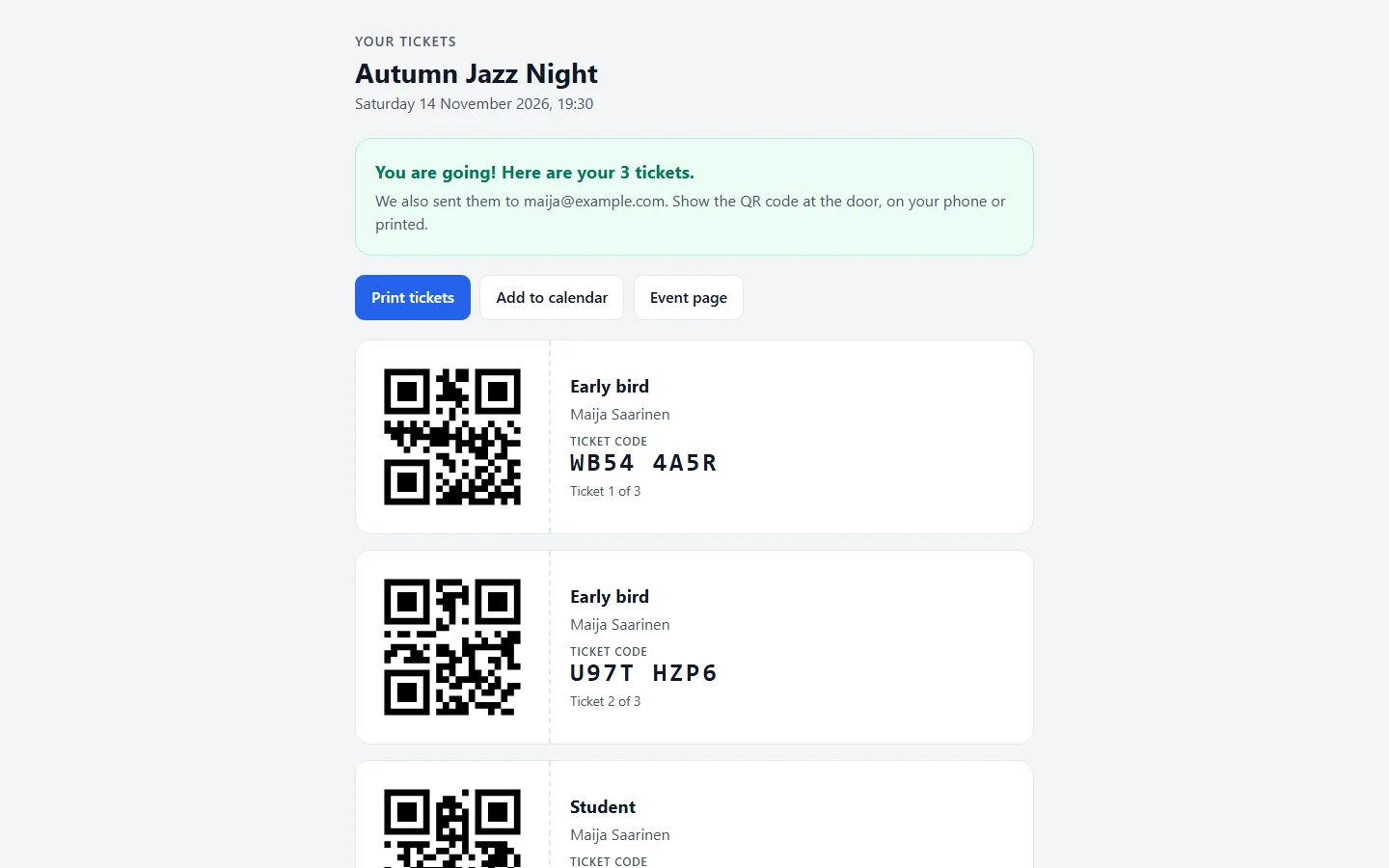
A printable ticket page with a QR code per ticket, and an email with the codes and the event as a calendar file. Codes are 8 letters and digits without look-alikes.
Check-in on a phone
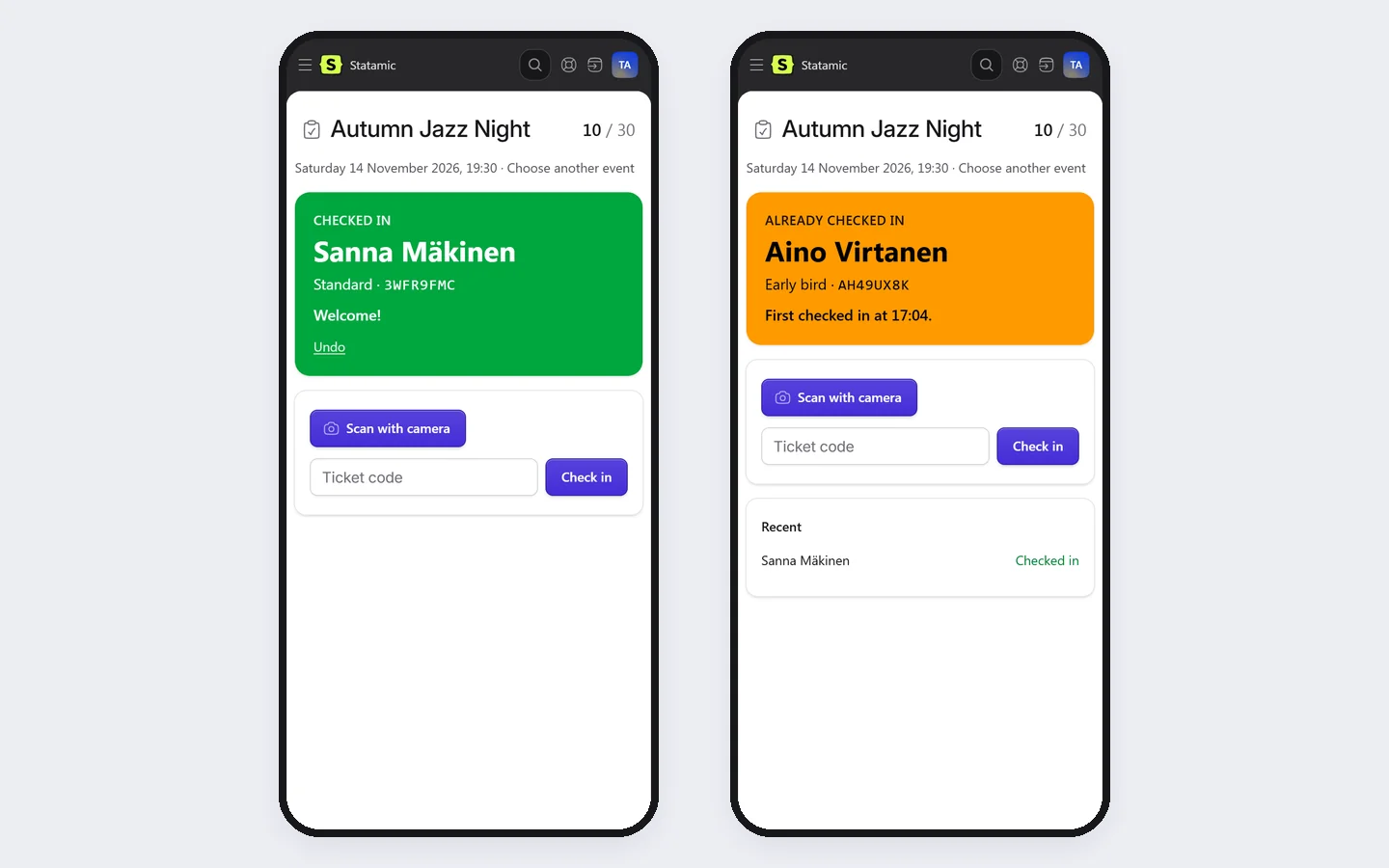
Scan with the camera or type the code. Green for welcome, amber for already in, red for refunded or the wrong event. Each ticket gets in once, with undo, and several people can check in at the same time.
Refunds and free tickets
Refund an order through Stripe and its tickets stop working; refunds made in the Stripe Dashboard are picked up too. Resend tickets, or add free tickets for guests, press or staff.
Run the sale from the Control Panel
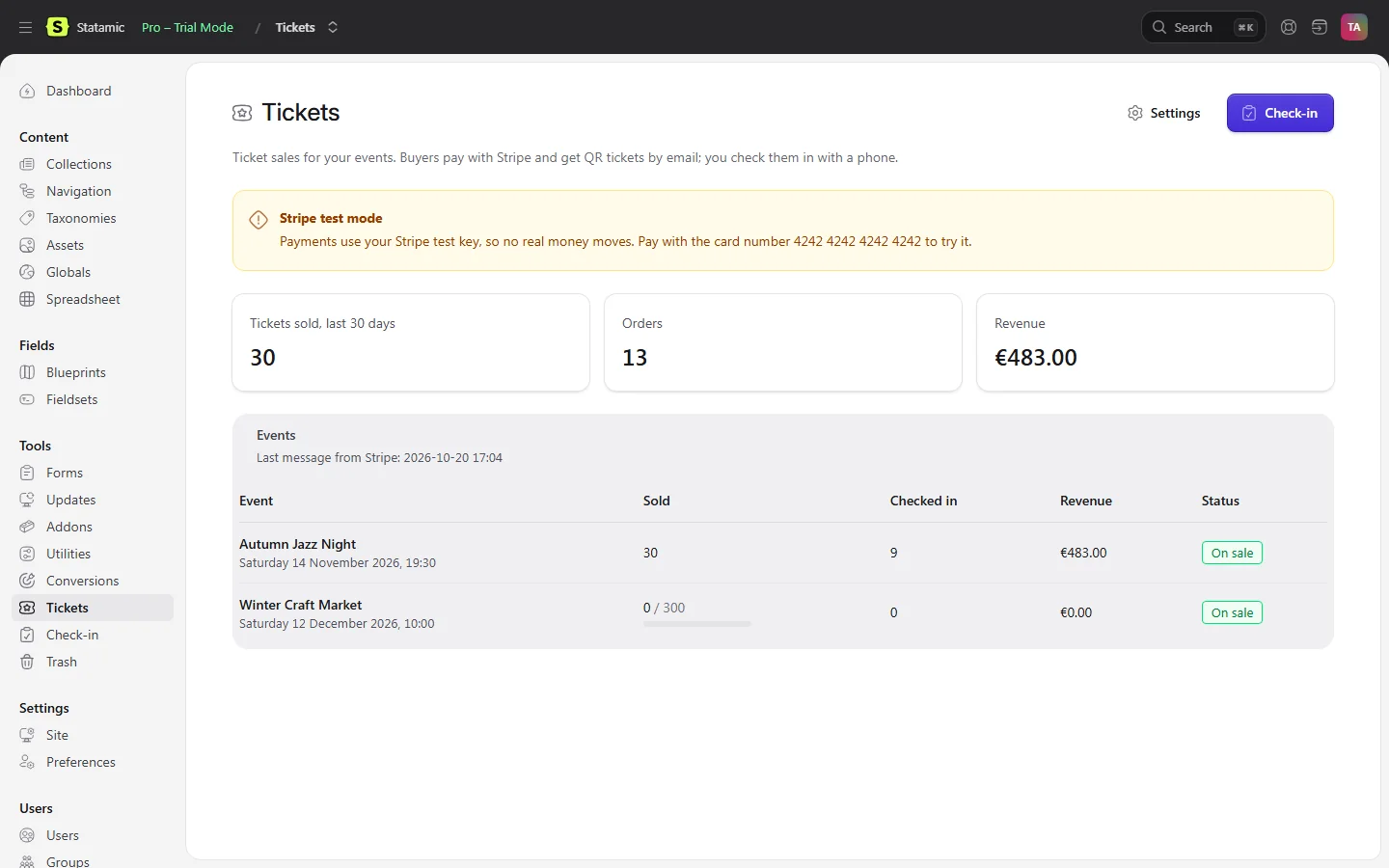
Sales per event and ticket type, orders, the attendee list as CSV and a dashboard widget.
A role for the door
With only the Check in attendees permission, door staff see the check-in page and the name on each scanned ticket, not your sales or the attendee list.
No per-ticket fees
The addon takes nothing per ticket. Stripe's normal card fees apply.
How it works
- Install. Run
composer require karelialabs/statamic-ticketsin your site's folder and attach the licence to the site in your statamic.com account. - Connect Stripe. Put your Stripe key and webhook signing secret in
.env, and add the webhook endpoint shown under Tools → Tickets in the Stripe Dashboard. - Add ticket types. Open an event, switch on Sell tickets in its Tickets tab and add ticket types.
- Sell and check in. Put
{{ tickets:form }}in your event template. At the door, open Tools → Check-in on a phone.
Screenshots
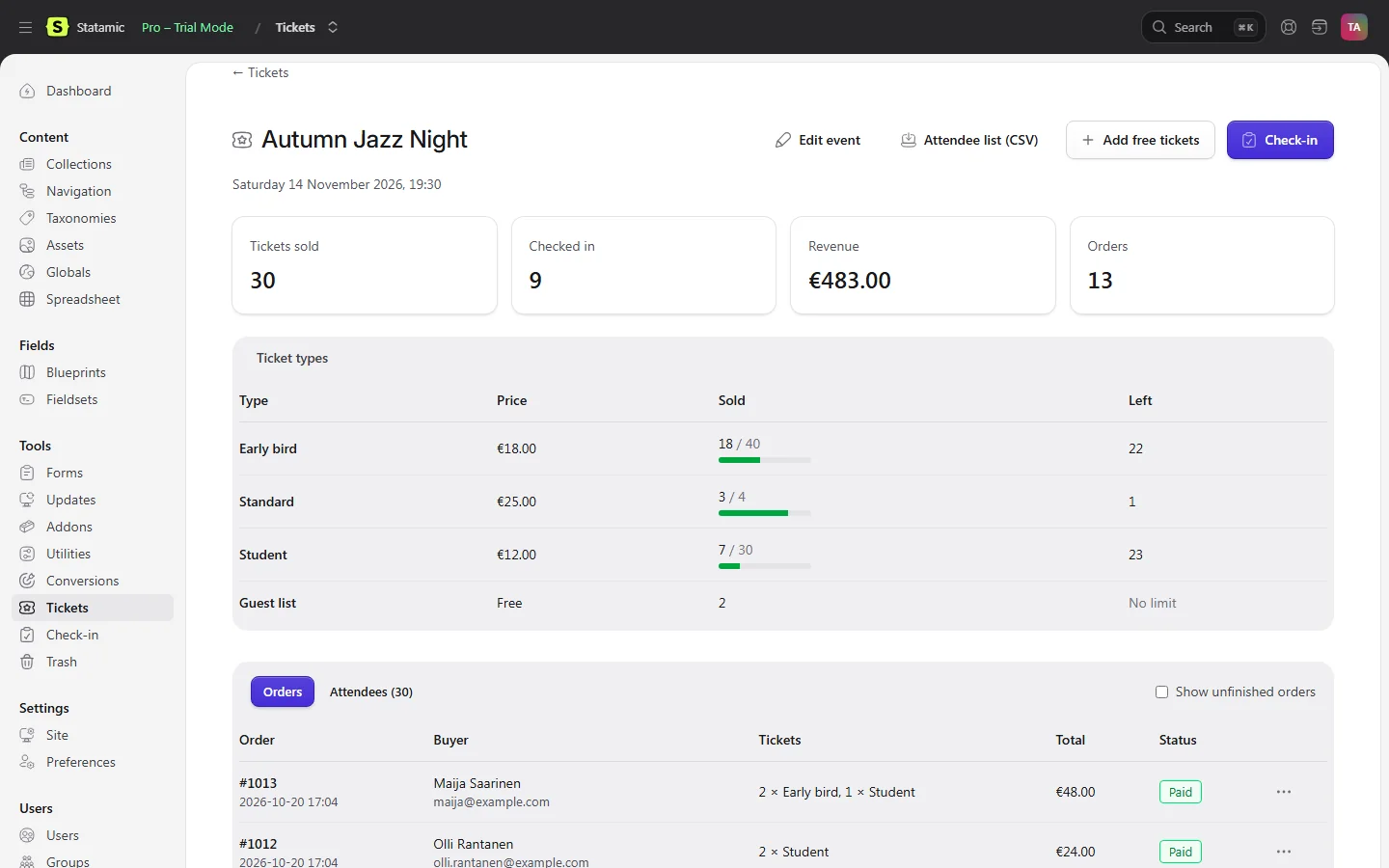
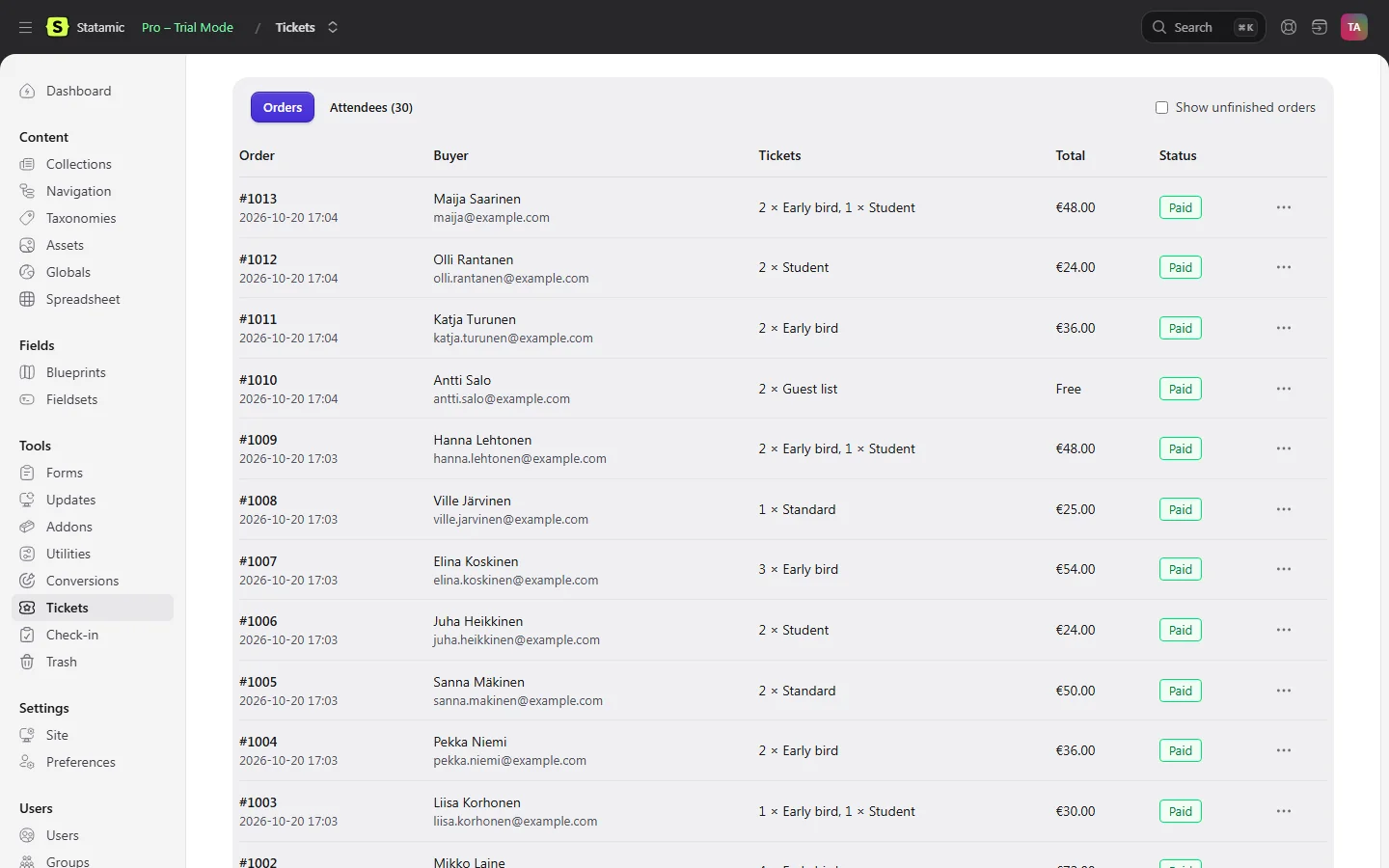
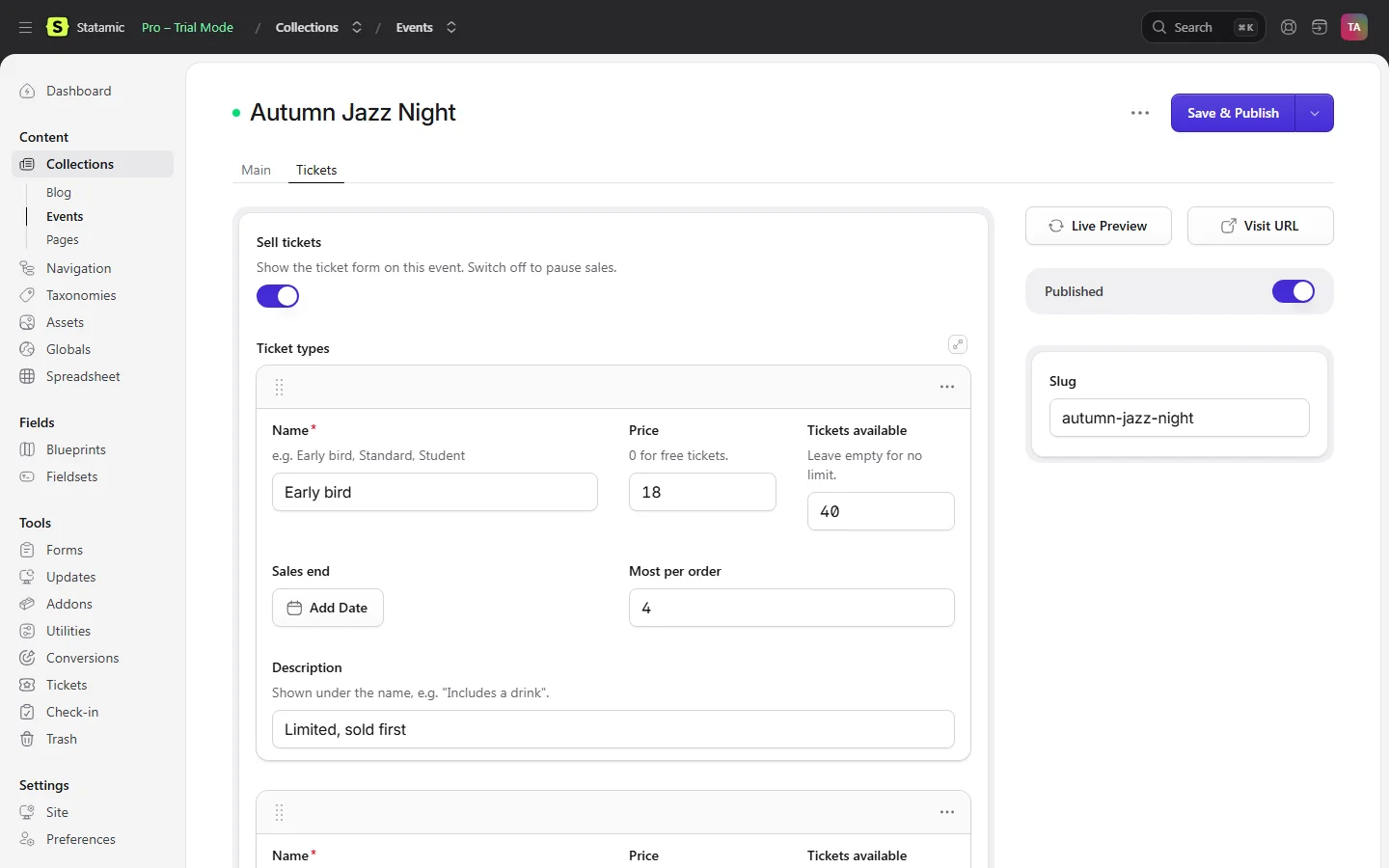
What each ticket type has
| Field | What it does |
|---|---|
| Name | For example Early bird, Standard, Student |
| Price | 0 for free tickets |
| Tickets available | Leave empty for no limit |
| Sales end | Optional date and time |
| Most per order | 10 by default |
| Description | Shown under the name |
From the Karelia Tickets 1.0 documentation.
How a purchase works
- The buyer chooses tickets and enters their name and email. The tickets are held for 30 minutes.
- They pay on Stripe Checkout.
- Stripe sends them back to their ticket page and calls the webhook. Whichever comes first issues the tickets; the other changes nothing.
- They get an email with the ticket codes, a link to the ticket page with the QR codes, and the event as a calendar file.
- If they go back from Stripe without paying, the order is cancelled and the tickets go back on sale. Free tickets skip Stripe and are issued straight away.
From the Karelia Tickets 1.0 documentation.
Pricing
Includes a year of updates. After that, updates are $39 a year, and the addon keeps working without them. Local and staging copies of your site need no licence.
Good to know
- Paid tickets need a Stripe account, and email set up in Laravel (
MAIL_MAILER) so the tickets can be sent. - Seats are not numbered: it sells general admission tickets, by type.
- One currency per site. Changing it later does not convert old orders.
- The price you set is what the buyer pays. The addon adds no tax on top.
- Camera scanning needs HTTPS (or localhost) and permission for the camera. Typing the code always works.
- The ticket page link in the email works without logging in: anyone with the link can see the tickets, like a paper ticket.
- On sites with several servers, use a shared cache store (Redis, database) so the locks that stop overselling are shared too.
Privacy
Karelia Tickets runs on your own Statamic server. It has no telemetry and never contacts Karelia Labs.
Buyers pay on Stripe's own checkout page, in your Stripe account. Card details never reach your site.
Orders are JSON files in storage/statamic/karelia-tickets/orders, outside git, with the buyer's name and email, the tickets and the Stripe payment ID. They are kept until you delete them; deleting an order's file erases that buyer's data.
Ticket pages are reached only through a 40-character random link sent to the buyer, are marked noindex and are never cached.
The check-in scanner reads the camera image in the browser; the image never leaves the device.
FAQ
How do I sell event tickets on a Statamic site?
Install Karelia Tickets, connect Stripe, switch on Sell tickets on an event and add ticket types, then put {{ tickets:form }} in the event template. Buyers pay on Stripe Checkout and get QR tickets by email.
Are there fees per ticket?
Not from the addon. The money goes straight to your own Stripe account, and Stripe's normal card fees apply.
Can I run a free event?
Yes. Set the price to 0: free tickets skip Stripe and are issued straight away, and free events work without a Stripe account. You can also add free tickets for guests, press or staff from the Control Panel.
How does check-in work?
Open Tools → Check-in on a phone, choose the event and press Scan with camera, or type the code. Each ticket gets in once, Undo reverses a check-in, and several people can check in at the same time.
Can two people buy the last ticket?
No. Tickets are held while the buyer pays, under a lock per event, so the last seat cannot be sold twice. On several servers, use a shared cache store such as Redis.
How do refunds work?
Refund order refunds the full amount through Stripe and the tickets stop working. Refunds made in the Stripe Dashboard are picked up by the webhook too. A partial refund keeps the tickets valid.
Does it sell numbered seats?
No. It sells general admission tickets, by type.
Can I try it before I go live?
Yes. Local, development and staging copies need no licence, and with an sk_test_ key everything runs in Stripe's test mode.
Is it affiliated with Statamic or Stripe?
No. It is an independent addon by Karelia Labs, sold on the Statamic Marketplace.
Related tools
Karelia Conversions
Send Statamic form leads, sign-ups and Cargo orders from your server to the Meta Conversions API, GA4 and TikTok Events API, after consent. $79 per site.
Karelia Trash
A trash bin for Statamic 6. Deleted entries, terms, assets, globals, form submissions and users come back with one click, in the same place. $39 per site.
Karelia Spreadsheet
Edit a whole Statamic collection like a spreadsheet: paste from Excel, fill down, find and replace, CSV in and out, saved through your blueprints' validation.
More from Karelia Labs
Updated