
Project Budget Tracker for Odoo: budget against actual on every project, before the money is spent
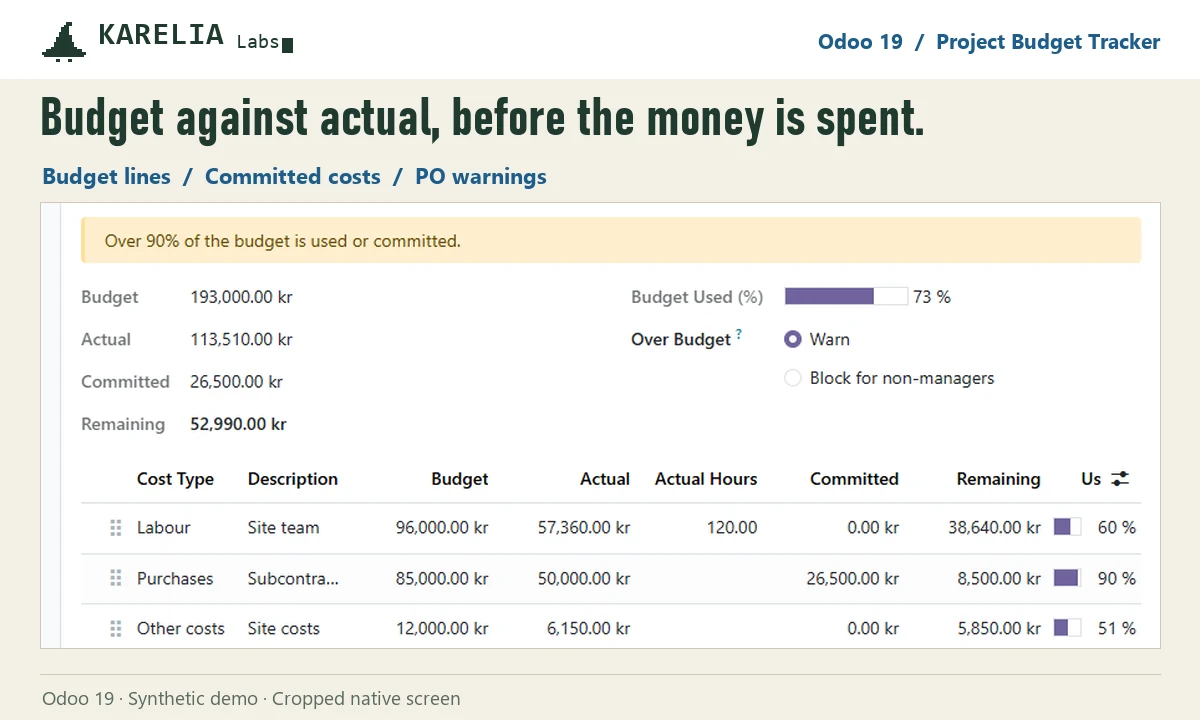
Odoo Community has no project budgets. Project Budget Tracker adds a Budget tab to every project: budget lines for labour, purchases, expenses, materials and other costs, with the actual costs from the project's analytic account and the committed costs of confirmed purchase orders next to them. A purchase order that would take a project over its purchase budget shows a warning before it is confirmed, or needs a project manager to confirm it.
- Odoo versions
- 18.0, 19.0 and 20.0
- Editions
- Community and Enterprise
- Hosting
- Odoo.sh or your own server
- Licence
- OPL-1, one-time purchase per Odoo version
What Project Budget Tracker does
Budget per cost type
Labour, purchases, expenses, materials and other costs, each with budget, actual, committed, remaining and percent used.
Committed costs
Confirmed purchase orders not billed yet count as committed, by open quantity and analytic split.
Warning on the order
Before confirming, the purchase order shows the project's budget, what is billed, other open orders and this order.
Warn or block
Warn confirms with a chatter note; Block lets only project managers confirm an order that goes over.
Status across projects
Budget, remaining and status columns in the project list, and a report of every budget line.
Labour in hours
With Timesheets, labour lines show hours and their cost from each employee's hourly cost.
Good to know
- Each project needs an analytic account; costs are read from it.
- Budgets per period or per general account, and revenue forecasts, are not included.
- Odoo Online can't install custom Python add-ons, so it needs Odoo.sh or your own server.
Guides
FAQ
Does Odoo Community have project budgets?
No. Project Budget Tracker adds them, using Project, Invoicing and Purchase, which are all in Community.
What counts as committed?
Confirmed purchase orders for the project, for the quantity not billed yet. A posted bill moves the amount from committed to actual.
Can a buyer confirm an order over budget?
With Warn, yes, and the order gets a chatter note. With Block, only project managers can confirm it.
Related tools
Project Profit Panel
Project profitability for Odoo 20 Community: invoices against timesheets, vendor bills, expenses and materials, margin per project and a pivot of all projects.
Maintenance Spare Parts
Spare parts on Odoo maintenance requests: reserve them in stock, consume what was used, and see parts cost per request and equipment. Odoo 18, 19 and 20.
Updated 2026-10-25