How to send Pterodactyl panel events to Discord with Blueprint
Updated
What Pterodactyl 1.x records
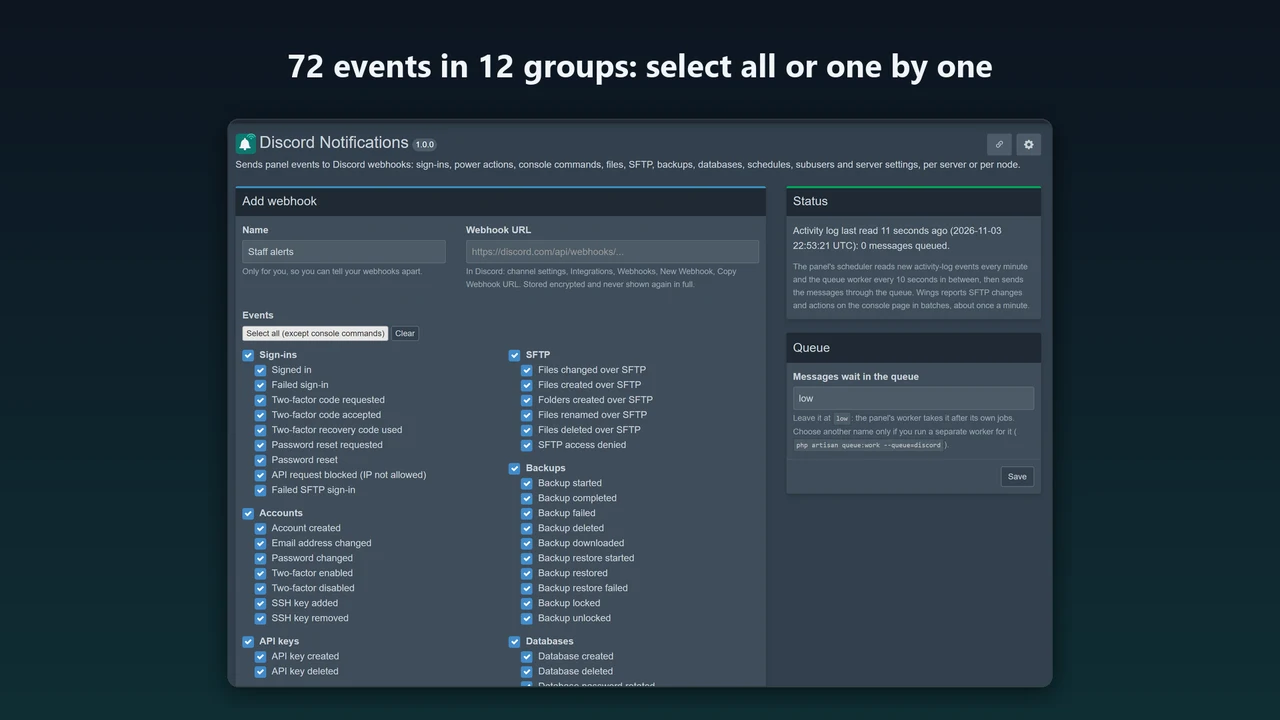
Pterodactyl 1.x keeps an activity log: the entries you see on a server's and an account's Activity page. It covers what users do on the panel and what Wings reports back:
- sign-ins, failed sign-ins, two-factor codes and failed SFTP sign-ins;
- account changes, SSH keys and API keys;
- power actions and console commands, also the ones sent from the console page;
- file edits, uploads and deletes, and changes made over SFTP;
- backups, databases, schedules, subusers and server settings.
Changes made in the admin area itself, such as a server suspended or deleted by an admin, are not in the 1.x activity log. Accounts created by an admin are.
Why a Blueprint extension reads the log
Blueprint extensions cannot register listeners in the panel's code, and the panel stores the events Wings reports in one bulk insert that fires no event at all. Reading the activity log table every few seconds in the background catches every event, including SFTP and the console page, without editing a panel file and without adding anything to the request that caused the event.
Set it up with Discord Notifications
Discord Notifications for Blueprint reads the log about every 10 seconds through the panel's scheduler and queue worker, which every Pterodactyl install already runs.
- In Discord, open the channel's settings, Integrations → Webhooks → New Webhook, and Copy Webhook URL.
- Put
discordnotifications.blueprintin your Pterodactyl folder (usually/var/www/pterodactyl) and runblueprint -install discordnotifications. With Blueprint in Docker, also runphp artisan migrate --forcein the panel container. - Open Admin → Extensions → Discord Notifications → Add webhook, paste the URL and tick the events you want. Select all leaves console commands out.
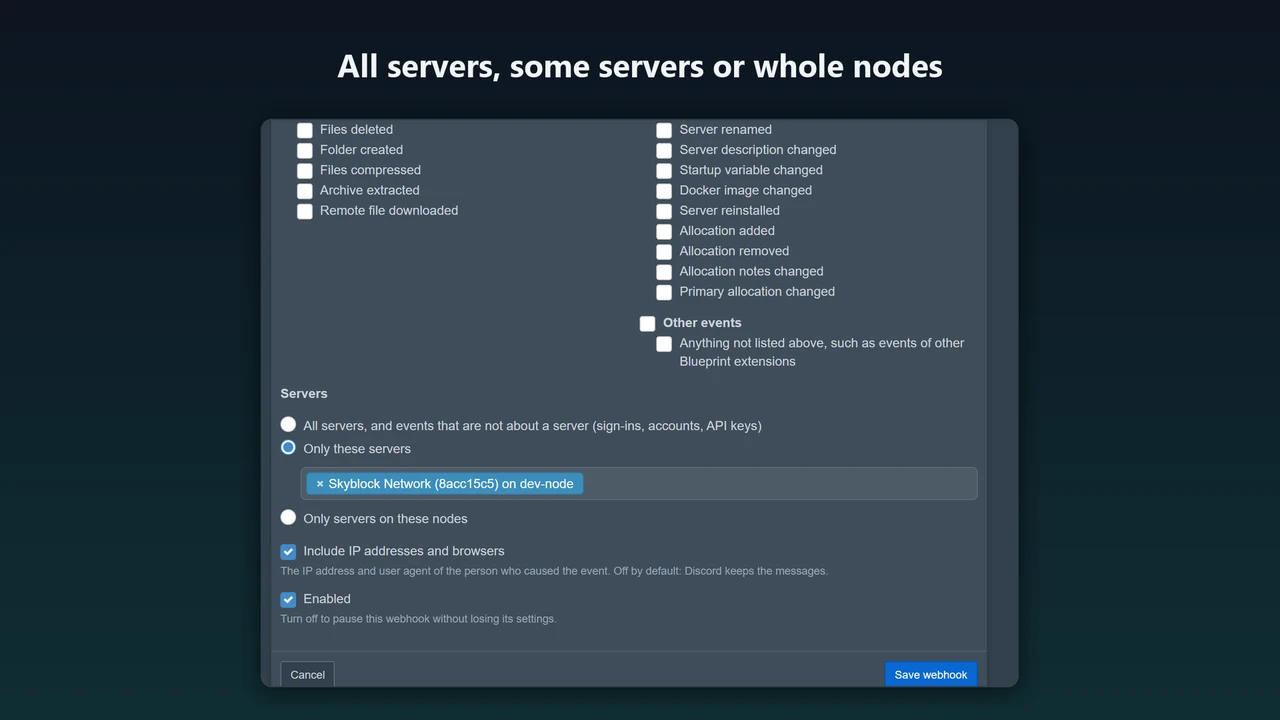
- Choose All servers, Only these servers or Only servers on these nodes, save, and click Send test.
One channel per customer
Each webhook has its own events and servers. A common setup is one staff channel with every event on every server, and one channel per customer with the power events and backups of their servers only. Events that are not about a server, such as sign-ins, only go to webhooks for all servers.
Keep secrets out of Discord
- Console commands can contain passwords and tokens: send them only to channels that need them.
- Leave IP addresses off unless your staff need them; Discord keeps the messages.
- Passwords, API key secrets, file contents and the values of secret-looking startup variables such as
RCON_PASSWORDshould never be in a message. Discord Notifications leaves them out. - Escape names: a server called
[click](https://…) @everyonemust not become a link or a mention in your staff channel.
Rate limits and outages
Discord limits how fast a webhook may be called and answers *429 Too Many Requests* when you go faster. Discord Notifications follows the limits Discord sends with every answer, waits as long as a 429 says, and retries after 10 seconds, 1 minute and 5 minutes when Discord does not answer. The last 50 results are listed under Recent deliveries, with Discord's answer.
Check that it works
- The Status box on the admin page says when the activity log was last read. If that was more than a few minutes ago, the panel's cron entry (
schedule:run) is not running. - If Send test works but no events arrive, the queue worker (
pteroq) is not running. - SFTP changes and actions on the console page come from Wings in batches, once a minute by default, so they arrive up to a minute later than the rest.
FAQ
Do I need to edit Pterodactyl's files?
No. Discord Notifications only uses Blueprint's extension features: an admin page, a scheduled command and two database tables.
Can I send admin-area changes, such as a server suspended by an admin?
Not on Pterodactyl 1.x: the panel does not write them to its activity log, so no extension that reads the log can send them.
Does it work on Pterodactyl 2.0?
No. Pterodactyl 2.0 has its own extension system and its own version, Discord Notifications for Pterodactyl 2.0.
More guides
How to detect game server crashes in Pterodactyl and get alerts (Blueprint)
When Wings restarts a crashed server, the console is cleared and nobody is told. Compare state changes with the activity log to tell crashes from manual stops, keep the console lines from before the crash, and send alerts. Crash Detector does this on Blueprint panels.
Read the guide →Fix Paymenter after upgrading to Pterodactyl 2.0: "api/application/nests could not be found"
Pterodactyl 2.0 removed the nest endpoints that Paymenter's built-in extension calls. Switch to a 2.0-aware extension with one command; products and services stay.
Read the guide →How to keep Paymenter stock in line with free Pterodactyl node capacity
Paymenter's stock only changes when you change it. Count what still fits on each node by the panel's own rule (memory, disk, overallocation and free ports), or let Auto Stock set every product's stock from it on Paymenter's scheduler.
Read the guide →